Harvest: AI Email to CRM Data Parser

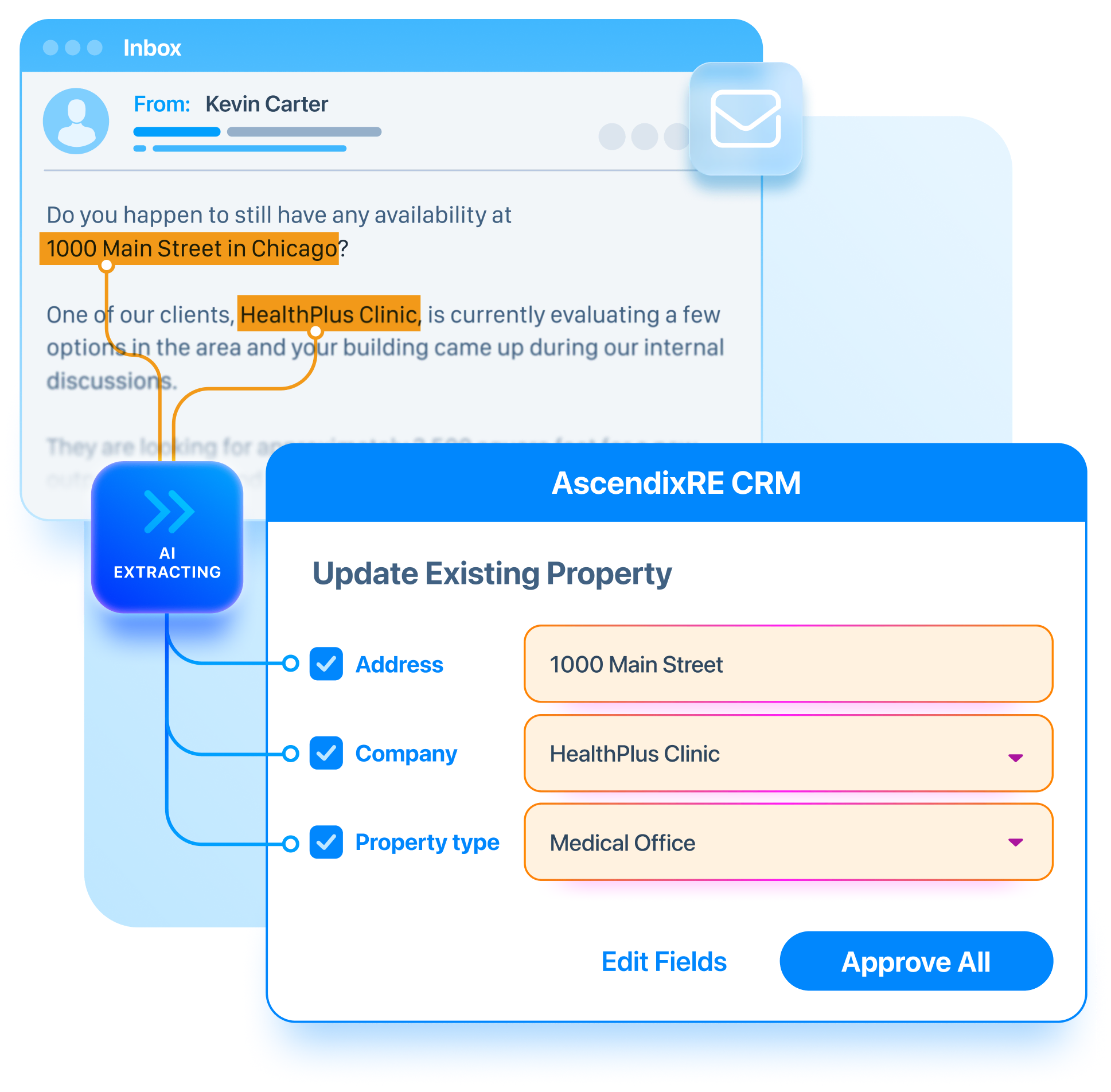
No more manual data entry. Forward a deal email and Harvest drafts the contact, company, and property record for you to review and approve.


Our Trusted Clients

The CRM work you haven't been getting around to. Harvest gets it done.

The deal moves forward. The CRM does not.

A tenant replies, a LoopNet inquiry lands, you close a showing. You mean to log it. But by the time you sit down, three more things need your attention first. to fill the space. to fill the space. to fill the space.

A catch-up becomes a half-day project.

One week of active deals. A dozen emails with names, numbers, and notes worth keeping. Logging them manually means reliving the whole week just to close out the data.

Conference follow-up stalls at the inbox.

You come back with 40 intro emails and strong intent to log everyone you met. Two weeks later, half of those contacts have never made it into AscendixRE. to fill the space. to fill the space. to fill the space.

The deal moves forward. The CRM does not.

A tenant replies, a LoopNet inquiry lands, you close a showing. You mean to log it. But by the time you sit down, three more things need your attention first. to fill the space. to fill the space. to fill the space.

A catch-up becomes a half-day project.

One week of active deals. A dozen emails with names, numbers, and notes worth keeping. Logging them manually means reliving the whole week just to close out the data.

Conference follow-up stalls at the inbox.

You come back with 40 intro emails and strong intent to log everyone you met. Two weeks later, half of those contacts have never made it into AscendixRE. to fill the space. to fill the space. to fill the space.

See how Harvest handles a real deal email

Book a short walkthrough and we'll run it on the kind of email sitting in your inbox right now

Harvest turns CRM updates from a chore into a quick check

01_01 icon

Forward or BCC the email

Send any deal-related email to your Harvest address. A tenant reply, an inquiry from Loopnet/Crexi, a post-meeting intro. No prompting needed. Forwarding is the trigger.

2 icon

Harvest reads it and suggests records

The AI extracts what is there: company, contact, property, requirements, preferences. It works from the email body and signature and surfaces only what it can infer. Within a few minutes, suggested records appear in your review queue.

3 icon

Review in a batch. Approve what's needed

Check the queue when it suits you. Confirm what looks right, adjust anything that needs it, and approve what goes into AscendixRE. You stay in control of what lands in the CRM. The data only updates when a broker says so.

Imagine just being able to forward that email into the system and it will create a company record, it will create a contact record and it will create a preference record. If they provide that detail.

Wes Snow, CEO at Ascendix Technologies

3 ways brokers use Harvest every week

Handle portal inquiries before you reply

When a LoopNet or CREXI inquiry arrives, forward it to Harvest. By the time you are ready to respond, the lead, property reference, and contact record are already drafted and waiting in your queue. Not buried in a tab you will get back to eventually.

Let Harvest log your deal emails

Add your Harvest address to the BCC on every deal email you send. By end of week, Harvest has processed the threads and your review queue reflects the conversations you actually had. One pass through the queue and the week is logged. to fill the space.

Log three records from one email

When a tenant finally responds with their requirements, forward the email to Harvest. It reads the body, pulls out the company, contact, and preference details, and drafts all three records for your review. The relationship does not stay buried in your inbox.

Handle portal inquiries before you reply

When a LoopNet or CREXI inquiry arrives, forward it to Harvest. By the time you are ready to respond, the lead, property reference, and contact record are already drafted and waiting in your queue. Not buried in a tab you will get back to eventually.

Let Harvest log your deal emails

Add your Harvest address to the BCC on every deal email you send. By end of week, Harvest has processed the threads and your review queue reflects the conversations you actually had. One pass through the queue and the week is logged. to fill the space.

Log three records from one email

When a tenant finally responds with their requirements, forward the email to Harvest. It reads the body, pulls out the company, contact, and preference details, and drafts all three records for your review. The relationship does not stay buried in your inbox.

What Changes with Harvest

01_harvest

CRM work shifts from entry to review

Harvest does not remove the broker from the process. It changes where the broker shows up. Instead of building records from scratch, you review records that are already drafted and decide what goes into AscendixRE.

Before Harvest:

  • ❌ Open the CRM after a deal email lands.
  • ❌ Create a company record by hand.
  • ❌ Add the contact and fill in each field.
  • ❌ Type out the tenant requirements separately.
  • ❌ Repeat for every email from the week.

With Harvest:

  • ✅ Forward the email to your Harvest address.
  • ✅ Harvest suggests the company record.
  • ✅ Harvest suggests the contact from the signature.
  • ✅ Harvest drafts the requirement from the email body.
  • ✅ Review the whole batch in one queue session.
01_harvest

Your inbox is already doing the work. Let Harvest finish it.

See how brokers use Harvest to turn deal emails into CRM records without the manual logging.

Questions brokers ask

Do I have to do anything after forwarding the email?

No. Forwarding to your Harvest address starts the abstraction workflow automatically. Within a few minutes, suggested records appear in your review queue: company, contact, inquiry details, preferences. You show up and confirm what looks right.

Will the person who emailed me become a contact record?

When enough detail is present, such as a name, title, and phone number from the signature block, Harvest will suggest a contact record for review. If the email is sparse, it will suggest what it can and flag what is missing.

Does Harvest summarize emails?

Harvest is built for record suggestion, not summarization. It extracts discrete CRM fields from the email body and turns them into structured records: company name, contact details, tenant requirements, property references. Summaries can be handled through the Agent module or connected LLM workflows.

Is Harvest a bulk import or migration tool?

No. Harvest is built for email-to-record workflows: inbound emails, forwarded inquiries, BCC threads. For large-scale data imports or migration projects, separate tooling applies. Harvest is the first mile of CRM adoption, not the whole road.

How does Harvest fit into AscendixRE AI Suite?

Harvest is one of four modules in AscendixRE AI Suite. It handles inbox-to-CRM workflows. xRE Connector links AscendixRE to external AI tools like Claude and ChatGPT. Composer handles outbound content creation. Agent is the module for working inside AscendixRE directly through natural language.

Contact Sales Team

First Name
Last Name
Work Email
Phone
How can we help you?

By submitting this form, you agree to Ascendix Privacy Policy

Contact Info

Ascendix Corporate Office
12222 Merit Drive Suite 1550
Dallas, Texas 75251

Ascendix User? Need help? Send your support requests to [email protected]