Looking for AI Solutions That Fit Your Business Wrokflows?
Ascendix team offers a free AI consulting call to help you understand your needs, estimate your AI readiness, and build a roadmap for seamless AI integration.


What’s actually sitting in your inbox right now: a random AI tool pitch, a cold email from a data provider trying to sell you comps, a couple of LoopNet notifications, and a whole pile of unprocessed client emails buried underneath all of it. So, you are looking for a way to automate CRM data entry from email using AI tools.
Here we will explore how you extract data from email to CRM automatically and what separates a real CRE tool from a generic one.
The priority mismatch, time consumption, and not seeing the benefits are main reasons CRM data entry in commercial real estate doesn’t get done.
Every deal email already contains a CRM record and often it is unstructured, hidden in the attachments or presented as a vague explanation.
Manual CRM data entry in commercial real estate takes the same steps: find or create the contact, find or create the company, attach the property, type the requirement, set a follow-up task. It might take five to fifteen minutes per email. Multiply that by a normal week of deal flow and it’s a few hours of pure re-typing, on top of everything else on your plate.
An hour of data entry loses to a call, a tour, or a follow-up almost every time, because those are the things that close deals, so nothing motivates brokers to put extra effort.
There are five options how to automate data extraction from email to a commercial real estate CRM:
This is the most turnkey option. For example, AscendixRE CRE CRM includes AI tools that understand CRE terminology natively without requiring configuration. Concretely, email parsing automatically extracts structured data from inbound emails and converts it into CRM records.
✅Pros: Purpose-built for CRE data (lease terms, rent rolls, NNN structures), minimal setup.
❌Cons: Locks you into that CRM’s ecosystem; AI features often gated behind higher tiers.
Salesforce and HubSpot are two of the most advanced generic CRMs in terms of AI functionality that can potentially automate CRM data entry from email. For example, Salesforce can provide AI data entry functionality via Agentforce that eliminates manual input by extracting and populating property information, contact details, and deal data from emails, documents, and listing platforms.
✅Pros: Massive integration ecosystem, enterprise-level security, regular updates.
❌Cons: Generic CRMs have no native understanding of commercial real estate industry out of the box, so custom objects are required to track properties, listings, and deals, and it cannot parse a commercial lease agreement or understand CRE-specific terminology.
Standalone products like Parseur, whose sole job is reading inbound emails (and sometimes attachments) and extracting structured data, then pushing it to whatever CRM you already run.
Many AI email data extraction tools support popular CRMs like Salesforce, HubSpot, Dynamics, and Zoho. Unfortunately, they rarely include a built-in library of ready-made templates for different industries such as real estate. You forward or CC emails to a dedicated parsing address, and AI handles the extraction.
✅Pros: Works with almost any system; some vendors offer onboarding for non-technical teams.
❌Cons: Adds another subscription and another vendor to manage; still needs a delivery mechanism (often Zapier) to get data the last mile into some CRMs; less deeply CRE-aware than a purpose-built CRE CRM; data safety can be compromised.
Instead of relying on the CRM’s own AI, you route emails through an automation platform that calls an LLM (via API) to parse the email, then pushes structured fields into whatever CRM you already use via its API (if available).
✅Pros: CRM-agnostic, cheap to prototype, full control over what gets extracted and how.
❌Cons: You own the maintenance; no CRE-specific templates out of the box; data security concerns.
For firms with in-house dev resources or bigger data volume, building a direct inbox-LLM-CRM pipeline gives the most control.
✅Pros: Fully customizable, no per-seat middleware fees at scale, can enforce brokerage-specific business logic (e.g., landlord vs. tenant-side routing).
❌Cons: Requires engineering investment and ongoing maintenance.
Ascendix team offers a free AI consulting call to help you understand your needs, estimate your AI readiness, and build a roadmap for seamless AI integration.
Harvest is an AI-powered email parsing tool built specifically for commercial real estate. It automates data extraction from the email body and attachments. Harvest is a part of the AscendixRE CRM AI Suite.
Pricing: AscendixRE AI Suite, which includes Harvest, is priced per organization rather than per user, and is available to AscendixRE customers on an Enterprise license. Cost scales with team size across five tiers. It runs on Agentforce credits that are provided with the subscription and can be purchased separately as a bundle if you run out.
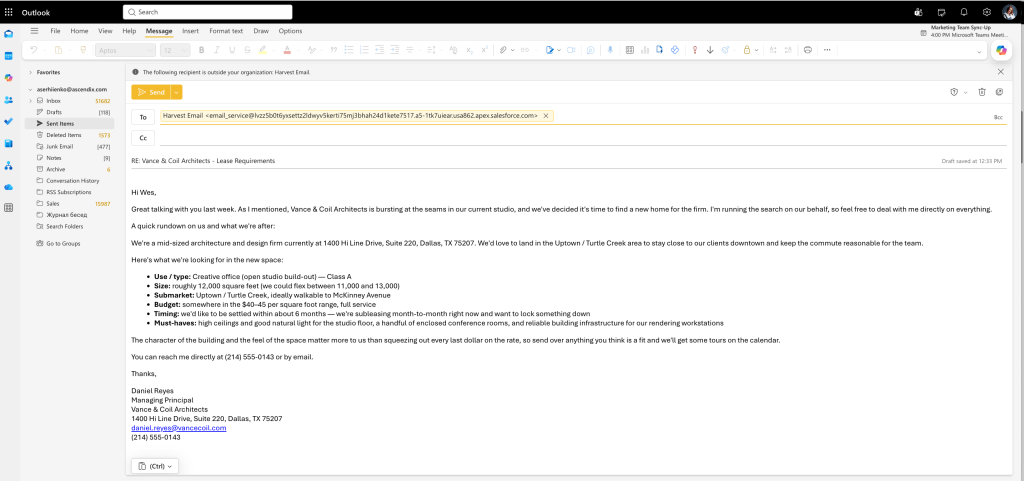
Email Forwarded to Harvest Intelligent Inbox | Source: Ascendix
You can forward one email, an email chain, or set up an automated routing to Harvest Intelligent Inbox. You don’t need to create a new email. Your clients will not receive any notifications or replies from Harvest.
Tip: Set up automation only for ongoing pursuits. Using Harvest to automate CRM data entry from LoopNet/ Crexi emails will create an unnecessary influx of new records, and you’ll use up your AI credits faster.
Harvest reads the email body and identifies structured data: sender name, company, property reference, stated requirements, and any follow-up action. It’s trained on CRE terminology, including abbreviations like NNN, TI, and WALT, so that language maps to the correct fields instead of getting skipped.
I can just forward inbound inquiries about our listings to Harvest and it will parse them into the particular listings. That is very very cool.
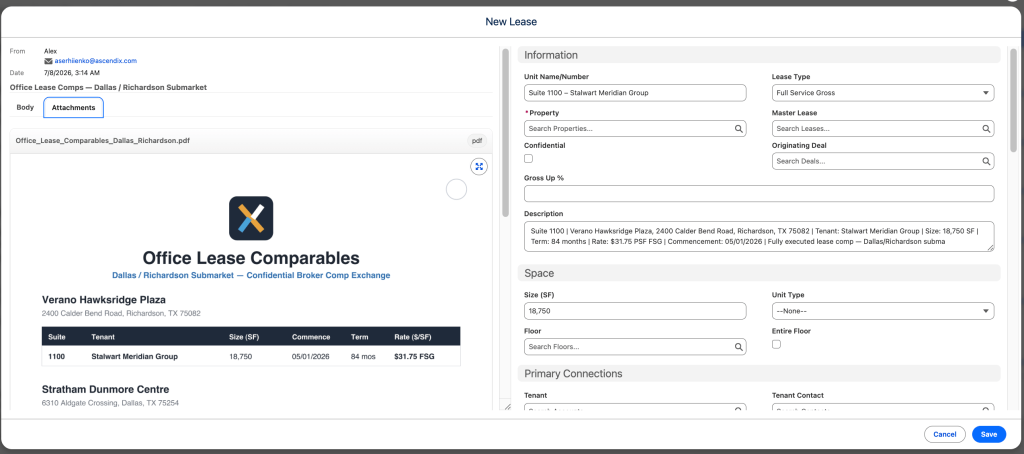
New Lease from Attachment Parsing | Source: Ascendix
Harvest email parser can handle Word, PDF, CSV, and PNG attachments up to 25MB. If the file doesn’t contain machine-readable text, OCR is applied to extract all full information instead of simply uploading the file into CRM.
Attachments don’t need to be forwarded separately. They’re analyzed in the same pass as the email itself.
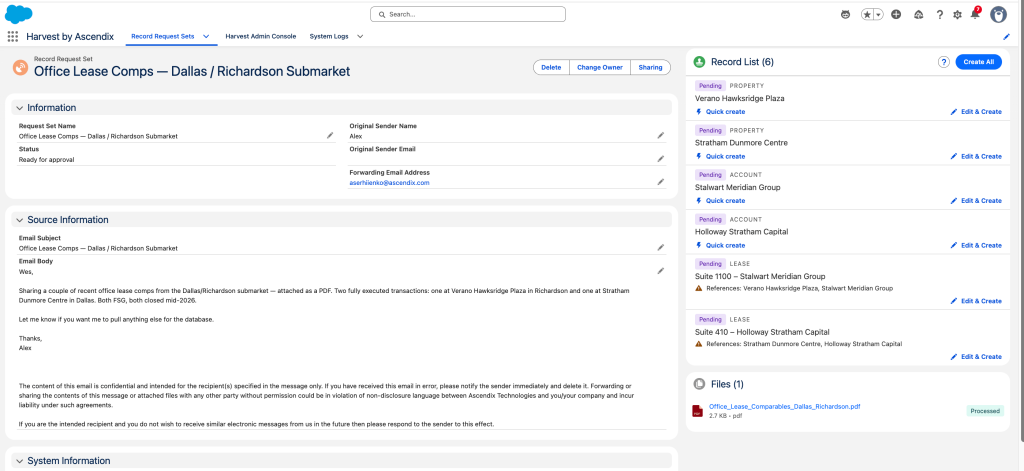
Records Drafted by Harvest | Source: Ascendix
Harvest checks what already exists before it creates anything. If a contact isn’t in the CRM yet, it creates the contact first, then links the requirement, property, or note to it. If a contact or company already exists, Harvest flags the match and asks whether you want to update the existing record or create a new one to prevent duplication.
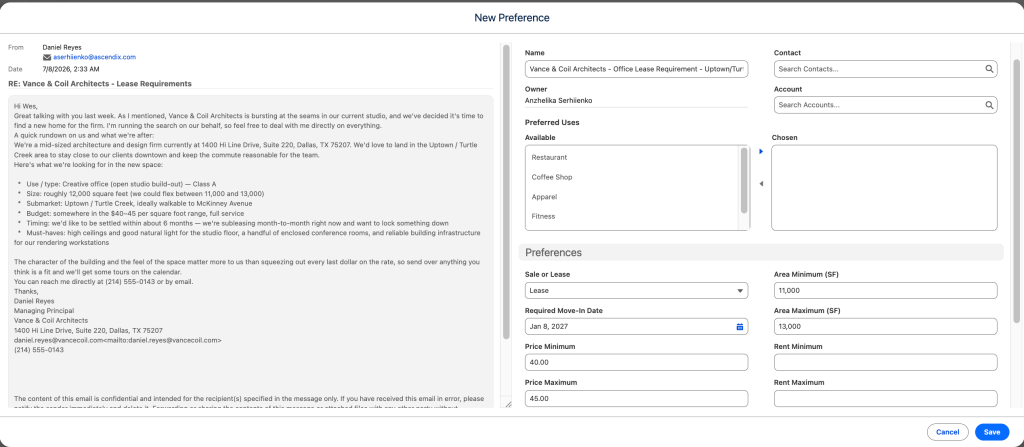
Revising and Editing of Drafted Records | Source: Ascendix
Harvest suggests what to enter, but the broker is the one making the decision. Every field in the draft is editable before it commits, so you can correct errors, change relationships, add a detail Harvest missed, or do not enter suggested records at all.
Warning: There’s no separate approval step; confirming the queue is the approval.
AscendixRE AI Suite offers not only a Harvest email parser but also three more modules that eliminate admin work and help you manage your CRM more efficiently.
Generic email parsers grab the basics: a name, an email address, a phone number. CRE deal emails carry a lot more than that, and generic tools can’t read past the industry vocabulary. A parser trained on commercial real estate reads the same line and knows exactly what each part means.
Tenant requirement email:
Data points a CRE-trained parser pulls out: property class, size range, move-in timeline.
Lease terms email:
Data points: lease structure, term length, TI allowance.
Showing follow-up email:
Data points: property detail, buyer reaction, follow-up trigger.
A generic parser sees three sentences. A CRE-trained parser sees nine structured fields, mapped straight to the record they belong in, because it’s built on the vocabulary brokers actually use: NNN, WALT, TI, FSG, lease expiry, stacking plans, rent rolls. That’s what email parsing CRM commercial real estate tools are supposed to do, and most generic tools never get there.
Different emails have different structures, intents, and attachments. There are just a few examples of what’s happening in CRE brokers’ inboxes every day.
Just based on those few examples, you can assume how much time Harvest can save you daily.
Many email parsing tools automate data extraction from email, which means it returns a structured document that you can scan more easily, but manual data entry work remains. Those that automate CRM data entry from email requires a secure connection between a parser and the system. Another issue is processing attachments that come in various formats and layouts. Also, not every real estate email to CRM tool is built for CRE brokers workflows.
So, there is a list of things to look for in email parsing tools for commercial real estate.
Tip: Pay special attention to data security: check certifications (SOC 1 &2), ask about data encryption and protocols to prevent AI from using your data for training. Consult an independent specialist if necessary.
Every brokerage handles the inbox-to-CRM gap differently: some with better data entry habits, some with more admin support, most without either.
Ascendix has spent twenty-five years building a CRM specifically for commercial real estate, and Harvest is a logical continuation of our ongoing effort to bring more technical advancements into the CRE industry.
Ascendix will help you understand your needs, estimate your AI readiness, and build a roadmap for seamless AI integration.
Yes. Forward the inquiry (or set up and automation) to your Harvest address and it pulls the contact details, property reference, and inquiry information into a drafted AscendixRE record. It lands in your review queue, and nothing writes to the CRM until you approve it.
Yes. Harvest reads both the email body and PDF, Word, CSV, and PNG attachments up to 25MB, so a forwarded LOI or lease abstract gets the same treatment as the email text around it: terms, dates, and counterparty extracted and queued for your review.
Generic email parsers do not understand most CRE terminology. Harvest is trained on commercial real estate language and maps terms like NNN lease structures, WALT, and TI allowances to the right AscendixRE fields, no setup needed.
No. Harvest puts suggested records in a review queue. Nothing writes to AscendixRE until you review and approve each one. Human is in the loop by design.
AscendixRE CRE CRM offers AI Suite that includes Harvest email parser built specifically for this in commercial real estate, covering LoopNet and CREXi inquiries, LOIs, post-showing emails, and other emails CRE brokers receive daily. Also, it can process attachments. It drafts linked contact, company, and property records in one pass.
Kateryna is an experienced writer focused on topics related to Salesforce consulting and optimizing operations within the real estate industry via CRM implementation. Through her insightful articles, Kateryna aims to help organizations make the most of their Salesforce adoption.
 (88 votes, average: 4.99 out of 5)
 Loading...