Book a AscendixRE AI Suite Demo
See AscendixRE AI Suite in a 30-minute live walkthrough on sample data. Or send us a redacted broker sheet and we’ll run it through Harvest before the call so you see your own records on day one.


Commercial real estate brokers rarely do something in the CRM just once.
You check lease expirations again next week. You revisit the same property criteria when new inventory comes in. You return to a search you ran for a client a few days ago.
The latest updates in AscendixRE AI Suite for AscendixRE CRM are designed around that reality.
What’s New in AscendixRE AI Agent
With the latest updates, commercial real estate brokers can:
See AscendixRE AI Suite in a 30-minute live walkthrough on sample data. Or send us a redacted broker sheet and we’ll run it through Harvest before the call so you see your own records on day one.
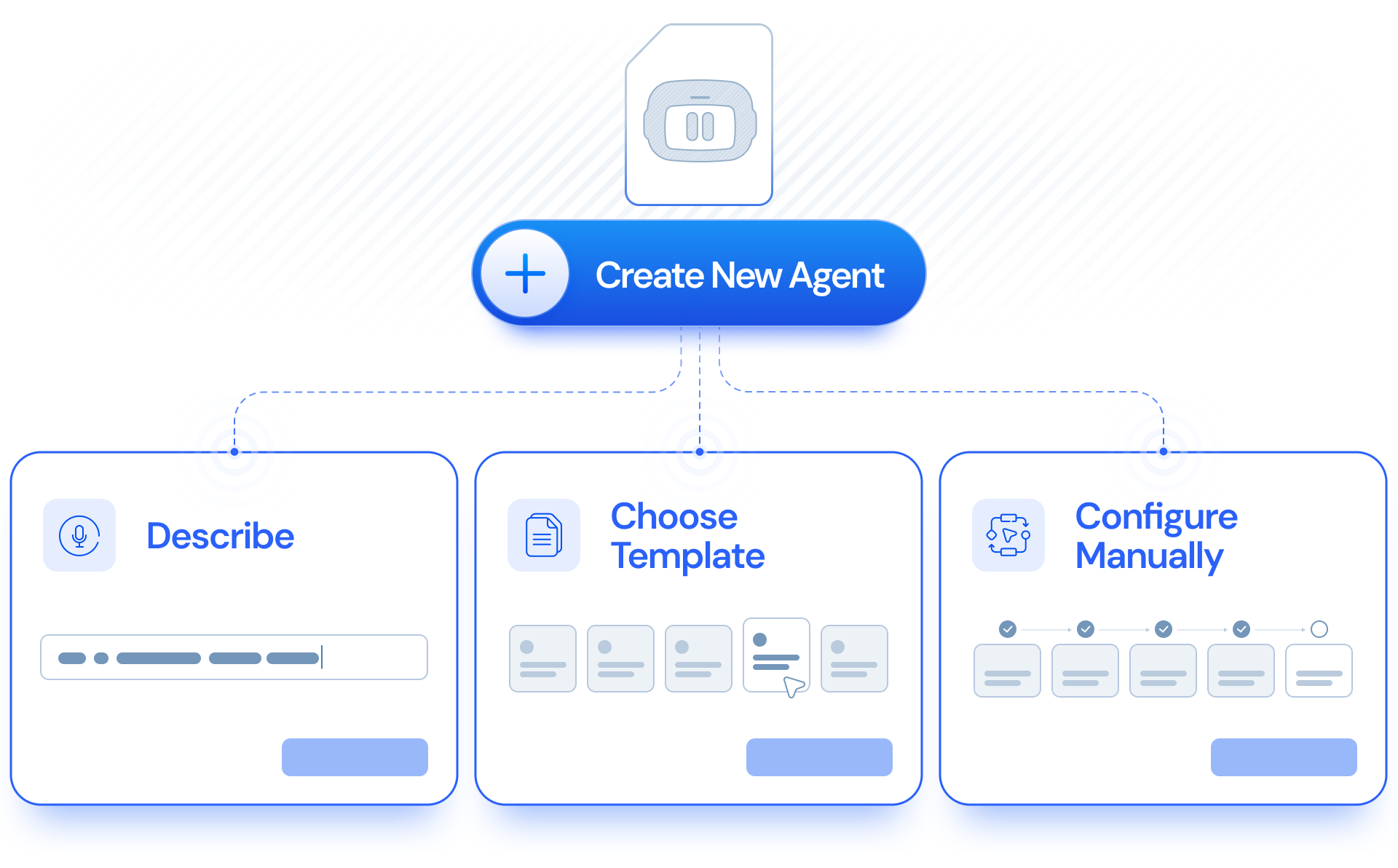
With My Agents, you can create and customize task-specific subagents around the commercial real estate workflows you want to repeat.
Describe what you need in plain English or configure the agent yourself. Then decide whether it should run on a schedule or only when you launch it.
Agents you’ve created can be edited, run on demand, or scheduled for later.

For example, you could create an agent to periodically review upcoming lease expirations, summarize new inquiries, or help surface deals you want to revisit.
And scheduled work doesn’t disappear into the background. You can choose whether results are delivered to AI Agent, email, or both.
If a scheduled workflow prepares an email draft, you can review and edit the recipients, subject, and message before anything is sent.
But to keep the workflow simpler you start with one of the templates built around common brokerage scenarios and configure it to completely match your needs.
The Stale Inquiry Finder brings attention to active inquiries that may need follow-up, including newly created inquiries with no activity yet and older inquiries that haven’t had activity for 30 days or more.
Instead of manually scanning inquiry records, brokers get a clearer answer to a simple question: Who may be waiting for me to follow up?
The Stale Listing Finder identifies your team’s active listings that have been on the market for 60+ days without an offer.
For a listing broker, that can be a useful trigger to reconsider the marketing approach, reconnect with ownership, or simply make sure a listing hasn’t been left sitting unnoticed.
The new Lease Expiration Alert looks for your team’s leases expiring within the next 18 months.
That longer window gives brokers more time to see renewal and representation opportunities coming, before the lease is close enough to make the conversation urgent.
The Listing Expiration Alert finds active listings scheduled to expire within the next 60 days.
Listings within 45 days of expiration are flagged as “Renew now”, helping brokers distinguish what can wait from what may need attention soon.
That can make it easier to stay ahead of listing renewals instead of discovering them at the last minute.
The Tenant Rep – No Activity Alert identifies contacts with a lease preference who haven’t had activity in the previous 30 days.
For tenant reps managing multiple requirements and relationships at once, it creates a simple follow-up checkpoint: which active relationships may have gone quiet?
The Tenant Rep – Lease Expiration Alert looks for contacts with a lease preference whose current lease expires within the next 180 days.
That can help tenant reps bring an upcoming lease event back into view and start the conversation while there is still time to discuss next steps.
Together, these templates turn My Agents into something practical: a way to keep recurring follow-up work visible without relying entirely on memory, spreadsheets, or manual CRM checks.
One of the more useful changes for brokers is the ability to search based on activity, not just property or deal fields.
AI Agent can now use the calls, emails, tasks, and events recorded on a AscendixRE CRM timeline as search criteria.
For example, you can ask: “Show me inquiries with no activity logged by me in the last 30 days.”
Or look for deals with recent activity, contacts without follow-up, or records where tasks are still open.
For brokers, that means questions like “Who haven’t we followed up with?” no longer have to start with exporting a list and checking records one by one.
And because activity conditions work with saved searches, you can save the query and rerun it later. The results are checked against the current activity in the CRM each time.
Maybe you regularly look for industrial availability in Dallas between 50,000 and 100,000 square feet. Maybe you keep returning to a tenant requirement or checking the same submarket.
You can now save a search under your own name and rerun it later against current CRM data.
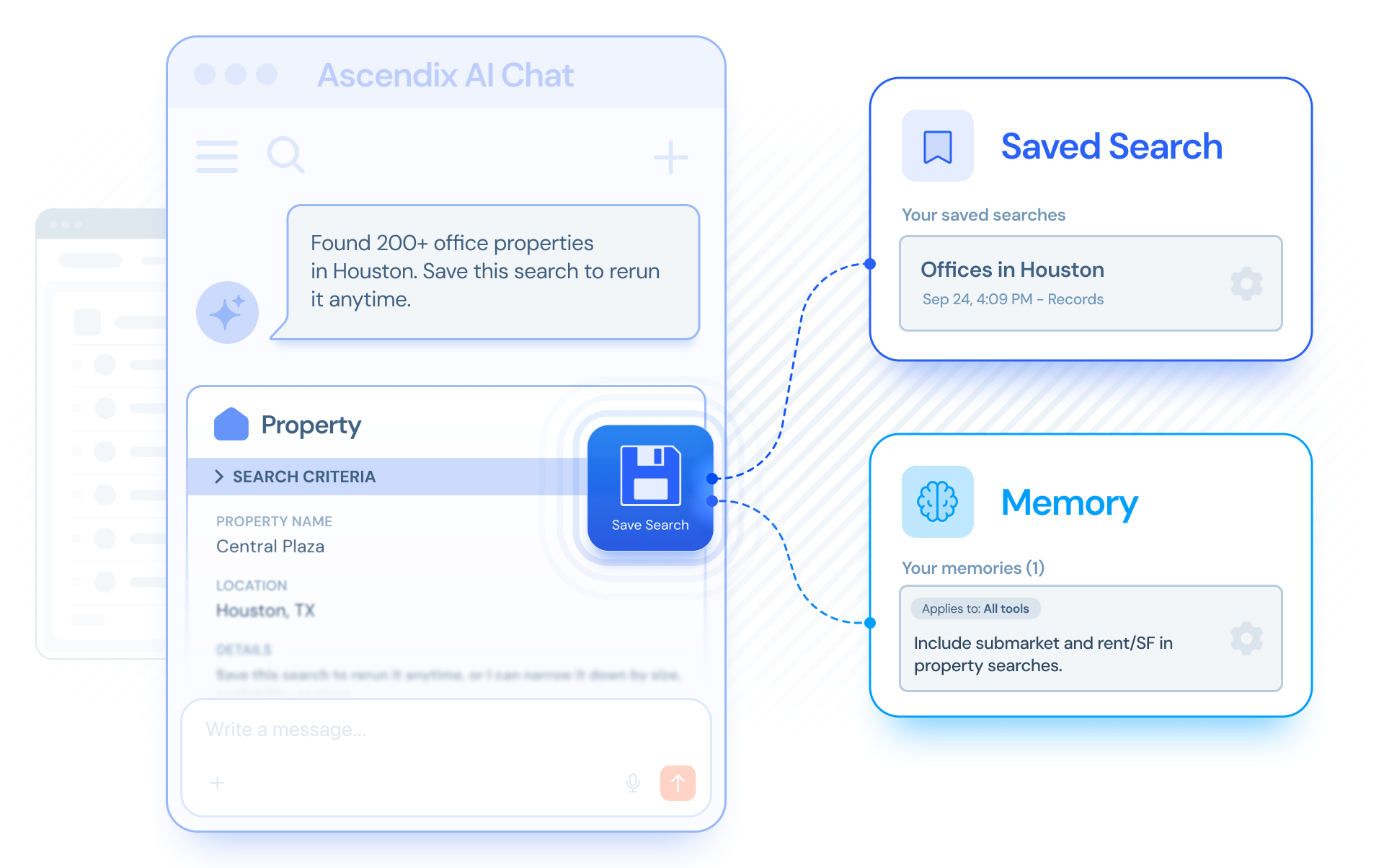
So, you’re not reopening an old list of results. You’re taking criteria you already built and applying them to what’s in the CRM now.
Moreover, your AI Agent remembers how you like to work and saves that as a memory and applies it in later conversations.
There’s another practical benefit: once AI Agent has translated your request into a search, manually refining the criteria and running the search again does not consume additional AI tokens.
The AI is used to turn your natural-language request into the search query, and subsequent manual adjustments and reruns are handled without another AI step.
Sometimes you know exactly who or what you are looking for. You just don’t know which CRM object contains it.
Type a company name, email address, or phone number, and AI Agent can search across the record types it works with and bring the matches together.
So instead of deciding: “Is Acme stored as an account? A contact? A deal? An inquiry?” you can start with: “Find anything about Acme.” And work from the results.
That reduces one of the small but constant CRM frustrations: knowing the information exists but having to remember exactly where someone put it.
AI Agent also has more context about the person using it and the AscendixRE CRM record they’re working with.
A manager can ask: “Show my team’s deals closing this month.”
A broker can say: “Update that deal I was just looking at.”
Or open a record and ask: “Show its contacts.”
All without repeatedly spelling out the owner, record name, or context.
The value is subtle but important: the conversation starts to feel more like working from your CRM context and less like writing instructions for a database.
Different brokers care about different fields.
A tenant rep may want to see size, submarket, and asking rate first. An investment sales broker may care more about price, property type, and owner.
You can now save your own default columns for different record types, including a different setup for the full results table and the compact chat view.
Those preferences apply to you without changing what anyone else on the team sees.
You search for properties, refine the criteria, review records, and then need to come back to the same work later.
AI Agent now keeps chat history, so you can reopen previous conversations, rename them, and search across them.

And if you refresh the page or move AI Agent into a pop-out window, your current conversation and results stay with you.
These updates also make AI Agent property search more visual.
You can already describe what you’re looking for in natural language.
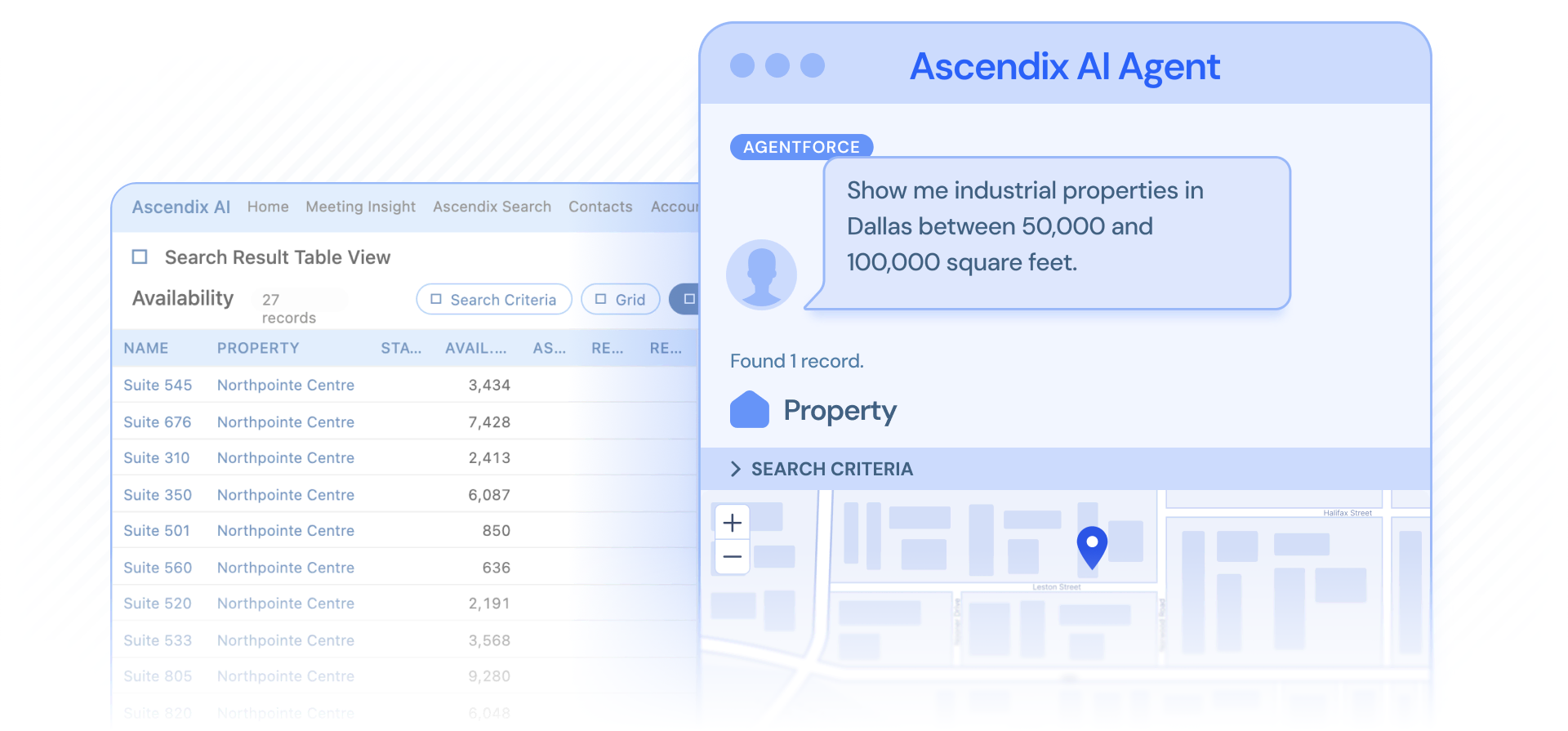
Now, when the matching records contain location data, you can switch from the search results grid to a map view and see where those properties sit.
Just ask: “Show me industrial properties in Dallas between 50,000 and 100,000 square feet.”
Then move from the list to the map to understand the geography behind the results.
That can be useful when you’re:
Refine your search criteria and the map updates with your results.
| CRE-Focused AI Agent Templates | Helps brokers catch follow-up opportunities and upcoming deadlines without manually reviewing CRM records | A tenant rep uses Tenant Rep – Lease Expiration Alert to surface contacts whose leases expire within the next 180 days and starts renewal conversations earlier. |
| Saved Searches | Reduces repetitive work by letting brokers reuse the same criteria against current CRM data | A broker saves a search for industrial availabilities between 50,000 and 100,000 SF in Dallas and reruns it whenever a client asks for updated options. |
| Activity-Based Search | Makes it easier to identify relationships and deals that may need follow-up | A broker asks for inquiries with no calls, emails, tasks, or events in the last 30 days instead of checking activity timelines one by one. |
| Cross-Record Keyword Search | Helps users find information faster without knowing which CRM record type contains it | A broker types a company name, email address, or phone number and sees matching accounts, contacts, deals, or other relevant records together. |
| Searchable Chat History | Lets brokers return to previous AI Agent work instead of recreating searches and conversations | A broker reopens last week’s property search for a client, reviews the previous context, and continues refining the requirement. |
| Persistent Conversations and Results | Prevents lost work when refreshing the page or moving AI Agent into a pop-out window | A broker refreshes Salesforce in the middle of a property search and continues from the same conversation and results instead of starting over. |
| Scheduled Agent Result Delivery | Brings recurring Agent outputs to the place where brokers are most likely to see and act on them | A broker schedules an Agent workflow and receives the result in AI Agent, by email, or both, depending on how they prefer to work. |
| Map-Based Property Search | Helps brokers understand the geography behind search results instead of reviewing only a table | A tenant rep searches for matching industrial properties and switches to map view to compare where the options sit across submarkets. |
| Context-Aware Requests | Reduces the amount of information brokers need to repeat when asking AI Agent for help | A manager asks, “Show my team’s deals closing this month,” or a broker says, “Update that deal I was just looking at,” without naming every record or owner again. |
| Personalized Result Views | Keeps the most relevant CRM fields visible for each user without affecting the rest of the team | A tenant rep saves size, submarket, and asking rate as their preferred property columns, while another broker keeps a different view for the same record type. |
| Look-Alike Record Comparison | Reduces the risk of choosing the wrong contact, company, or deal when records have similar names | If several records are named “John Smith,” AI Agent shows details such as when each was created or changed so the broker can identify the right one before continuing. |
| Conversational Search Refinement | Lets brokers narrow results naturally instead of rebuilding a search from scratch | After finding available properties, a broker asks, “Which of those are over 5,000 square feet?” and AI Agent refines the latest results. |
Already using AscendixRE AI Suite? Review new release update notes or contact Ascendix Support if you’d like help setting up agents around your team’s workflows.
And stay tuned to more feature updates in AscendixRE AI Suite.
The bigger story behind these updates isn’t another button or another AI mode.
It’s making the work you already do in AscendixRE CRM easier to repeat, revisit, and act on.
Create a subagent for the workflow you want to repeat. Save a useful search instead of rebuilding it. Refine the results without spending additional AI tokens on every adjustment.
Come back to yesterday’s conversation instead of starting from zero.
AI Agent does more of the repetitive setup, while the broker stays in control of the decisions that matter.
Talk to your account manager to explore how AscendixRE AI Suite can support real CRE workflows.
You can now create task-specific agents for repeatable CRE workflows. Each agent can have its own goal and can run either when you launch it manually or on a schedule. For example, you might create one agent to monitor lease expirations and another to prepare a weekly pipeline review.
A normal AI Agent request is typically something you ask when you need it. A task-specific agent lets you save that job so you can run it again or schedule it to run automatically, without rebuilding the request each time.
Agents are especially useful for repeatable CRM checks and summaries, such as reviewing upcoming lease expirations, monitoring new properties, preparing deal or pipeline summaries, finding records that need follow-up, or reviewing activity on a recurring basis.
Yes. The new My Agents area is designed to manage multiple agents with different purposes, schedules, and statuses.
No. You can describe what you want in plain English, start from a template, or configure the agent manually.
Completed runs appear in the results notifications, so you can see when an agent has finished and open the result.
The product includes a history of agent runs, so you can review previous results and when the agent ran. I would validate exactly how much run history is retained before publishing this answer.
They work with the CRM records that AI Agent can access. The usefulness of an agent therefore depends on the data available in the CRM and the user’s access to those records.
The core functionality is part of the new AI Agent experience. However, some workflows may depend on your CRM configuration, data structure, and permissions. So contact our Customer Support team if you have any difficulties with setting up new features.
You can run an agent on demand instead of waiting for its next scheduled execution.
Anzhelika is a seasoned B2B content marketing strategist with extensive experience in elevating corporate profiles through compelling content. At Ascendix, she offers a wealth of knowledge in Salesforce consulting, providing valuable tips, tricks, and comprehensive guides. Additionally, Anzhelika stays at the forefront of the industry, delivering expert analysis on the latest Salesforce tools and emerging technology trends.

 (51 votes, average: 4.90 out of 5)
 Loading...
Book a demo and we’ll show how you can capture deal data from emails, ask your CRM questions in English, and create client-ready documents from live CRM records.