Get a Free AI Consultation
Ascendix will help you understand your needs, estimate your AI readiness, and build a roadmap for seamless AI integration.


Brokers log calls when they remember to. Deals sit in the wrong stage for weeks. Leadership asks for a pipeline view, and someone has to build the report from scratch. The data that would answer the question is in the CRM, but requires 15 minutes of searching, filtering, and switching tabs.
Claude connected to Salesforce via MCP can query live CRM data, reason over notes and activity history, and generate formatted output in one prompt.
Key takeaways:
Most CRE firms share a version of the same operational friction. Most of them, if not all, can be solved with the Claude Salesforce integration.
Bottlenecks common to commercial real estate teams:
There are a few Claude AI Salesforce integration use cases sorted by role that can help handle those frictions. Find yours, take the prompts that fit, and use the skills section to make the output repeatable.
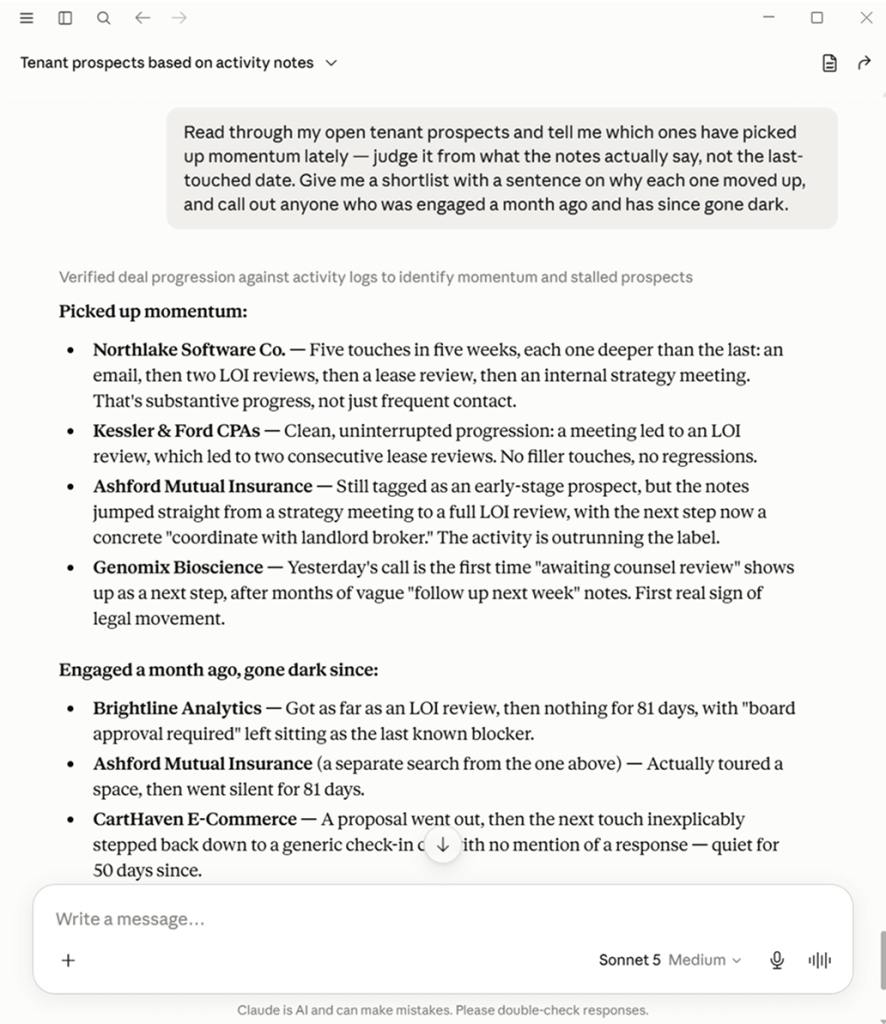
Read through my open tenant prospects and tell me which ones have picked up momentum lately — judge it from what the notes actually say, not the last-touched date. Give me a shortlist with a sentence on why each one moved up and call out anyone who was engaged a month ago and has since gone dark.
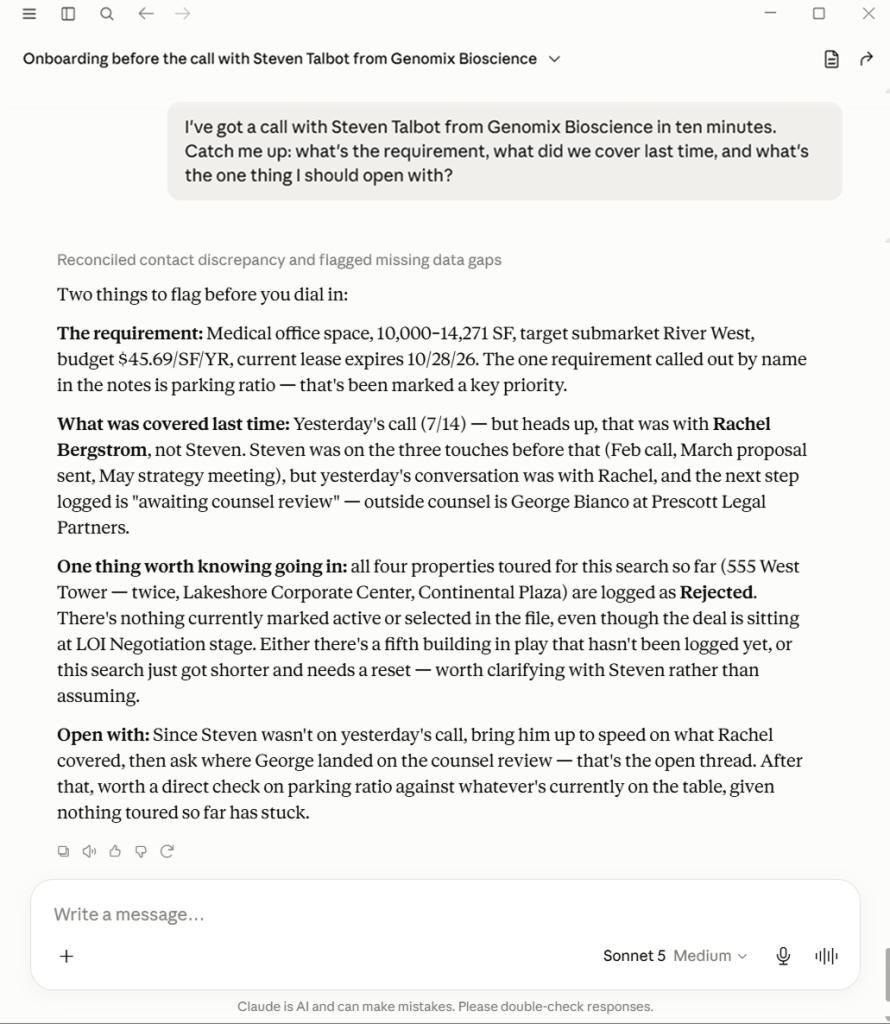
I’ve got a call with [the contact] at [the company] in ten minutes. Catch me up: what’s the requirement, what did we cover last time, and what’s the one thing I should open with?
Which of my active tenant requirements have a target move-in within the next six months? For each, show me the company, the size range, the class, and the submarkets they’re open to — I want to prioritize who I’m sourcing space for.

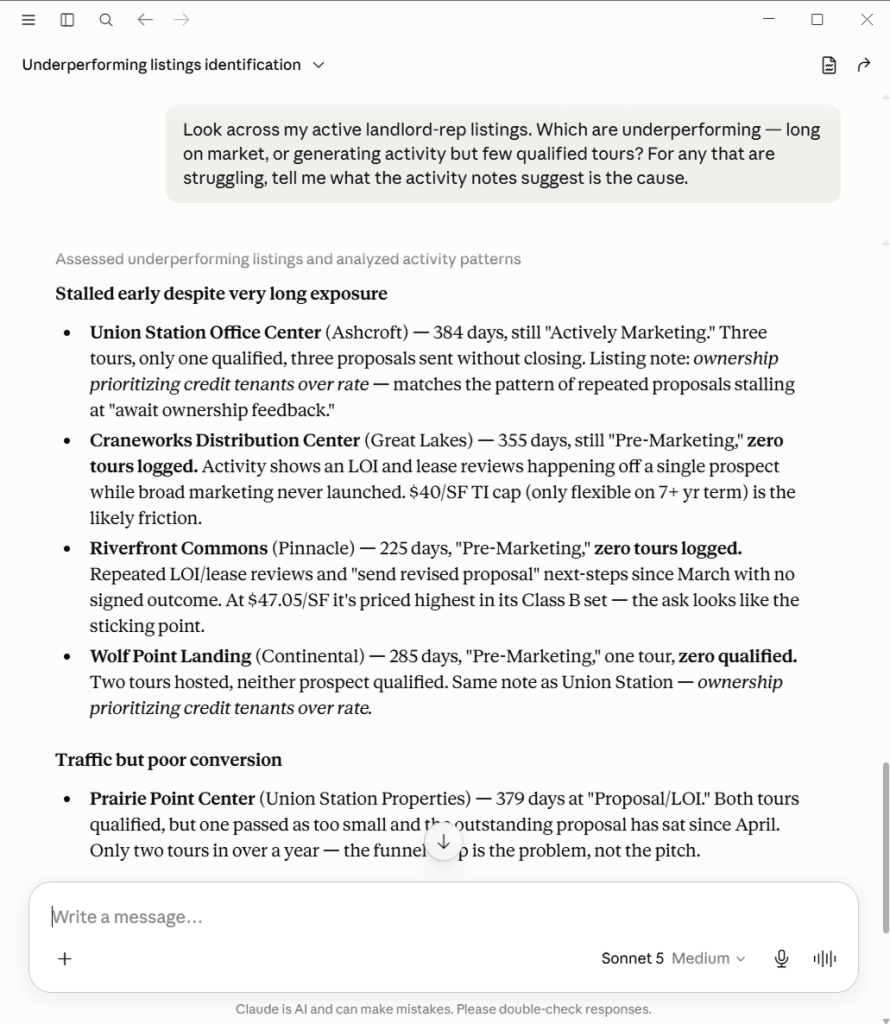
Look across my active landlord-rep listings. Which are underperforming — long on market, or generating activity but few qualified tours? For any that is struggling, tell me what the activity notes suggest is the cause.
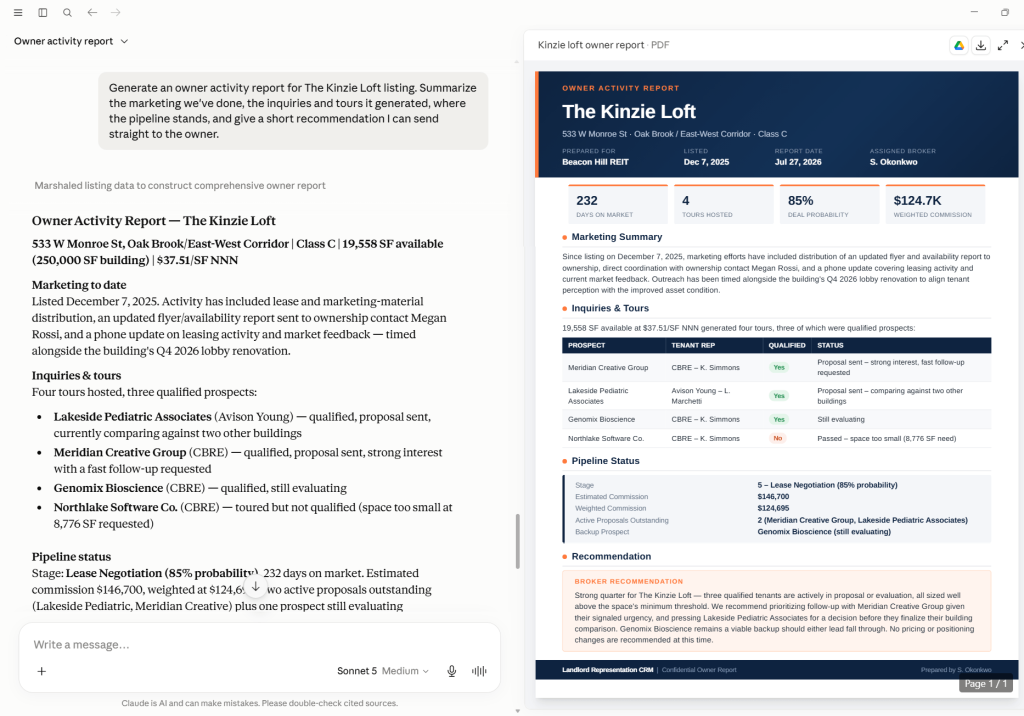
Generate an owner activity report for the [listing name] listing. Summarize the marketing we’ve done, the inquiries and tours it generated, where the pipeline stands, and give a short recommendation I can send straight to the owner.
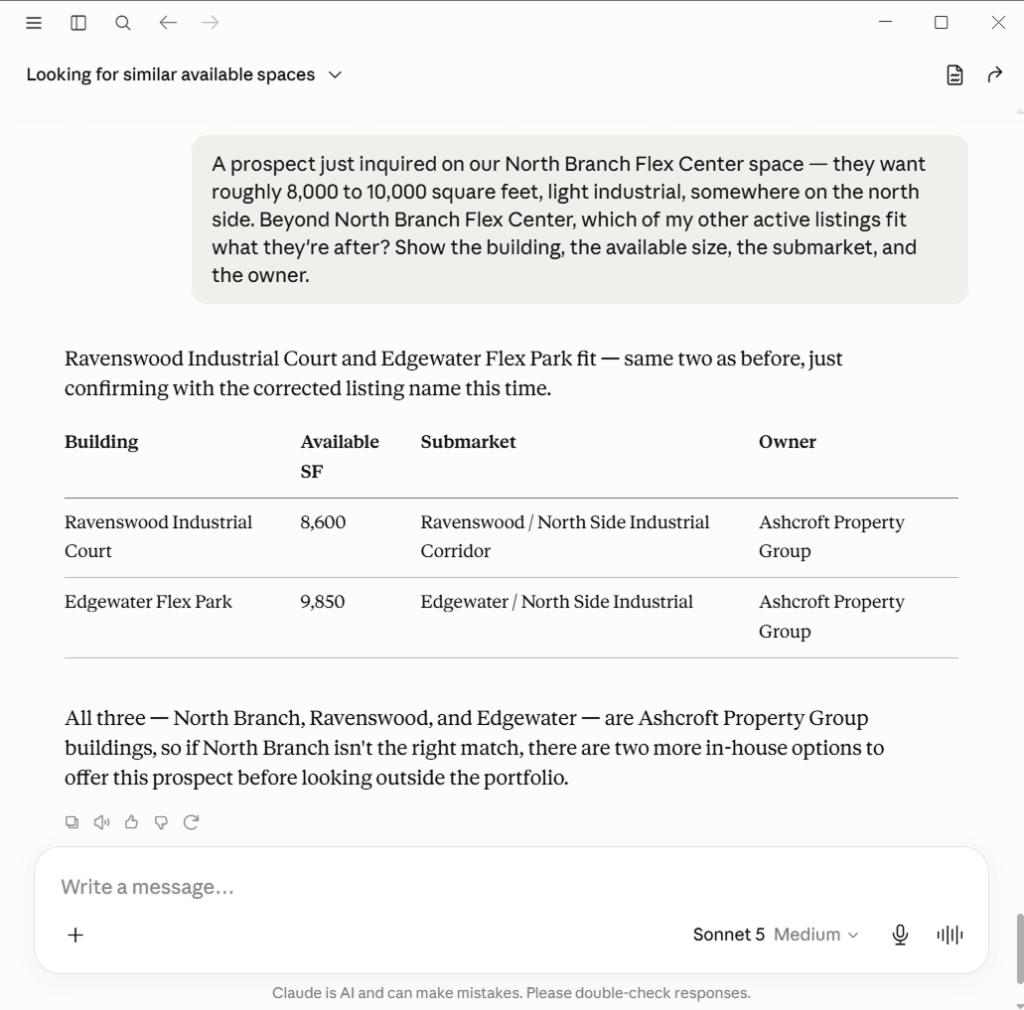
A prospect just inquired on our [listing] — they want roughly [size] square feet, [property type], somewhere [location]. Beyond [listing], which of my other active listings fit what they’re after? Show the building, the available size, the submarket, and the owner.
Ascendix will help you understand your needs, estimate your AI readiness, and build a roadmap for seamless AI integration.
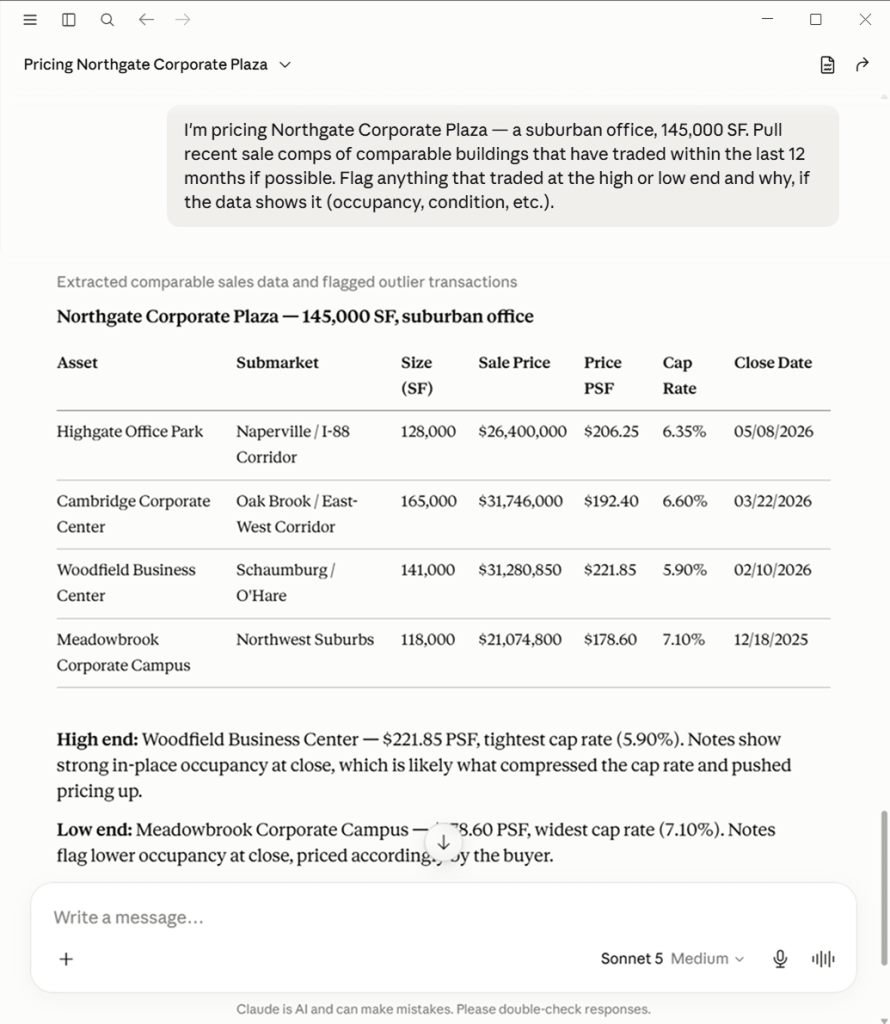
I’m pricing a [property type] asset in the [submarket] submarket, roughly [size] SF. Pull recent sale comps of comparable buildings that have traded within the last 12 months if possible. Flag anything that traded at the high or low end and why, if the data shows it (occupancy, condition, etc.).
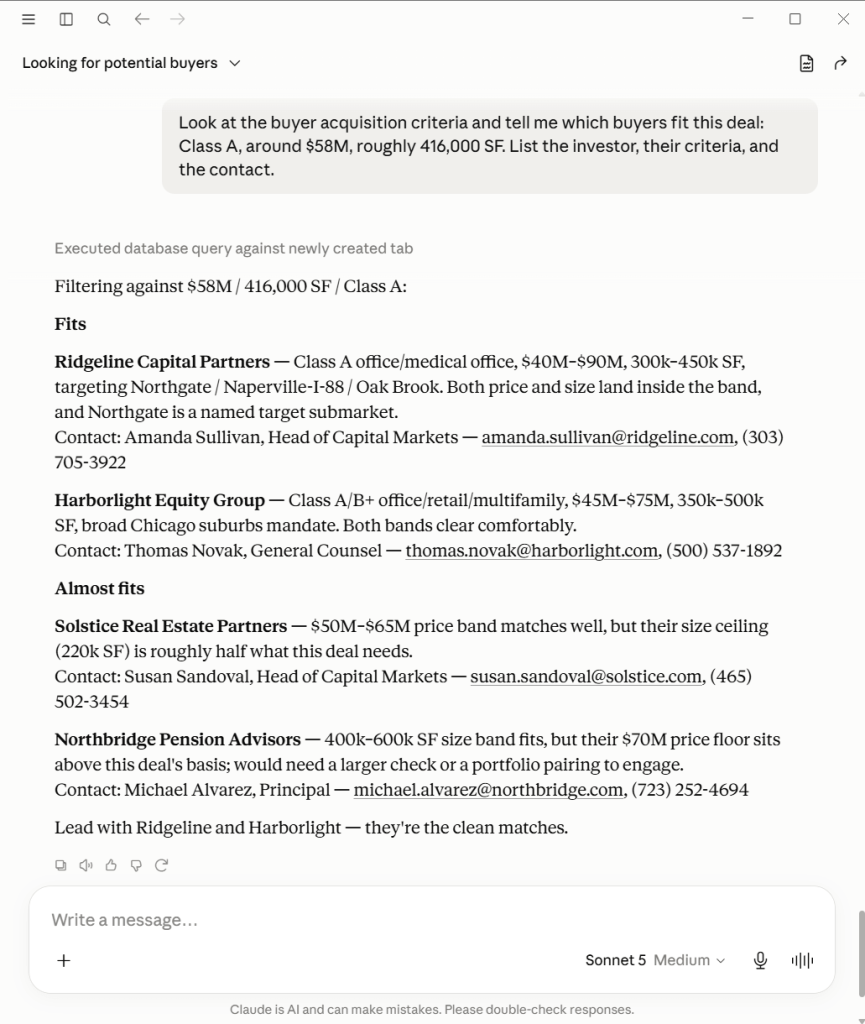
Look at the buyer acquisition criteria and tell me which buyers fit this deal: Class A, around $58M, roughly 416,000 SF. List the investor, their criteria, and the contact.
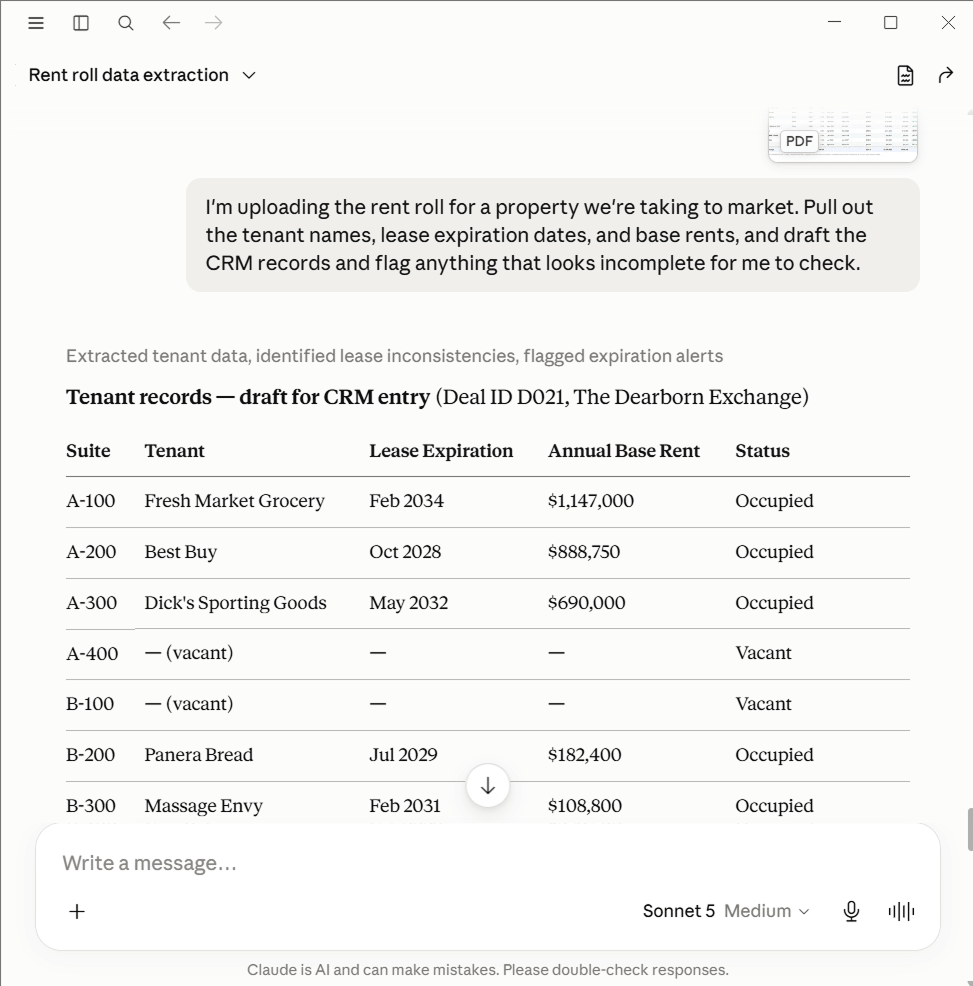
I’m uploading the rent roll for a property we’re taking to market. Pull out the tenant names, lease expiration dates, and base rents, and draft the CRM records and flag anything that looks incomplete for me to check.
Across the assets I manage, which leases will have a renewal decision date in the next 12 months? For each, give me the tenant, the suite, the current rate, and the notice deadline.

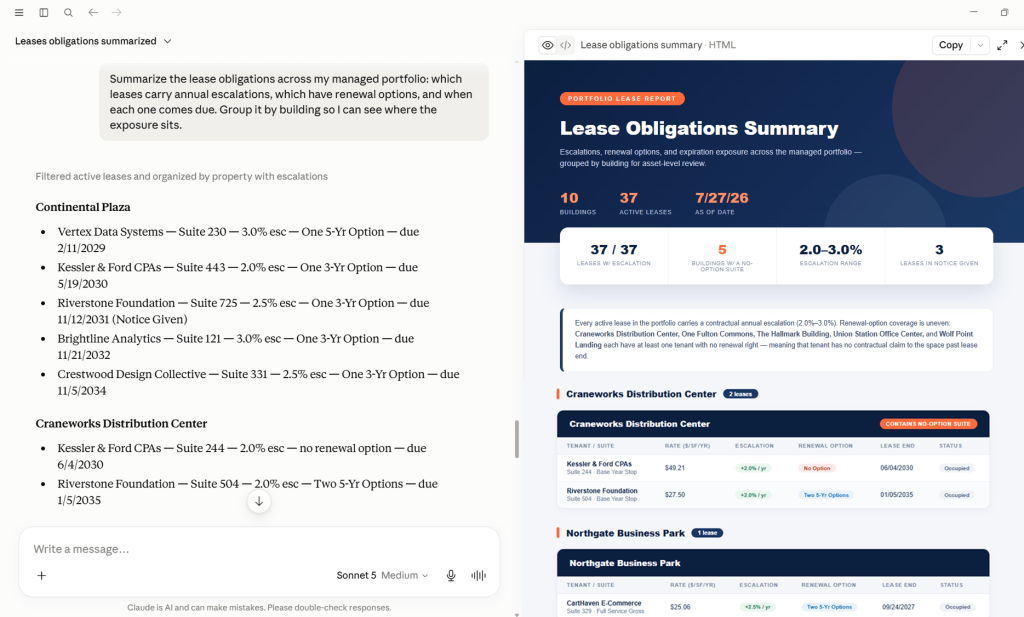
Summarize the lease obligations across my managed portfolio: which leases carry annual escalations, which have renewal options, and when each one comes due. Group it by building so I can see where the exposure sits.
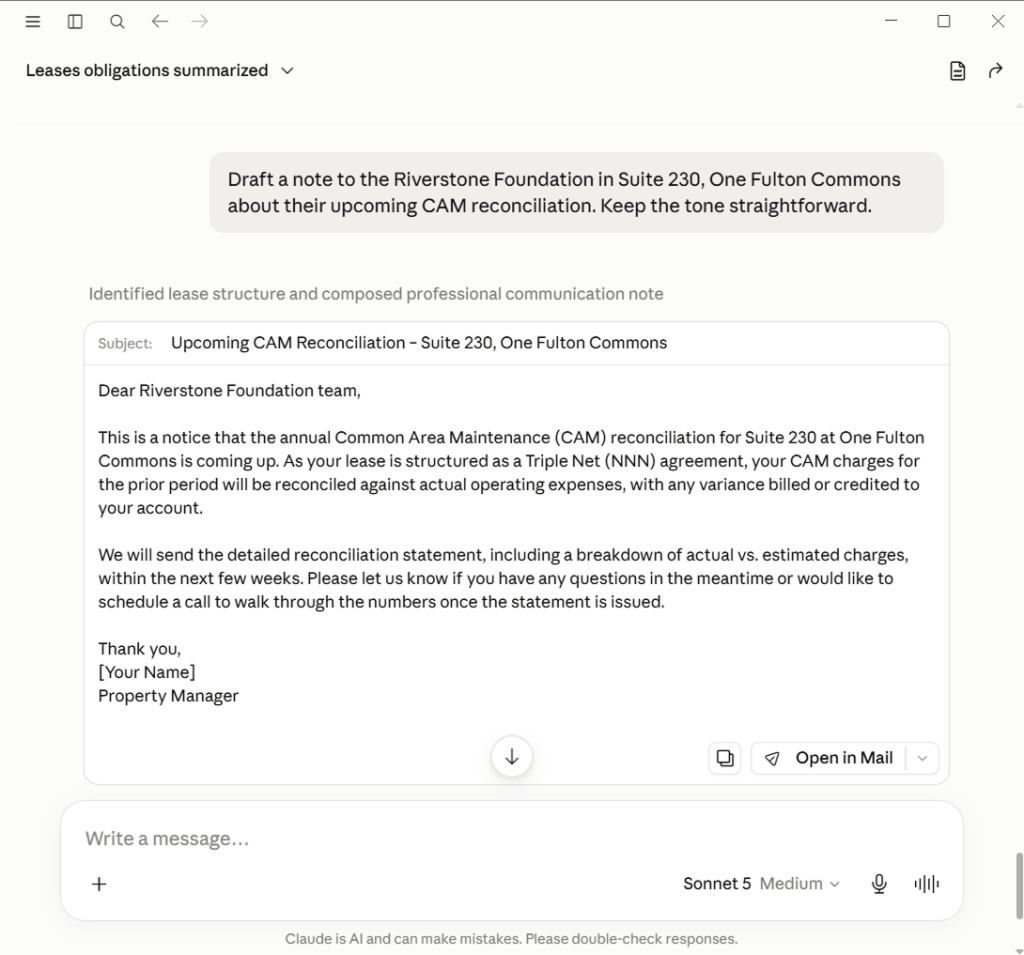
Draft a note to the tenant in [property] about their upcoming CAM reconciliation. Keep the tone straightforward.
Give me a weighted pipeline for the leasing team this quarter, broken down by broker, with projected close dates. Flag any deal that’s slipped its expected close more than once.

I’m prepping for a one-on-one with [name]. Pull their activity over the last 60 days — new deals opened, tours run, deals that advanced a stage, anything that’s gone cold.

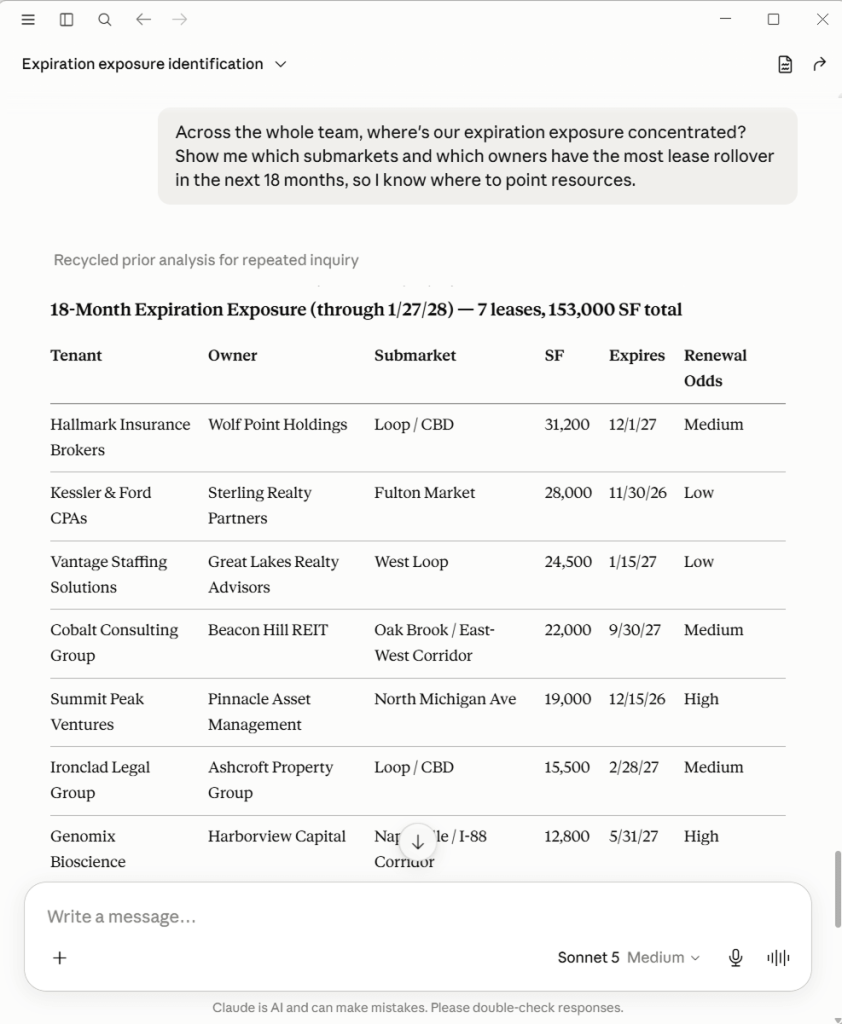
Across the whole team, where’s our expiration exposure concentrated? Show me which submarkets and which owners have the most lease rollover in the next 18 months, so I know where to point resources.
Ascendix tech team nurtures Claude with CRE vocabulary and skill set specific to your business needs.
Pull comparable sales for a [property type] in [market area], between [size range] SF, that have traded in the last 24 months. Filter out anything with more than [X]% vacancy at time of sale. Sort by sale date, most recent first.
Check the subject property record for [property address] for completeness. Which fields are missing that are typically required for a [property type] appraisal: year built, GBA, lot size, zoning, last sale date and price?
Draft the market conditions section for an appraisal of [property type] in [submarket]. Use the comp trends in the CRM: average days on market, price per SF movement over the last 12 months, and current vacancy rates if available.
Which lenders in our database have appetite for a [loan type] deal: [asset class], [geography], around [loan amount], [LTV]? List the lender, their stated criteria, and the contact.
I’m presenting [deal name] to a lender tomorrow. Pull the deal summary from the CRM: property type, location, loan amount, LTV, borrower profile, and current status. Format it as a one-page briefing.
What’s in the pipeline for [borrower name or company]? Show me all active deals, their current stage, the lender they’re with, and any open items that need to move.
Claude connected to Salesforce can generate more than text. When the data is in the org, a single prompt can produce a formatted table, a rendered chart, a structured CSV, or a styled document that is ready to download or share. These are not integrations with external design tools. They are outputs Claude generates in the conversation from data pulled via MCP, so the output can be not as consistent.
“Pull the weighted pipeline for the leasing team and generate a bar chart showing projected close value by broker for each month this quarter. Use the weighted amounts, not the full deal values.”
What it produces: a rendered bar chart in the conversation showing each broker’s weighted pipeline by month. Useful for leadership reviews and team meetings.
“Pull all active leases across my managed portfolio and generate a timeline showing expiration dates by month for the next 24 months. Group by building and color-code by lease size: under 5,000 SF, 5,000 to 20,000 SF, and above 20,000 SF.”
What it produces: a visual timeline artifact rendered in the conversation. Gives asset managers and ownership groups an immediate picture of rollover concentration.
“Pull the comparable sales I’ve assembled for [subject property] and format them as a clean table: address, sale date, size, price, price per SF, cap rate, and occupancy at sale. Sort by price per SF descending. I want to paste this directly into a presentation.”
What it produces: a formatted HTML table or clean markdown table ready to paste into a deck or document. No reformatting required.
“Generate a formatted owner report for [owner name] covering [property]. Include: current occupancy, active listings with marketing summary, tours and inquiries in the last 30 days, pipeline status, and a short recommendations section. Format it as a document I can download and send.”
What it produces: a structured document in the conversation with clear sections, ready to copy into a PDF or email. If paired with a skill encoding your firm’s report format, the output matches your template.
“Pull all active leases across the portfolio and produce a CSV with the following columns: tenant name, property, suite, lease start, lease end, base rent, escalation schedule, renewal options. I want to import this into Excel for analysis.”
What it produces: a clean CSV-formatted output in the conversation that can be copied directly into Excel or saved as a .csv file. Useful for offline portfolio analysis or sharing with investors.
“Pull [broker name]’s activity for the last 90 days and generate a one-page productivity report: deals opened, tours run, deals advanced by stage, deals gone cold, and a summary of what the numbers suggest. Format it clearly so I can use it as a one-on-one agenda.”
What it produces: a structured single-page report formatted for printing or sharing. Gives leadership a consistent format across all broker reviews.
Prompts get you started. Skills are what make the output consistent.
A skill is a reusable instruction package that Claude loads automatically when a task matches its description. In practice it is a folder: a short description file Claude reads at the start of every session, plus whatever supporting material the task needs.
Skills may manage templates, field mappings, vocabulary reference, tone guidelines, output standards, brand rules, etc. Claude reads only the description upfront and pulls the rest in when the task calls for it, so a skill can carry a 40-page brand guide without consuming tokens on sessions where it is not needed.
A skill is an instruction layer. It operates on what MCP provides. When MCP has nothing to provide, the skill has nothing to work with.
Ascendix has been in CRE space for over 25 years. We know how to make AI work as your business needs it to.
| Skills cannot | What you need instead |
|---|---|
| Query Salesforce on their own | MCP server connection |
| Enforce that output lands in the right fields | Apex logic, Flows, validation rules |
| Trigger automatically when an event occurs | Agentforce agents |
| Produce pixel-identical formatted documents | A dedicated document generation tool |
| Correct missing or bad data | Data architecture work, data cleanup |
| Replace a system of record | Salesforce CRM with proper history |
| Compensate for missing CRE objects | Salesforce customization first |
Tip: A skill is only as reliable as the institutional knowledge behind it. A lease abstraction skill that maps terms to the wrong Salesforce fields produces output that looks right and is wrong. Getting the field mappings, vocabulary, and relationship structure right is the substantive work. The skill file that references them is much simpler once that work is done. Contact Ascendix if you want skills built and governed for your specific org.
Ascendix Technologies is a Salesforce Summit Partner (the highest tier) and a member of the Agentforce implementation network. We’ve been building on Salesforce for over two decades and have delivered more than 300 Salesforce projects across commercial real estate, capital markets, private equity, and other data-heavy industries.
If you are looking for ready-made solutions:
Any Salesforce admin can connect Claude to Salesforce. Far fewer Salesforce partners can make it reliable for CRE workflows because the connection is commodity, and the knowledge layer and data model are not.
Tell Ascendix Consultants about your business, goals, and struggles and get an outline of what you need to do and what solutions you should consider.
Not for all of them. The standard Salesforce Hosted MCP Servers give Claude read access to standard and custom objects already in your org. Prompts that pull Accounts, Contacts, Activities, and custom objects like Property or Lease will work on a standard server if those objects exist. Prompts that require write-back queries or role-specific tool logic benefit from a custom server.
Both are possible. The standard servers separate read and write access so you can choose. Starting read-only and enabling writes deliberately is the sensible sequence. Write prompts like the call logging example require write access enabled and ideally Salesforce-side validation in place.
The prompts will return whatever is available. If the Requirement object does not exist, the tenant sourcing prompts return Opportunity or Contact data that may approximate the need but will not be precise. Building the missing objects is a Salesforce customization engagement.
The cost of connecting Claude to Salesforce breaks down to three components: Claude licenses for your users, your Salesforce edition and licensing, and the build effort for anything beyond the standard servers. The third varies most and requires detailed scoping.
Kateryna is an experienced writer focused on topics related to Salesforce consulting and optimizing operations within the real estate industry via CRM implementation. Through her insightful articles, Kateryna aims to help organizations make the most of their Salesforce adoption.
 (88 votes, average: 4.99 out of 5)
 Loading...