Book AscendixRE AI Suite Demo
See how you can use Claude to manage your AscendixRE CRM in plain language.


Claude has become a renowned AI chosen by many due to its high-quality texts, ability to reason across large amounts of information at once, and to automate routine tasks.
These make Claude a perfect choice for commercial real estate. However, Claude doesn’t automatically have industry expertise and access to a brokerage CRM data or any commercial real estate–specific context.
To successfully use Claude for commercial real estate, you need to give it access to your AscendixRE CRM data through the AI Suite. It lets AI perform actions on a broker’s behalf and gives it the context of the business: its contacts, deals, and properties.
Here are some Claude AI real estate use cases for different CRE specialists:
AscendixRE AI Suite is the AI layer that connects your Claude to AscendixRE. xRE AI Connector, a module in AI Suite, allows you to manage your CRM directly from Claude and grounds its answers in a brokerage’s actual data, so you can ask Claude for pipeline updates, lease comps, or owner reports in plain English in Claude and get the answers based on their real data. Also, we cover common pitfalls of using Claude for commercial real estate.
See how you can use Claude to manage your AscendixRE CRM in plain language.
You can connect Claude to AscendixRE CRM with xRE Connector, one of four integral modules of the xRE AI Suite, an agentic AI layer on top of AscendixRE CRM.
The AscendixRE Connector is a Model Context Protocol (MCP) connector that allows Claude to connect directly to AscendixRE AI CRM, so users can ask questions, find information, and complete tasks within Claude chat using live CRM data instead of spreadsheets, exports, or outdated snapshots.
AscendixRE is one of the first commercial real estate CRM platforms that implemented a native MCP server, giving LLMs access to CRE data, helping teams get faster and more accurate answers from AI.
Learn more about AscendixRE AI Suite
| Feature | Generic Claude AI | Claude + AscendixRE MCP (xRE Connector within AI Suite) |
| Data Source | General internet training | Your actual property & deal records |
| Data Entry | Copy-paste manually | Automatic data capture from emails (Harvest) |
| Context | Understands and guesses context based on prompts, often multiple prompts are required to provide full context understanding | Has access to your lease expirations & pipeline, so has full context of business tasks, deals, and properties |
| Security | Public cloud (unless paid) | Native Salesforce security perimeter |
xRE Connector operates inside a brokerage existing AscendixRE ecosystem, with access to the same permission structure that’s governing who sees which deals and contacts, so your data stays within your CRM, simultaneously allowing you to reap the benefits of well-trained AI in real estate CRM.
Yes, but only once you connect Claude to your AscendixRE CRM with xRE Connector from xRE AI Suite. On its own, Claude has no access to a brokerage’s CRM and no visibility into your contacts, listings, or deal records.
Once that connection is established, Claude can read your actual data and reason over it using CRE terms like NNN, cap rate, and lease expiration natively, rather than treating your CRM as generic spreadsheet data.
Discover the list of Top AI Tools for Commercial Real Estate
Claude works within your AscendixRE CRM records — Accounts, Opportunities, Contacts, and any custom property or lease fields a brokerage tracks.
You can simply write your request in plain English directly within Claude chat window without clicking through screens: AI will perform the required action for you, like pull the report, answer the question about the property, or update a record.
Claude AI real estate can also write back to the CRM: logging a call note, creating a follow-up task, or reminding you the progress with the deal.
Explore how a real estate CRM with AI understand CRE deal data, captures it from the emails you are already sending, and makes your pipeline accessible from inside Claude chat.
In practice, a broker can ask for:
– the same things that would otherwise mean building a Salesforce report or pulling records manually.
The specifics shift by specialty: a tenant rep might use it to prioritize prospects, a landlord rep to flag stalling listings and retention risk, an investment sales broker to match buyers to a new listing; in every case, though, the underlying pattern is the same: you ask a question in plain English and get a result without even leaving Claude.
The use cases below demonstrate how xRE Connector within xRE AI Suite helps brokers manage their CRM with Claude in an easier way. The examples are illustrative prompts of how one can utilize Claude for commercial real estate most efficiently.
At the start of the day, a broker asks Claude for a morning briefing. Claude surfaces open tasks, new inquiries, high-priority deals, and a narrative summary of what needs attention without opening Salesforce. In one live demo, this returned 36 open tasks and 2 new inquiries with commentary in seconds. It works best when Claude is also connected to email and calendar for a fuller daily picture.
“Provide me my morning briefing.”
Before a call or meeting, the broker asks Claude to summarize every interaction with a specific contact notes, activities, logged emails, and meeting transcripts if an AI notetaker is connected into a concise briefing covering history, requirements, and suggested talking points. The same pattern works just as well after a long gap between conversations catching up on months of notes and activity before a follow-up call, not just refreshing right before a meeting.
“Give me a historical overview of all the interactions I’ve had with Chris Edwards related to Edwards RE partners”
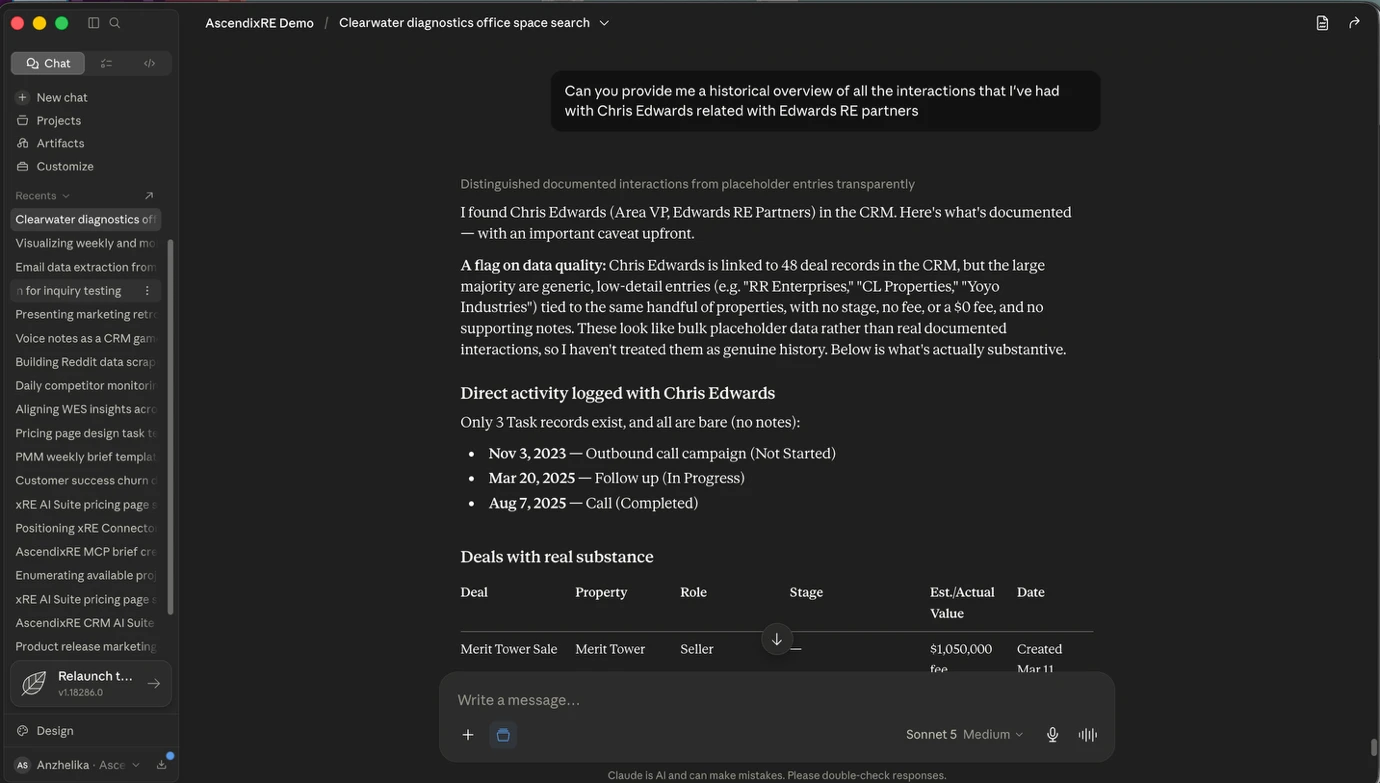
“It’s been a while since I spoke with Chris Edwards of Edwards RE Partners. Provide me an overview of all the interactions that I’ve had with her, including notes, activities, and any interesting tidbits that will help me ground my follow-up call just to catch me up from six months of activity.”

“I’m about to call Karen Rourke at Stone Brook Partners. Brief me on where we left off, what they need, what matters to them, and what I should lead with on this call.”

Claude drafts outreach emails grounded in a contact’s actual CRM record and inbox history not a fill-in-the-blank template. Drafts are queued for the broker’s review, not sent automatically.
“For the three prospects whose leases expire soonest, draft a short, friendly outreach email to each of them. Reference that their lease is coming up and that I’d like to help them get ahead of it. Queue them as drafts for me to review.”
Learn more about What Is Real Estate CRM with AI
The broker asks Claude to generate a map of properties matching a filter, client, or listing pulling geocoded property records and rendering them without a separate mapping tool.
“Show me a list of office properties that are 15 miles from the central business district of Dallas.”

A chart summarizing available square footage by property type across the brokerage’s book the kind of rollup that would otherwise mean building a Salesforce report by hand.
“Can you create a chart that shows properties by property type with the summation of total available square footage for each?”
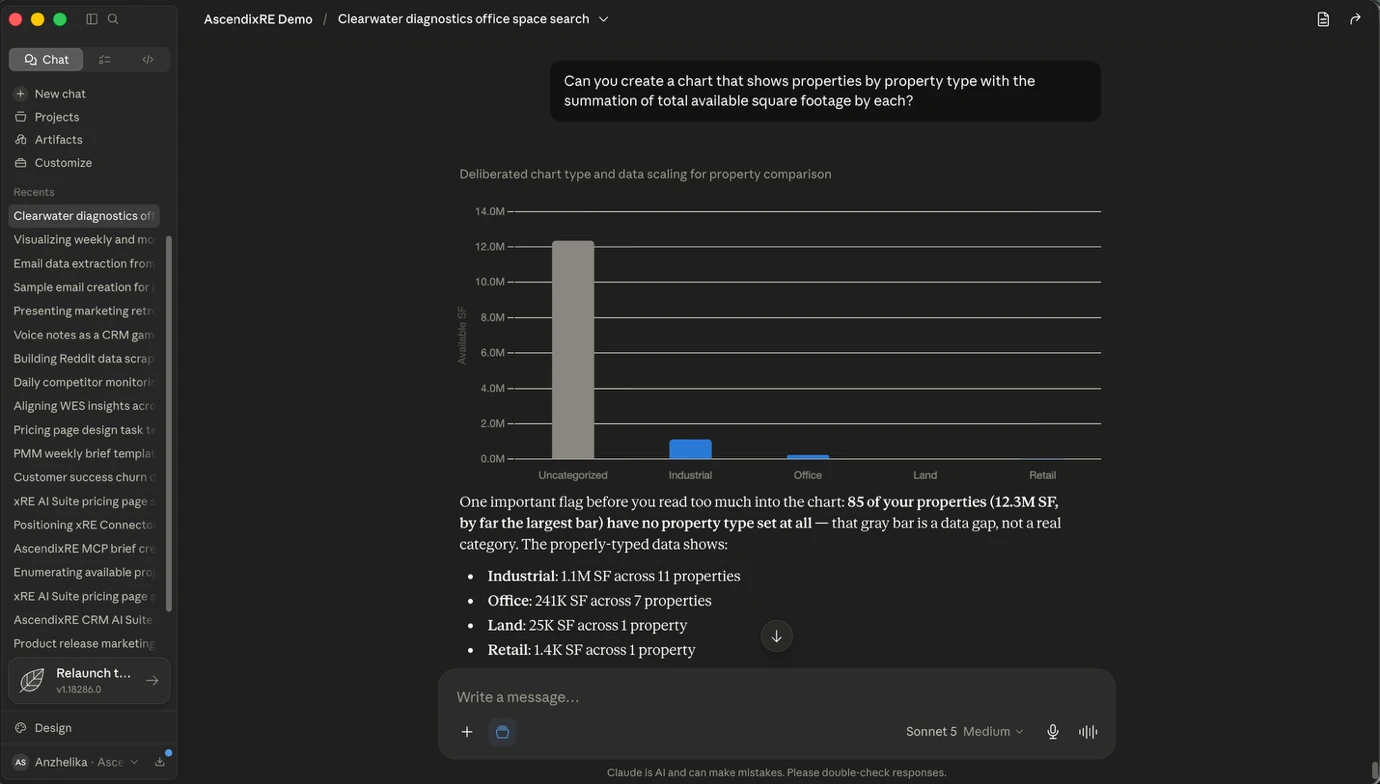
A filtered list of every deal where a specific broker is named as a commissionable party useful for a team lead reconciling splits or checking a broker’s book across deal types.
“Provide me a list of all deals where Wesley Snow is a commissionable broker on the deal.”

A portfolio-wide list of leases expiring within a given window, scoped by property type rather than by a specific tenant book or building useful for a market-level view rather than a single rep’s pipeline.
“Show me the leases that are going to expire in the next 18 months related to office properties.”

Before a demo or for market research, Claude can crawl a brokerage or listing website, or read a CoStar export, and create the associated property, listing, company, and contact records in the CRM without manual data entry. Human review before committing the records is still recommended, and very large datasets (500+ records) are better handled by a dedicated import tool.
“Go to [brokerage website] and pull the industrial listings into this session for me to review, then create records for the ones I select.”
Beyond pulling comps already logged in the CRM, Claude can research the market directly finding recent lease transactions for a submarket from public sources and formatting them to seed a comps database. As with any bulk import, human review before committing records is recommended.
“I’m trying to build out my lease comps database. Go research lease comps for office properties in far north Dallas and find me 20 to 30 I can use to fill out my database.”
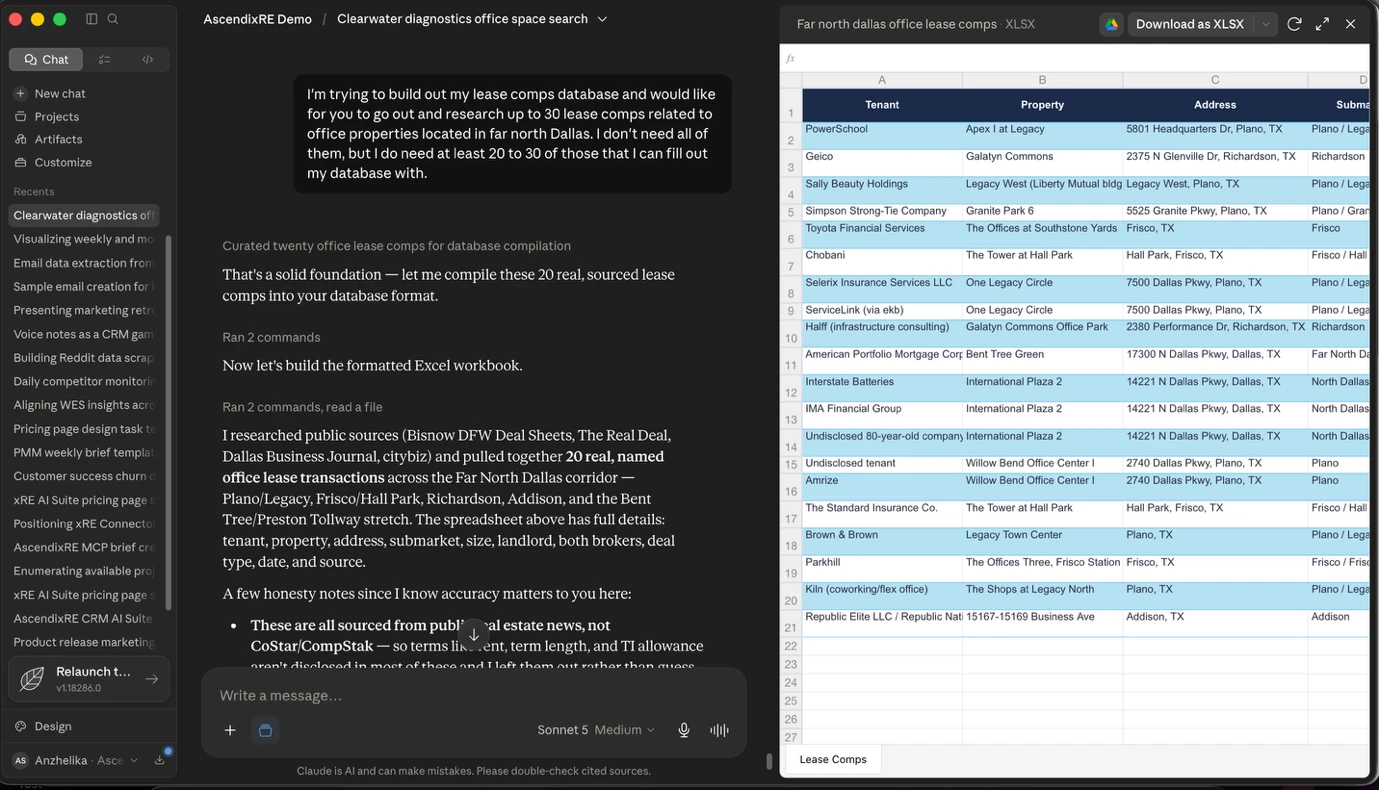
Claude ranks active tenant prospects by engagement and readiness to move, reasoning over the sentiment and content of logged CRM notes not just date fields and flags anyone who was warm but has gone quiet.
“Based on the tone and momentum in my recent notes, which of my active tenant prospects are heating up and most worth my time this week? Ranked them by how engaged and ready to move they seem based on my last few interactions. Flag those who are warm but have gone quiet and give me your top few with the reasons for each.”

A ranked list of tenant contacts or prospects whose leases expire within a given window, ordered by expiration date, including contacts that haven’t been touched recently.
“Give me a complete list of every tenant prospect whose current lease expires in the next nine months. No exceptions, including ones I haven’t contacted recently. Order them by expiration date.”

A recurring, scheduled check that surfaces any prospect without a deal and without recent activity served up as a prioritized list, with follow-up tasks already created.
“For any prospective tenant that doesn’t currently have a deal and hasn’t had activity in the last six weeks, run a task and serve that up to me every Monday morning. Schedule a follow-up task for me so I can take action on it.”
The tenant rep’s entire active book of requirements, like company, size range, class, submarket, and target move-in date, are pulled fresh from the CRM instead of a spreadsheet that goes stale the day it’s built.
“Show me all my active tenant lease requirements: the company, the size range, the class, the submarket, and their target move-in date. Sort by move-in date.”
Before dialing a prospect, the broker asks Claude from their phone to brief them on where things left off pulling from notes, activities, and requirements.
“I’m about to call Karen Rourke at Stone Brook Partners. Brief me on where we left off, what they need, and what I should lead with on this call.”
Immediately after a call, a single spoken prompt logs the call notes and sets the follow-up task against the correct contact record no pulling over, no CRM form.
“Log a call I just had with Karen Rourke at Stone Brook Partners. We walked through the three uptown options. She’s most interested in two with structured parking and wants tour dates before the end of the week. Set me up a follow-up task to send her those tour dates in the next five business days.”
Personalized outreach emails for the prospects whose leases expire soonest, referencing the upcoming expiration directly and queued for review before sending.
“For the three prospects whose leases expire soonest, draft a short, friendly outreach email to each of them. Reference that their lease is coming up and that I’d like to help them get ahead of it. Queue them as drafts for me to review.”
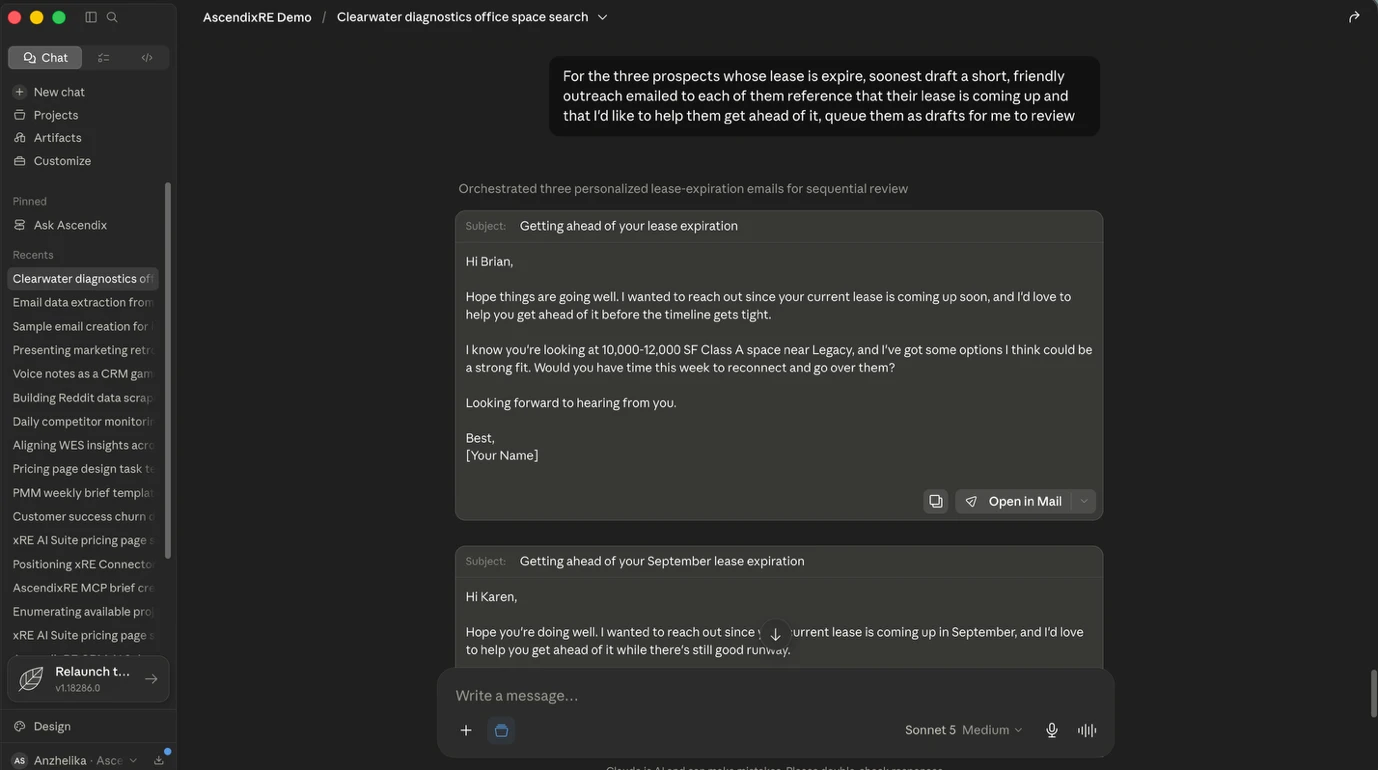
Recent comparable lease transactions in a prospect’s target submarket building, size, lease rate per square foot, and lease type so the broker can advise on what the market is actually trading at.
“Pull recent comparable office lease comps in the Uptown and Las Colinas submarkets show the building, the size, the lease rate per square foot, and the lease type, so I can advise on what’s market for their requirement.”
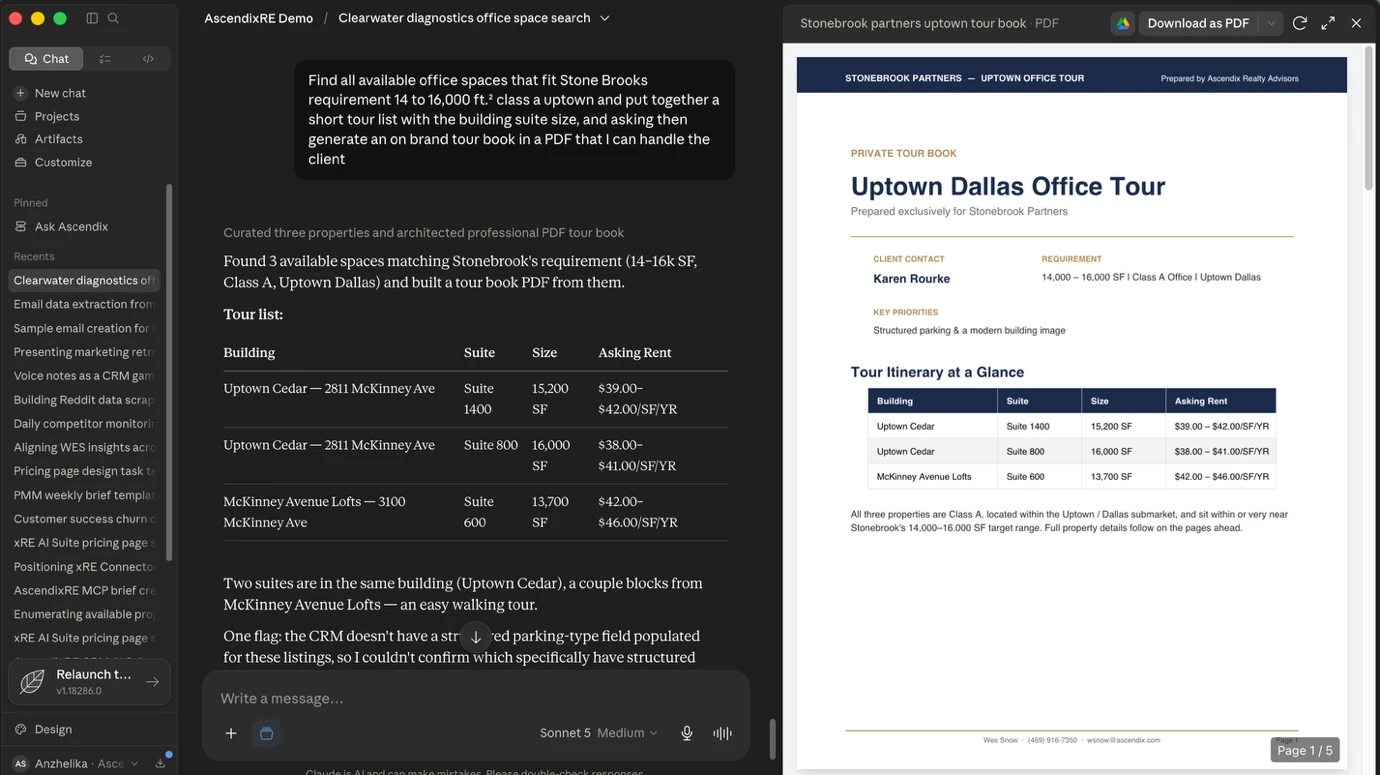
Claude finds available spaces matching a prospect’s requirement and assembles a short tour list building, suite, size, and asking rent then generates an on-brand tour book PDF.
“Find all available office spaces that fit the requirement 14 to 16,000 square feet, Class A, Uptown and put together a short tour list with the building, suite, size, and asking rent. Then generate an on-brand tour book in a PDF that I can hand to the client.”
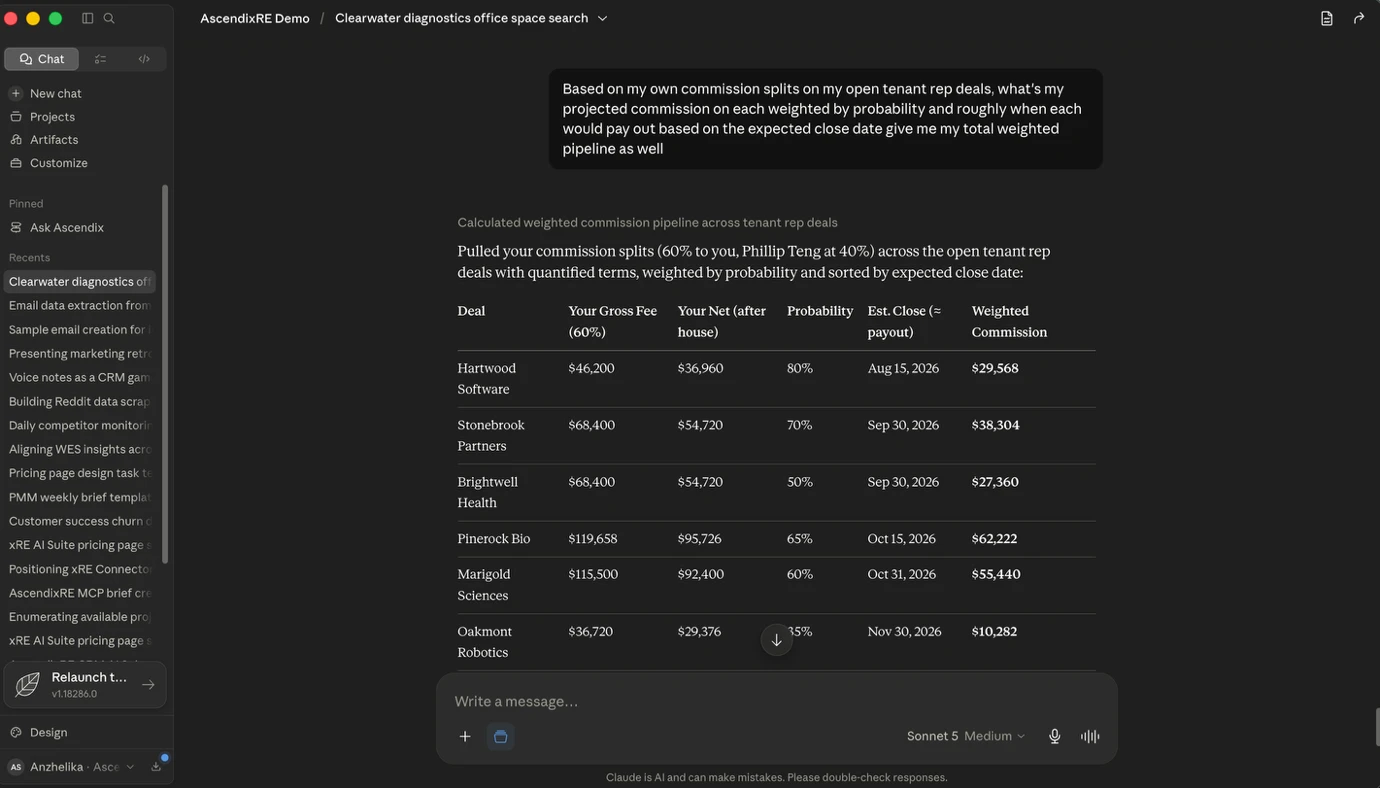
Projected commission on every open deal, weighted by probability and expected close date, with a total weighted pipeline value without any commission data entry.
“Based on my own commission splits on my open tenant rep deals, what’s my projected commission on each, weighted by probability and roughly when each would pay out based on the expected close date? Give me my total weighted pipeline as well.”
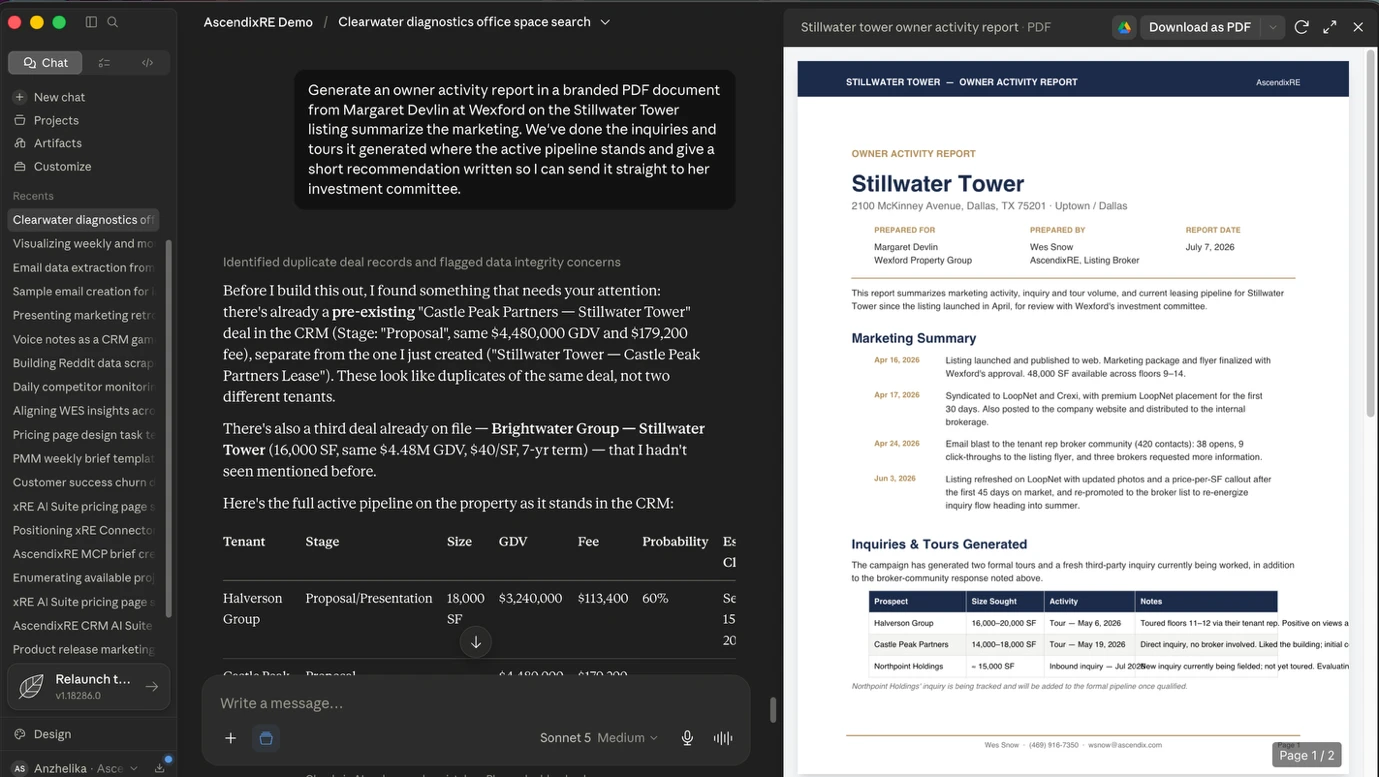
A client-ready PDF summarizing the marketing done, inquiries and tours generated, active pipeline status, and a short recommendation for a specific listing generated in seconds, not an afternoon.
“Generate an owner activity report in a branded PDF document for the owner on the Stillwater Tower listing. Summarize the marketing we’ve done, the inquiries and tours it generated, where the active pipeline stands, and give a short recommendation, written so I can send it straight to the investment committee.”
A brokerage’s own listings compared against comparable properties within a defined radius, producing a price-per-square-foot comparison. Claude supplements with public sources like LoopNet when internal CRM data alone isn’t enough.
“Show me price per square foot for these three listings and compare that to all the other listings within a 5-mile radius.”
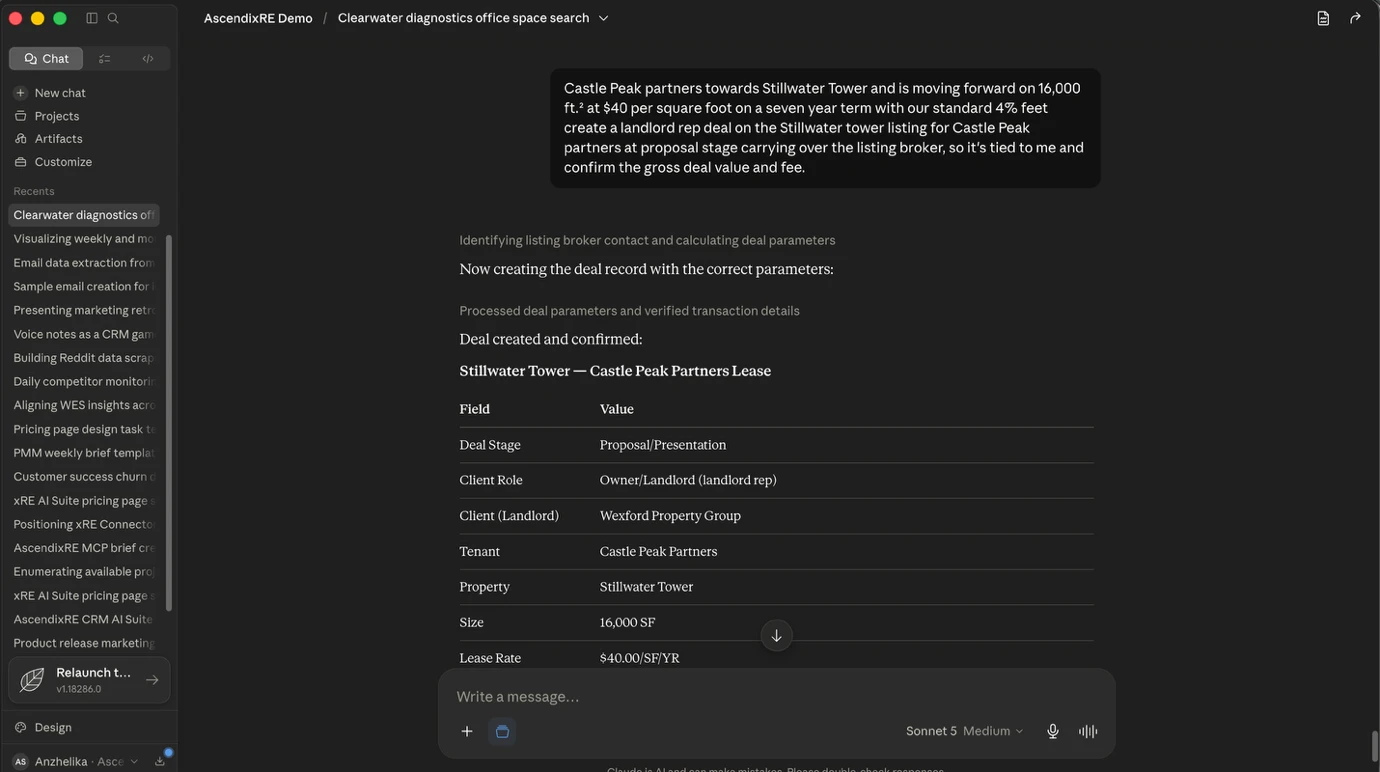
When a tenant tours a space and moves forward, a single spoken prompt creates the landlord rep deal in the CRM size, rate, term, and fee at the right stage, tied to the listing broker, with the gross deal value and fee calculated automatically.
“Castle Peak Partners toured Stillwater Tower and is moving forward on 16,000 square feet at $40 per square foot on a seven-year term with our standard 4% fee. Create a landlord rep deal on the Stillwater Tower listing for Castle Peak Partners at proposal stage, carrying over the listing broker so it’s tied to me, and confirm the gross deal value and fee.”

The landlord-rep version of the same weighted pipeline view projected commission on open deals, weighted by probability and expected close date.
“Based on my own commission splits, take my open landlord rep deals and tell me my projected commissions on each, weighted by probability and roughly when each would pay based on the expected close date. Give me my total weighted pipeline.”
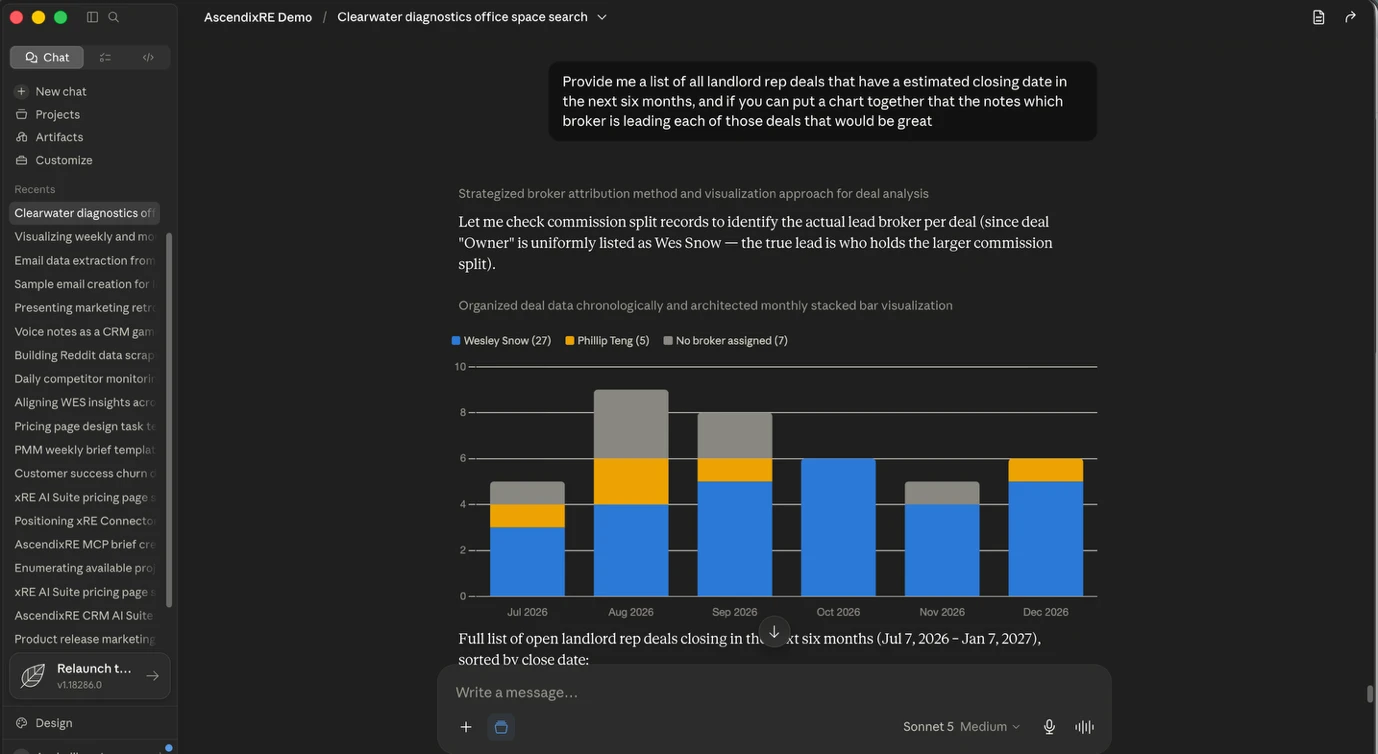
A list of landlord rep deals with an estimated closing date in a given window, paired with a chart showing which broker is leading each one useful for a team lead checking coverage across a book of listings.
“Provide me a list of all landlord rep deals that have an estimated closing date in the next six months, and put together a chart that notes which broker is leading each of those deals.”
Claude looks across active listings to flag which ones are on-market too long relative to marketing effort and, by reading activity notes, surfaces a likely cause.
“Look across my active landlord rep listings which are underperforming, either long on market or generating marketing activity but few qualified inquiries or tours? For any that are struggling, tell me what the activity notes suggest is the cause.”
Before walking into a building meeting, the broker asks Claude which in-place tenants have leases expiring in the next 12–18 months, flagging any who are a retention risk based on notes.
“Across the buildings I represent, which in-place tenants have leases expiring in the next 12 to 18 months? For each, give the building, the size, and the expiration, and based on my notes, flag any tenant who is a retention risk I should engage now rather than later.”

Instead of searching for tenants for a specific listing, the landlord rep flips the question: which active tenant requirements already in the CRM fit the space currently being marketed?
“I am marketing our Fort Worth industrial space. Which active tenant requirements in our database match what we have available?”
When a prospect inquires about one listing, Claude surfaces every other active listing in the portfolio that also fits their criteria turning a single inquiry into a multi-property conversation.
“North Point Holdings inquired on Stillwater Tower. They need about 15,000 square feet of Class A office in or near uptown, budget mid-30s to low-40s. Beyond Stillwater, which of my other active listings also fit what they’re looking for? Show the building, the submarket in the available space, and the owner.”

Book a demo and discover how AscendixRE AI Suite will keep your CRM accurate without extra manual work.
Claude extracts tenant names, lease expiration dates, and available decision-maker contact details from an uploaded offering memorandum or rent roll, then builds the corresponding CRM records and a targeted call list without manual data extraction.
When an owner engages the broker to sell, a single spoken prompt creates the seller rep deal in the CRM property, seller, deal value, and stage without opening Salesforce.
“Lone Star Logistics has engaged us to sell their Fort Worth industrial asset at around $58 million. Create a seller rep deal against that property with them as the seller, at the stage of In the Market / Tracking.”
Recent comparable sale transactions price, price per square foot, and cap rate pulled from a brokerage’s own CRM data to ground a pricing recommendation before a new listing goes to market. The same pull works as a standing market check, too comps that closed in a trailing window, independent of any specific listing.
“Provide me recent DFW industrial sales comps comparable buildings that have traded with price price per square foot and cab rate so I can ground the pricing on Lonestar “
Doubt that AI tools will fit your workflows?
Discover our AI development services for CRE
A standing pull of comparable sale transactions that closed within a recent window, independent of any specific listing for ongoing market awareness rather than a one-off pricing exercise.
“Provide me a list of sale comps that closed in the last 6 months.”

For land, where a brokerage’s own CRM data is often thin, Claude supplements with publicly available listings to assess market coverage for example, counting parcels above a size threshold in a given county and returns a count alongside a list.
“I have some land listings in my database, but I want an assessment of market coverage of land listings in Palo Pinto County, Texas. Review publicly available listings and tell me how many land parcels and tracts are 15,000 acres or greater, and provide me a list.”

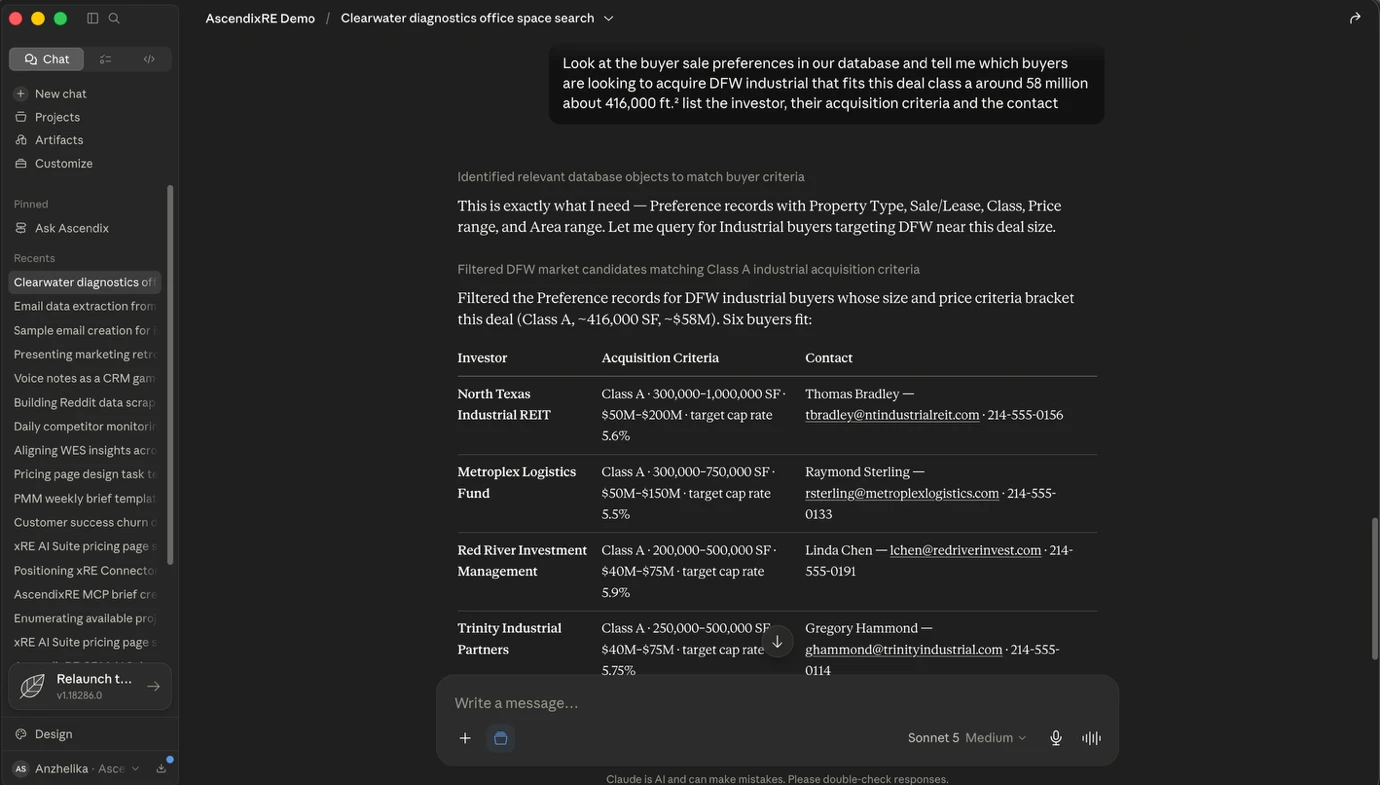
Claude matches a specific listing against every buyer acquisition criteria (sale preference) already in the CRM, returning a short list of investors whose profile fits on class, price, size, and asset type.
“Look at the buyer sale preferences in our database and tell me which buyers are looking to acquire DFW industrial that fits this deal Class A, around $58 million, about 416,000 square feet. List the investor, their acquisition criteria, and the contact.”
After buyers are matched, Claude drafts a short introductory outreach email to each one, introducing the offering and queuing the drafts for review.
“Draft a short outreach email to those top buyers introducing the offering and show it on screen for review.”

Grounding Claude in real CRM data through the xRE AI Suite significantly reduces the risk of a fabricated answer, but these practical guardrails still matter a lot.
Claude’s writing quality and context window make it well suited to the document-heavy side of commercial real estate leases, offering memorandums, listing copy.
But the capability that actually changes a broker’s day-to-day is the connection to AscendixRE. Without it, Claude is a smart assistant with no memory of a brokerage’s business.
With the xRE AI Suite grounding it in real CRM data, it becomes something closer to a virtual admin: one that already knows the pipeline, the lease expirations, and the client history, and can act on all of it in plain English.
Ready to stop copy-pasting? See how the AscendixRE AI Suite grounds Claude in your CRM data, and discover how Claude AI can help you close deals faster.
Yes. The AscendixRE Connector operates inside a brokerage’s existing AscendixRE Salesforce-based ecosystem, respecting the same permission structure that governs who sees which deals and contacts, so your data stays within your CRM’s existing sharing rules rather than being newly exposed by the connection.
Yes. Claude has no built-in access to your AscendixRE CRM on its own, so connecting the two requires an additional layer. AscendixRE AI Suite provides that connection for Enterprise plan users of AscendixRE CRM at just $39/user/month.
It’s possible to connect Claude to your CRM directly via a generic MCP. Done that way, though, Claude starts with a blank slate: no CRE context, no pre-built understanding of a brokerage’s data model. The xRE AI Suite handles that same connection while also grounding Claude in CRE terminology and a brokerage’s actual deal data from the start. It adds a few things a direct connection doesn’t: automatic activity capture through Harvest so notes and comp swaps log themselves, branded report templates through Composer, and support for mobile use so a broker can query the CRM from the field, not just a desktop.
Once Claude is connected to your AscendixRE CRM, a broker can hand off the kind of work that normally means toggling between the CRM and a separate document:
Claude is commonly used for lease abstraction because it handles long, unstructured documents well pulling specific terms like rent escalations, expiration dates, and renewal options out of a lease that would otherwise take a person a careful read-through. The more useful version of that capability for a broker is one where the abstracted terms land directly in the right CRM record, rather than staying in a standalone chat window as a summary that still has to be typed in somewhere. AscendixRE AI Suite allows brokers to do just that and save significant time on data entry into the CRM by connecting Claude to your AscendixRE CRM.
Both are capable general-purpose AI assistants, and plenty of CRE professionals use each; Claude has a reputation in the space for handling long documents leases, offering memorandums, rent rolls, and for a writing tone that reads less like marketing copy, which matters in client-facing work. For a broker already running deals through Salesforce, though, the more relevant question usually isn’t which model is generally “better” it’s which one can actually see the CRM. An assistant with sharper writing but no access to your deal data is less useful day to day than one that’s connected to it.
Yana is a professional in Salesforce consultancy services. She shares valuable insights about Salesforce products and services, helping businesses choose the best solution for their operations.

 (6 votes, average: 4.70 out of 5)
 Loading...