Book a AscendixRE AI Suite Demo
Discover how Harvest in AscendixRE Ai Suite helps you capture property information, tenant requirements, and client inquiries from emails without manually entering every detail into your CRM.


With the latest AscendixRE AI Suite update, you can now customize how AI extracts information from your emails and turns it into CRM records.
Instead of relying on the same AI instructions for everyone, Harvest (an AI email parsing tool for commercial real estate within AscendixRE AI Suite) gives individual users more control over email parsing.
The recent update also simplifies how property inquiries are linked to existing listings and makes it easier for team members to manage AscendixRE CRM record requests on behalf of colleagues.
Discover how Harvest in AscendixRE Ai Suite helps you capture property information, tenant requirements, and client inquiries from emails without manually entering every detail into your CRM.
Check how improved Harvest helps with AI-powered CRM data extraction and data entry automation by turning incoming emails and supported attachments into suggested CRM records.
Now, individual users can control how Harvest interprets their incoming emails. This gives commercial real estate brokers more flexibility to align email extraction with the information that matters most to your business.
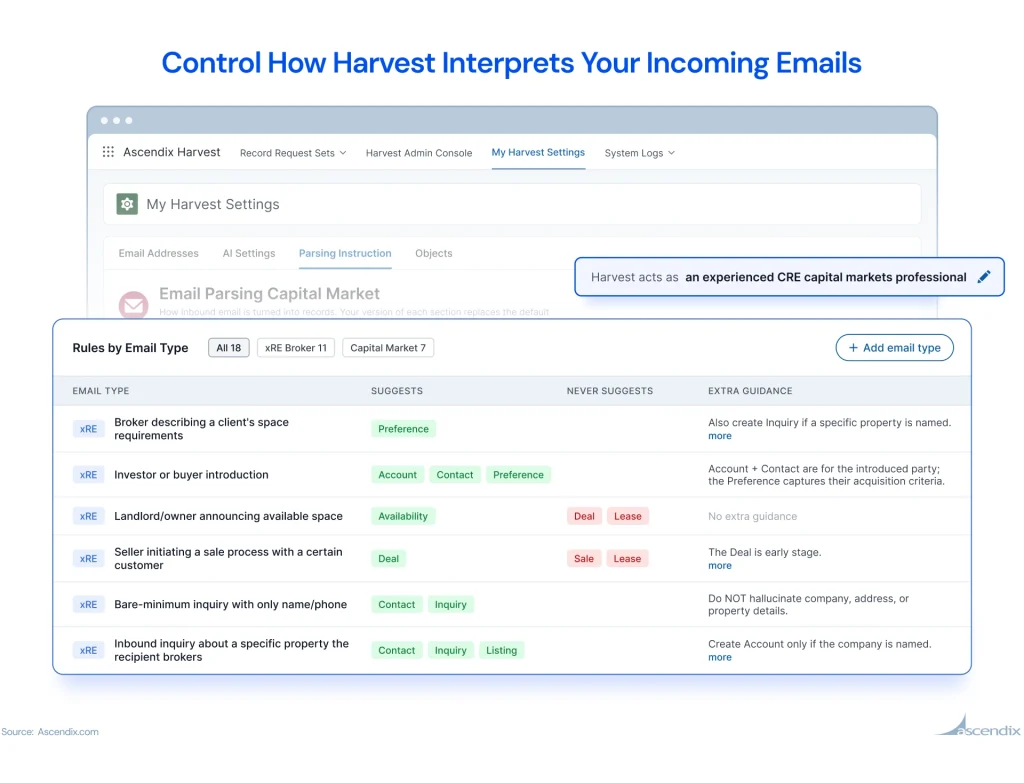
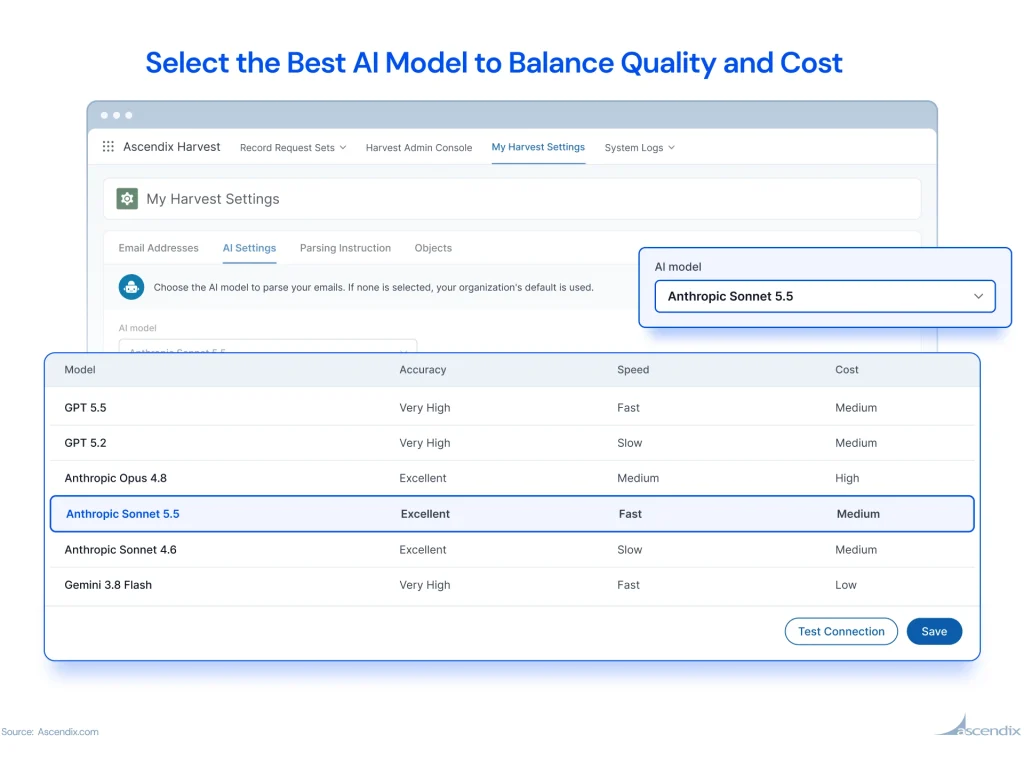
Moreover, with new AI model choices – Anthropic Sonnet 5.5 and Gemini 3.8 Flash and with their updated accuracy, speed and cost ratings, you’ll be able to balance quality and cost.
For example:
You receive several emails from prospects looking for office space. Their requirements include location, square footage, preferred floors, and timing.
By tailoring Harvest’s AI instructions to your workflow, you can guide how this information is interpreted and organized into suggested CRM records.
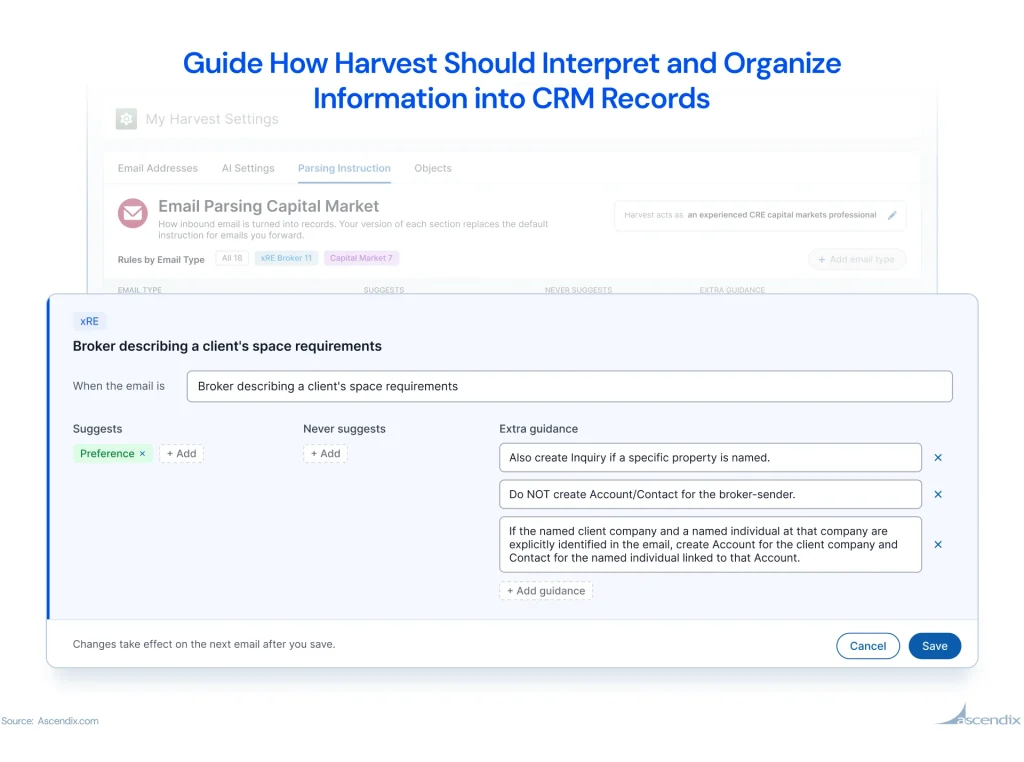
Instead of relying entirely on generic parsing behavior, you can make Harvest better suited to the types of conversations you manage every day.
When a prospect inquires about a property, it’s important to keep their requirements connected to the correct property.
If you receive an inquiry about an existing property, automatically creating another property or listing record can make your database harder to manage.
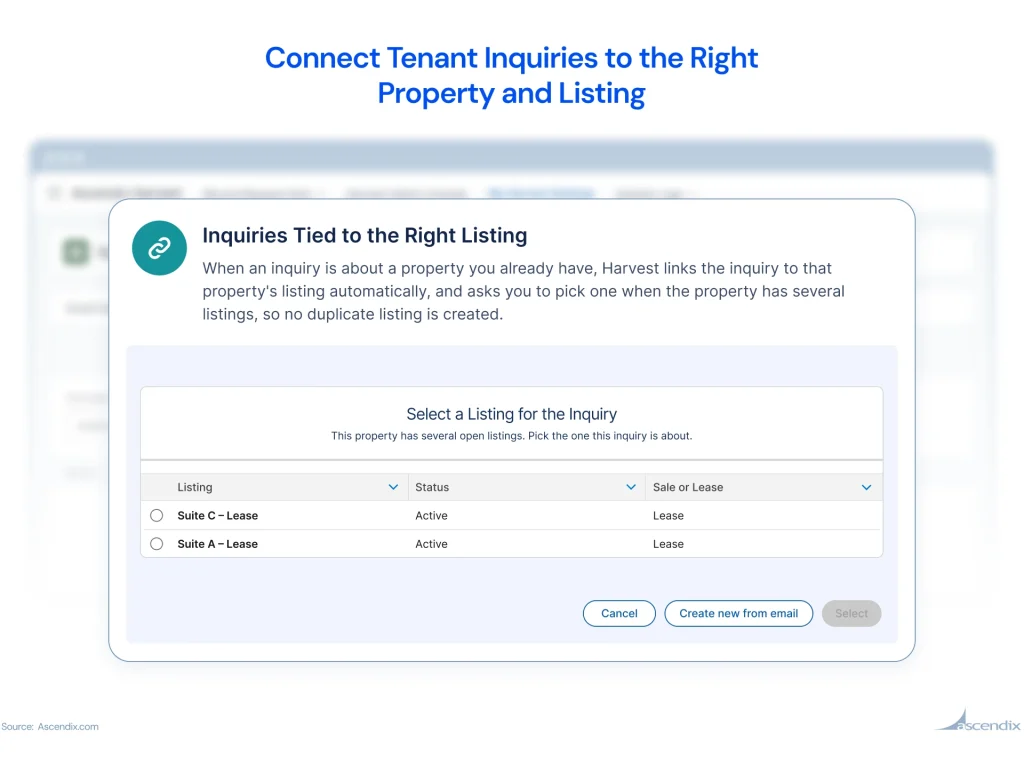
The updated Harvest workflow helps you review existing records and associate the inquiry with the appropriate listing.
For example:
A prospect sends an inquiry about an office building, mentioning that either the second-floor or sixth-floor space could work.
Both spaces are already represented in your AscendixRE CRM.
Instead of creating a duplicate property, you can choose to keep the existing property record. Harvest then allows you to select the relevant listing associated with that property.
The inquiry can be connected to your selected listing, while the unnecessary suggested listing is removed from the pending workflow.
The updated My Harvest Settings page gives every Harvest user a place to find their dedicated email address.
You can also check whether the email service is active and ready to receive forwarded messages.
Rather than searching for setup instructions or requesting your forwarding address from an administrator, you can quickly copy it from your settings.

Check another update in AscendixRE AI Suite: Give AI Agent for CRE the Jobs You Repeat
Important client information doesn’t stop arriving when someone goes on vacation, attends a conference, or is out of the office.
The latest Harvest update allows reviewing, editing, creating, and approving suggested records not just by the owner of the record request but also other team members.
This means authorized colleagues can manage Harvest requests on someone else’s behalf when the necessary permissions are configured.
For example:
A broker is away for a week, but property inquiries continue to arrive.
Instead of leaving those requests pending until the broker returns, an administrator can configure access for a colleague to review and approve the suggestions.
The team can keep incoming information moving into CRM without waiting for the original record owner.
Sometimes you know exactly who or what you are looking for. You just don’t know which CRM object contains it.
Sometimes an email isn’t parsed correctly, or you’ve updated your Harvest settings and want to apply the new instructions to a message you’ve already forwarded.
With the new email re-processing feature, you can re-parse record requests directly in CRM without re-forwarding in just one click. This is especially helpful, when you customized your parsing rules and want to check how new rules improve the email parsing.
For example:
You receive a property listing email, but Harvest doesn’t extract all the details you need.
After adjusting your AI parsing instructions, you can simply reprocess your email again to have Harvest re-analyze the original email using your updated settings.
Once the new CRM record suggestions are ready, Harvest notifies you so you can review and approve them.
There’s no need to forward the same email again or manually enter the missing information.
Your inbox already contains information about properties, clients, listings, and opportunities.
AscendixRE AI Suite and Harvest as a part of it helps move that information into your CRM while keeping you in control of which suggested changes are approved.
With personalized AI instructions, improved record matching, and more flexible team access, the latest update makes it easier to fit email-to-CRM automation into the way your brokerage actually works.
See how the updated Harvest workflow helps brokers manage incoming emails, review suggested records, and connect inquiries with existing listings.
Already using AscendixRE AI Suite? Contact our Customer Support team for assistance with accessing the latest Harvest functionality and configuring it for your workflow. Or check our Harvest Admin Guide and Harvest User Guide.
And stay tuned to more feature updates in AscendixRE AI Suite.
See how AscendixRE CRM and its AI Suite can help you manage contacts, listings, and inquiries with less manual data entry.
Harvest is a module of AscendixRE AI Suite that extracts information from forwarded emails and supported attachments and turns it into suggested AscendixRE CRM records. Users can review, edit, and approve the suggestions before changes are saved.
Yes. With the latest update, individual users can control AI parsing instructions, allowing Harvest to be configured around their email-processing needs.
Yes. Harvest supports reviewing suggested information against existing CRM records. When processing property inquiries, users can select existing properties and choose the relevant listing instead of creating unnecessary records.
Yes, provided the appropriate sharing rules are configured in AscendixRE CRM. Authorized colleagues can manage and approve record requests on another user’s behalf.
No. Harvest generates suggested records and changes for review. Users approve the information before it is created or updated in CRM.
Harvest can identify potential duplicates and support comparing new information with existing records. The updated default rules for Contact and Sale records allow users to proceed after receiving a duplicate warning. Administrators can modify these rules according to their organization’s requirements.
Existing users can contact Ascendix Customer Support for assistance with availability, permissions, and configuration. If you’re evaluating AscendixRE AI Suite, you can request a demo to see how Harvest and other modules work with commercial real estate data.
Anzhelika is a seasoned B2B content marketing strategist with extensive experience in elevating corporate profiles through compelling content. At Ascendix, she offers a wealth of knowledge in Salesforce consulting, providing valuable tips, tricks, and comprehensive guides. Additionally, Anzhelika stays at the forefront of the industry, delivering expert analysis on the latest Salesforce tools and emerging technology trends.

 (51 votes, average: 4.90 out of 5)
 Loading...
Book a demo and we’ll show how you can capture deal data from emails, ask your CRM questions in English, and create client-ready documents from live CRM records.