In the Spring Release of 2026, the focus of Salesforce is on AI enhancements and implementing Agentforce into all clouds and processes for higher automation and independent AI agents’ integration.
The Salesforce Spring ’26 release is available in the Salesforce Sandbox from January 9, 2026. Officially, Salesforce Spring Release 2026 arrives on January 16, February 13, and February 20, and the features for admins are set for release on January 26.
Beyond the AI transformation, this release includes upgrades of UX/UI, development tools & best practices, Salesforce initial setup, and accessibility; it also brings better security and faster workflows for both users and admins.
Several critical security migrations have firm deadlines, including the retirement of Triple DES for SAML configurations and the transition from Connected Apps to External Client Apps.
In this blog post, we will overview the key general Salesforce updates and upgrades that happened to:
Salesforce Spring Release 2026: General Overview
The release adds customization for Salesforce Go, more unified employee management capabilities, and enhanced accessibility with features like reflow capabilities at high zoom and improved contrast styling. Also, Salesforce made the certificates expire faster and added the new My Trust Center for system health monitoring.
Salesforce Go Customization
You can now customize the Salesforce Go home page by rearranging or removing sections. With new subvertical filters, you can easily access features specific to industry verticals (like Banking or Health). You now also can use enhanced search to spot the differences between features and feature sets with the same names.

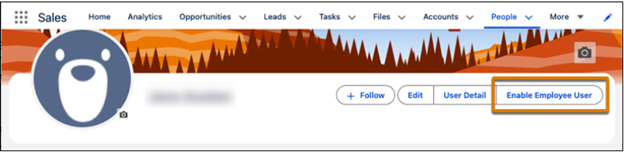
Unified Employee Management
You can now define Salesforce users with Unified Employee licenses as employee users to capture more details for your reports, such as employee status and number. This applies to Enterprise, Performance, and Unlimited editions.
Certificates Expire Faster
Certificates that keep your connections secure will need to be replaced more often. This is an industry-wide change, not just Salesforce. Also, Salesforce will stop sending announcements when they update their own certificates, so to set up notifications about future certificate expiration, you will need to assign the Expired Certificate Notification permission to specific admins.
Reflow and High Magnification
To comply with WCAG 2.2 standards, Salesforce is introducing “reflow” capabilities. When users zoom in up to 400%, page headers, modal windows, and cards will now wrap or shift instead of blocking content or requiring horizontal scrolling.
Contrast Styling
Salesforce changed how it highlights the text you selected. Instead of Salesforce-specific style, it now will use your browser’s default styling to ensure there is enough color contrast for everyone to read clearly.
My Trust Center (Beta)
Personalized Trust has now become Salesforce My Trust Center. It is an authenticated site where you can see the health of your specific Salesforce products, subscribe to notifications about maintenance, and view a full year of history regarding any system incidents
“ Start planning your certificate automation strategy now and implement the Certificate Metadata API immediately.
It takes about 3 weeks to set up properly, but it will save your team 80% of manual certificate work over the next 5 years. ”
Arthur Ambartsumyan, Technology Director at Ascendix
Salesforce Sales Cloud Spring ’26 Release Notes: What Changed
Sales Cloud is rebranded as Agentforce Sales with autonomous AI agents for inbound lead generation, lead nurturing, and sales management. The release upgrades Einstein Conversation Insights with native Salesforce data storage, introduces bulk territory-based actions in Enablement programs, and new territory planning features like shared boundaries and alignment-based quota planning.
Sales Cloud Is Now Agentforce Sales
Salesforce keeps integrating independent AI agents into all its products. And since Sales Cloud is the most popular product with the highest volume of processes inside it, it’s no surprise that part of these processes will now be overtaken by AI agents of Agentforce. So, Salesforce is moving away from “Cloud” focus toward “Agentforce” to highlight that the platform is now built around autonomous AI agents.
Agentic AI Features in Salesforce Sales Cloud Spring Release ‘26
Inbound Lead Generation with Agentforce Sales
Agentforce Inbound Lead Generation autonomously captures leads from web and messaging channels, answers questions, and schedules meetings. If a prospect does not schedule a meeting, the system can automatically handoff the lead to the Lead Nurturing agent for follow-up.
The Agentforce Qualification agent evaluates how closely a prospect fits a company’s Ideal Customer Profile by analyzing conversation data. Then it assigns a rating to Lead and creates tasks for sellers to follow up on “Hot” leads.
Lead Nurturing with Agentforce Sales
Agentforce Lead Nurturing setup is simplified through a guided experience in Salesforce Go that automates permission assignments and user record creation.

The agent now features Automatic Limit Management, which organizes the outreach queue to stay within email and AI processing limits. Sellers can now assign prospects to the nurturing agent in bulk batches of up to 200 from list views.
Additionally, the agent’s workflow is now modular, allowing administrators to set up and edit topics and actions easily, for a higher level of customization.

Agentforce Sales Management
The Agentforce Sales Management agent can now analyze conversations, call transcripts, and voice calls in order to suggest the best action after the meeting, such as follow-up emails or new meeting requests.
Agentforce Account Management AI can now perform deep research into the account company, business priorities, and industry trends to help you prepare for sales meetings.
These management agents can now be found in Slack, which allows you to update opportunities and research accounts without leaving the Slack interface.
Einstein Conversation Insights for Agentforce Sales
ECI now combines call summaries and generative insights for both voice and video calls into a single feature.
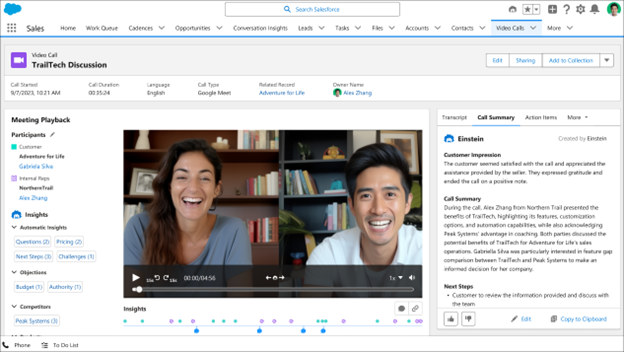
Salesforce also added Vendor Transcript Processing, so that your team can quickly access call summaries and critical call insights.

Einstein Conversation Insights (ECI) data is now stored natively on the Salesforce platform, making it accessible for standard reports and automations like Flow and Apex. Existing customers will be able to migrate to Salesforce in Summer 2026. Also, if you were using Analytics for Conversation Insights, it is now scheduled for retirement in Summer ’26.
Transform your operations with AI agents that automatically summarize call scripts, extract documents, and operate via voice commands.
Contact Ascendix to learn more.
Bulk Territory-Based Actions in Enablement Programs
Administrators can now bulk assign users to Enablement programs based on their roles within a territory model. When specific territory roles are linked, any user holding that role is automatically assigned, so you don’t have to do the process manually.

Bulk User Removal in Enablement
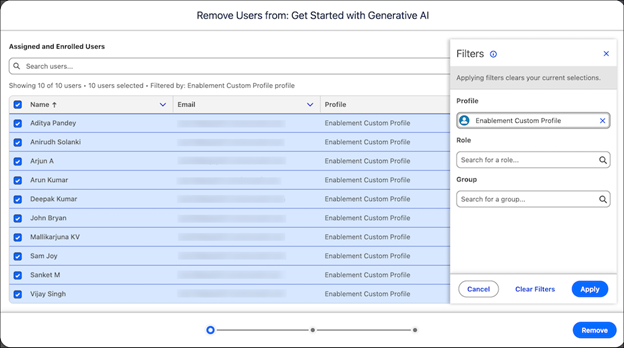
Salesforce introduced a new automated bulk user removal flow for Enablement programs. This feature allows administrators to filter assigned and enrolled users by profile, role, or public group to remove them in large batches to save time and avoid manual processes.
Shared Boundaries Feature Available for Densely Populated Territories’ Modeling
Territory Planning now supports shared boundaries, allowing a single boundary (such as a postal code) to be assigned to multiple sales areas. This is specifically designed for complex geographic markets like large cities, where sales areas frequently overlap.

Territory Alignment-Based Quota Planning
Organizations can now create quota plans directly from existing territory alignments. This integration ensures that quota assignments and territory models remain synchronized; if the source territory hierarchy changes, the system flags the mismatch and prompts for an update.
For advanced territory and geographic planning in Salesforce, Ascendix Search provides map-based visualization and ZIP code search capabilities to help you define and manage sales territories more effectively.
“ As you switch to Agentforce Sales, remember to delegate your tasks to AI agents step by step. Begin with your top 2 use cases where AI automation would bring the most ROI - typically it's inbound lead qualification and meeting follow-ups. This way, you'll be able to handle 60% of repetitive seller tasks and get 30% faster lead response times within the first month. ”
Anzhelika Serhiienko, Salesforce-Certified Senior Content Marketer at Ascendix
Experience Cloud Updates in Salesforce Spring Release 26 Overview
Experience Cloud now supports Generative Engine Optimization (GEO) for better AI-powered search engine discoverability and introduces dynamic redirect rules for Aura sites. Salesforce also expanded LWR components, personalized task reminders for users, simplified custom domain management, and introduced easier file management with additional “Delete” access levels and increased file size limits up to 10 GB.
Experience Cloud Sites Can Now Be Found Easier with GEO Optimization
Administrators can now enable Generative Engine Optimization (GEO) to make public site pages more discoverable by AI-powered search engines like ChatGPT, Perplexity, and Gemini. This setting allows AI bots to request content snapshots to provide more precise answers based on the site’s data.

Want to Improve Experience Cloud Sites Performance?
Our Experience Cloud specialists ensure seamless transitions, optimize site performance, and configure proper security controls to minimize deployment risks.
Redirects on Aura Sites
Dynamic redirect rules, previously only available for LWR sites, can now be used on Aura sites. This allows administrators to redirect users to different URLs using specific patterns without needing to write code:

After the Session Ends, Users Are Returned to a Previous Page
Authenticated users on LWR sites will now be returned to the specific page they were viewing before their session ended. Previously, users were sent back to the Home page after logging back.
Expanded LWR Components
Salesforce has expanded allowlists for tags and attributes in the HTML Editor components, allowing more expansive design possibilities. Sixteen standard components, such as banners, buttons, and videos, are now available for all Lightning Web Runtime (LWR) sites, even if the organization does not have an active Community license.

Personalized Task Reminders for Users
Salesforce introduced new home page components – the Pending Task banner and the Activity Timeline. These are meant to allow users to track their recent history and see high-priority tasks immediately upon logging in.
Updated Request Approval
The site visitors can now submit records for approval directly from an object detail page using the new Request Approval component.
Simplified Custom Domain Management
Organizations using third-party services to serve custom domains can now use their My Domain login URL as a stable target host name. By doing so, your custom domain remains functional across all Salesforce infrastructure changes and eliminates the risk of downtime during Salesforce maintenance.

Only the Specified Favicon Is Now Shown
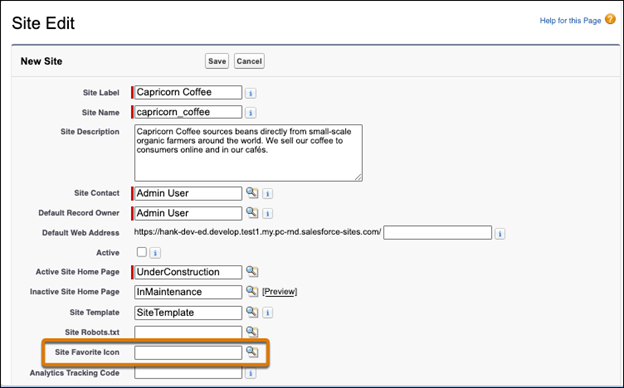
Visualforce sites now support an empty value in the Site Favorite Icon field. The small icon appears in browser tabs, bookmarks, and search results for your site. Previously, when no icon was specified, users could see the Salesforce logo.
Salesforce File Management Was Enhanced
A new security setting allows Salesforce to scan files for viruses and malware during upload or download, blocking malicious files from the system from the very start.
The maximum size for files in the Files home and libraries has increased from 2 GB to 10 GB.
Administrators can now assign a “Delete Salesforce Files” permission that allows users to delete any file they have permission to view, even if they do not own it.

Agentforce & Einstein Changes in Salesforce Spring ‘26 Release Notes
From now on, connected apps can no longer be created, so Salesforce recommends migrating to external client apps. However, already existing apps remain unaffected. The release includes updated agent topics and actions across multiple clouds. Agents in the new Agentforce Builder can now access knowledge from assigned data libraries.
Connected Apps Can No Longer Be Created
With the Spring ’26 release, you can no longer create connected apps, and it is recommended to migrate your connected apps to external client apps. Existing connected apps and connected apps for Slack in the legacy Agentforce Builder aren’t impacted.
Updated List of Agent Topics and Actions
Salesforce updated existing and edited new agents’ topics and actions in Field Service, ESG Data Collection, FinServ Package, Nonprofit, Sales, and others.
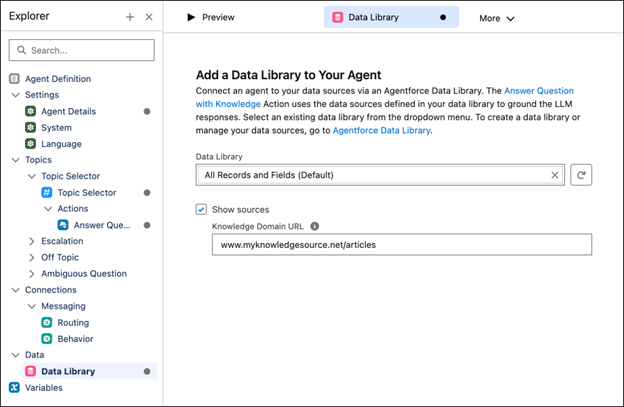
Connect Agents to Your Knowledge Sources in Agentforce Builder
From now on, agents built in the new Agentforce Builder can access the knowledge you’ve added to their assigned data library, ensuring they provide the most accurate and up-to-date responses tailored to your business specifics.
Need Help with Salesforce Cloud Optimization?
We will set up and customize your Salesforce so that you use its full potential without overpaying for unnecessary functionality.
Salesforce Spring Release ‘26 Notes for Developers
The release includes Error Console for non-fatal error management, RunRelevantTests (Beta) for faster deployments, and complex expressions in Lightning Web Components (Beta). Additional updates include easier PDF generation from Apex, generally available Apex cursors, Apex Agent Actions for Agentforce, and a refined sandbox copy UI with visual progress tracking.
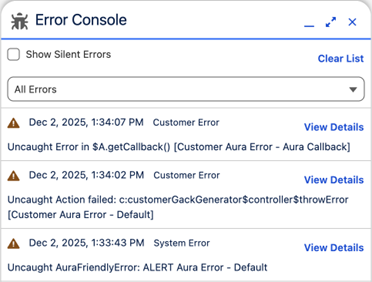
Error Console Issues Management
You can now manage errors conveniently in Error Console, without them interrupting your work. The console collects non-fatal errors so you can see them when it’s convenient for you, and they don’t require interaction. Fatal errors still show in modal error panels that you must dismiss before continuing. Fatal errors are also collected in the Error Console for later inspection.
Save Time with Running Only Relevant Tests (Beta)
Salesforce has introduced the RunRelevantTests test level to run only the tests relevant to your code changes. This will help significantly reduce Apex component deployment times. The feature automatically determines which tests to run by analyzing the deployment payload and its specific dependencies. For better control, developers can use new annotations in API version 66.0 and later manage test behavior and fine-tune specific aspects of testing.
Complex Expressions in Lightning Web Components (Beta)
Lightning Web Components were originally designed with simplicity in mind – template expressions were intentionally limited to properties and getters only.
That philosophy is now evolving. LWC templates can now support complex expressions, marking a notable expansion of the framework’s capabilities.
For more possibilities and a more detailed overview of the new possibilities for developers, refer to the official Salesforce release notes.
Generate a PDF directly from Apex (to be enforced in Summer ‘26)
Salesforce is updating the Apex Blob.toPdf() method to use the Visualforce PDF rendering service instead of the legacy rendering engine. This provides enhanced font support, including multibyte characters for international languages, and ensures consistent PDF rendering across the entire Salesforce Platform. Developers will get more reliable PDF generation with broader language support.
Apex Cursors and Pagination Cursors
Cursors are now generally available to handle large SOQL query result sets more efficiently than batch Apex. Standard cursors allow for flexible record processing within queueable Apex chains, while pagination cursors are specifically optimized for navigating multi-page record lists in user interfaces.
Apex Agent Actions
Developers can now expose Apex REST and AuraEnabled controller methods as autonomous actions for Agentforce agents. This is achieved by annotating the methods and deploying a generated OpenAPI spec to the API Catalog.
Data 360 SOQL Result Limits
To protect server stability, SOQL query results for Data 360 are now limited to 12 MB. If a query exceeds this limit, it is rejected, and developers must use “query more” links to paginate through the data.
Refined Sandbox Copy UI
The setup interface for sandbox copies and refreshes has been modernized with a visual progress bar and real-time status updates for every stage.
Self-Serve Subscriber Debugging
Partners can now enable access to a subscriber’s Apex debug logs directly through the License Management App (LMA). This allows for faster troubleshooting of issues specific to a customer environment without requiring manual intervention from the subscriber’s admin.
Salesforce Spring Release ‘26: Marketing Cloud Updates
Marketing Cloud is now being rebranded as Agentforce Marketing. Users will be able to draft campaign briefs using natural language queries and a conversational AI chatbot. Marketing Cloud is now also automatically aligned with the brand and supports up to 50 business units. Account Engagement adds unified engagement history dashboards via Tableau Next and distributed marketing template sharing. Marketing Cloud Engagement enables flow-based email sending and extended 7-day delivery retry logic.
Marketing Cloud Next (Agentforce Marketing)
Marketers can use an Agentforce conversation to draft and preview campaign briefs and full campaign flows. This way, you can return to the brief at any time to refine the structure and content before finally generating the campaign.

The Campaign Creation Agent can be deployed to automatically generate multi-channel steps within a campaign, including specific email and SMS message flows.
To improve accuracy, agents can now draft marketing briefs based on uploaded strategic documents such as PDFs or Word files. Once uploaded to Salesforce Files, these documents can be referred to in a prompt to adjust the agent’s output to the existing company’s strategy.
If you’re working with large volumes of documents in Salesforce and need automated data extraction capabilities, Ascendix also created a document abstraction framework, designed to streamline document processing workflows.
AI-generated campaign drafts are now automatically grounded in the specific tone and identity of the related brand, meaning you won’t have to manually edit the output to match the brand’s voice.
New fields have been added to the Brief object (such as primary goals, KPIs, and brand guardrails) to provide Agentforce with essential context, ensuring more targeted decisions and reducing generic AI responses.
The platform now supports up to 50 business units, and a new Identify Business Unit agent action determines the correct scope for an agent’s operations during an active session.
Marketers can integrate third-party generative AI tools, translators, and tone enhancers directly into the authoring workspace via extensions that appear in a floating panel.
Marketing Cloud Account Engagement
Salesforce introduced the unified engagement history dashboards. Using Tableau Next, you can visualize every interaction for leads, contacts, and accounts. These dashboards provide immediate, actionable marketing insights directly based on Salesforce CRM records.

Marketing teams can now share approved email, SMS, and WhatsApp templates with Salesforce Platform users through the Distributed Marketing and Alerts feature, making collaboration easier and smoother.
To ensure compliance, the platform now allows marketers to match overall email marketing consent between Account Engagement prospects and Marketing Cloud Next records. To track overall email consent changes between the two apps, you should turn on Consent Matching in the Account Engagement Settings tab in the Lightning App.
Marketing Cloud Engagement in Salesforce Spring Release ‘26
Marketing specialists can now send Engagement emails via flows, create lockable email templates for use by platform users, and view unified reporting in context.
If a user did not receive an email, the system will now have up to 7 days to try and resend it, and only after this will deliver the notification about failed attempt. Previously, the process was immediately stopped after a failed delivery.
Schedule Your Free Salesforce Consultation
Discover how you can embrace Salesforce Spring Release updates to transform your operations.
Salesforce Spring Release ‘26: Flows Updates Overview
Flow Builder adds collapsible branching elements for easier navigation. Users can edit and change the flow using Agentforce natural language prompts. The release includes new visualization tools like Kanban boards, native file previews, flow version comparison, and on-canvas performance metrics with run counts and status distributions.
Collapsible Branching Elements
Users and admins can now collapse and expand branching elements such as Decisions, Loops, and Wait elements to simplify the canvas layout. The builder automatically saves these layout preferences locally in the browser, making it easier to return to complex flows without visual clutter.

Iterative Flow Evolution with Agentforce
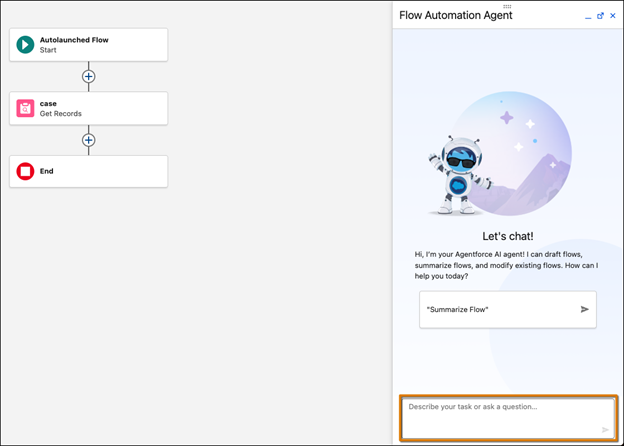
You can use conversational natural language prompts in the Agentforce panel to modify existing record-triggered and schedule-triggered flows. This allows for adding, modifying, or deleting elements without manual dragging and dropping, and changes are highlighted on the canvas for easy review.
Improved Navigation and Variable Context
The canvas now supports panning via mouse scrolling, trackpads, and arrow keys, replacing the “grab and move” method. Additionally, hovering over info bubbles for action inputs and subflow variables now reveals their full descriptions without requiring the admin to enable the resource or open a menu.

Component-Level Styling Overrides
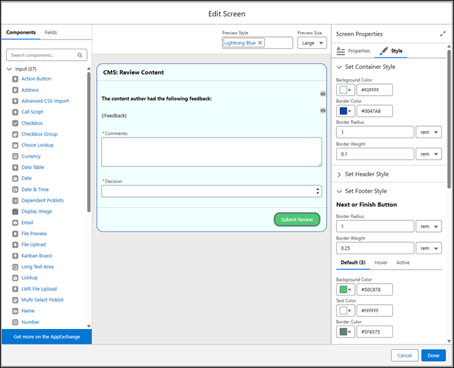
You can deliver a more personalized experience by overriding default org or site themes directly within a screen flow. New properties on the Style tab allow for customization of background colors, border weights, text colors, and button radius for individual components.
New Message Screen Component
This component allows for the addition of visually distinct, accessible alerts to show information, success, error, or warning states. The message type automatically determines the color and icon used, with accessibility in mind.

Additional Object Support for Record-Triggered Flow
Triggering logic has been expanded to better support customer-centric automation, specifically through Automation Event-Triggered Flows. Flows can now be triggered when a Prospect, Lead, or Contact record changes, or even when a record related to those individuals is modified. For example, a flow can now trigger a personalized follow-up email to a contact the moment a related Case is closed, or notify a lead owner when an associated Opportunity reaches a new stage.
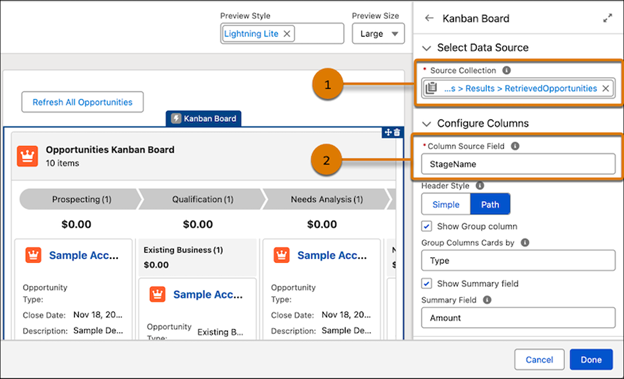
Kanban Boards in Screen Flows (Beta)
Users can now visualize records as cards in columns representing workflow stages. This read-only component supports grouping by picklist fields and displaying up to five fields per card, providing a dashboard-like experience within a flow.
Native File Previews
The new File Preview component enables users to review document content directly within the flow screen. This eliminates the friction of downloading files externally before making approval or review decisions.
Compare Flow Versions
A new tool allows admins to track exact changes between any two versions of a screen flow. The comparison highlights added, updated, or removed elements, resources, and styles, and results can be shared via a direct link.

On-Canvas Performance Visualization
Users can now visualize flow performance metrics directly on the Flow Builder canvas. Total run counts and status distributions are displayed on supported elements, allowing for immediate identification of performance bottlenecks without running external reports.

Version-Level Run Analytics
New analytics provide a unified view of completion rates and status distributions for specific flow versions. This helps admins monitor version-wide health and spot systematic issues affecting multiple users at once.

How Ascendix Can Help You with Salesforce Spring ’26 Implementation
The Salesforce Spring ’26 release introduces transformative changes, particularly with Agentforce integration for real estate and capital markets companies and critical security and data migrations.
Whether or not these will be a sweeping success – we’ll see in some time.
However, if you’re struggling to keep up with the changes, feel overwhelmed with the scope of updates, or simply need some guidance and clarity about the new release, feel free to reach out!
The Ascendix team of Salesforce experts will be happy to guide you through the updates and provide consultancy on what will make the most sense for your operations.
Ascendix can help you to:
Book a free consulting call with us, and together we’ll find the best solution for your needs.
Yana Yarotska , Content Writer
Yana is a professional in Salesforce consultancy services. She shares valuable insights about Salesforce products and services, helping businesses choose the best solution for their operations.



 Loading...