Salesforce Winter ’26 arrives with significant updates across Sales Cloud, Service Cloud, Experience Cloud, Agentforce and other 30+ products. The rollout spans multiple weekends from September 19 through October 10, 2025, depending on your instance location.
Your preparation window is shorter than you think. Sandbox Preview begins September 5, giving you just two weeks to test critical features against your customizations before the production release hits.
This detailed guide shows you the hidden features and critical updates in the Salesforce Winter ’26 release that could affect your instance. You’ll learn about Salesforce latest release updates for users, admins, and developers in:
- General Salesforce updates – TLS certificate lifespans will decrease, WCAG 2.2 accessibility improvements, multi-language translation of reports etc.
- Sales Cloud – granular forecasting with opportunity line item (OLI) splits, custom fiscal year support for Consumption Forecasting, etc.
- Service Cloud – simplified SLA Management setup is generally available, Email-to-Case introduces a 250 daily email limit per case , etc.
- Experience Cloud – legacy force.com site URLs will stop working by Spring ’26, new static resource images and Preview Style features for flows
- Nonprofit Cloud – volunteer management enhancements including automated initiative creation, smart matching technology, and a redesigned interface
- Agentforce & Einstein – AI account research for customer insights, automated case closure through Employee Agent, and 13 pre-built Einstein email templates
- Salesforce Flows – AI-powered Decision elements for unstructured data analysis, enhanced Resource Menu with smart filtering, immediate access to newly created record fields.
What are General Salesforce Winter ’26 Release Updates?
The key Salesforce Winter ’26 updates span around:
Security & Accessibility: TLS certificate lifespans will decrease from 398 days to 47 days by 2029, requiring automated certificate rotation. WCAG 2.2 accessibility improvements become mandatory in Summer ’26 for high-magnification users.
Enhanced User Experience: Dashboard charts gain reference lines for performance benchmarking, reports support multi-language translation for global teams, and users can now schedule Salesforce nudges for optimal timing
Certificate Lifespans Will Shorten Dramatically Over Next 3 Years
TLS certificate lifespans will decrease from 398 days to just 47 days by March 2029, following industry standards set by the CA/Browser Forum.
Salesforce will stop announcing certificate rotations and recommends discontinuing certificate pinning practices that can cause outages.
Organizations should prepare to rotate certificates more frequently and use the Certificate Metadata API for automation.
“ Start planning your certificate automation strategy now and implement the Certificate Metadata API immediately.
It takes about 3 weeks to set up properly, but it will save your team 80% of manual certificate work over the next 5 years. ”
Arthur Ambartsumyan, Technology Director at Ascendix
Lightning Experience Must Comply with WCAG 2.2
Salesforce enforces mandatory accessibility improvements in Summer ’26 for date pickers, popovers, bottom utility bars, and record headers to support users viewing at 200%+ browser magnification.
This update requires the Page Headers and Modal Windows enhancement to be enabled first and ensures full accessibility compliance at up to 400% magnification.
Test and activate this release update now from Setup > Release Updates to avoid potential UI display issues for users with visual impairments.
Salesforce Nudges Now Support Custom Scheduling
Salesforce’s “Suggested For You” prompts can now be scheduled for later viewing with options for one hour, next day, next week, or custom timing across all Lightning Experience editions.
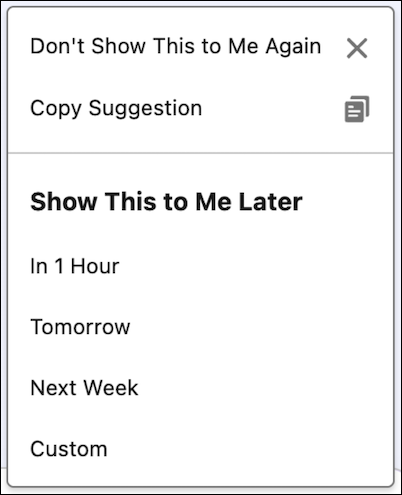 Schedule Suggested For You Prompts for Later
 This user-controlled scheduling ensures critical nudges appear when most relevant rather than interrupting current workflows, improving productivity and user experience.
Dashboard Charts Get Reference Lines for Instant Performance Benchmarking
Lightning dashboard charts now support reference lines to instantly visualize performance against targets, quotas, and benchmarks. This was previously only available in report charts.
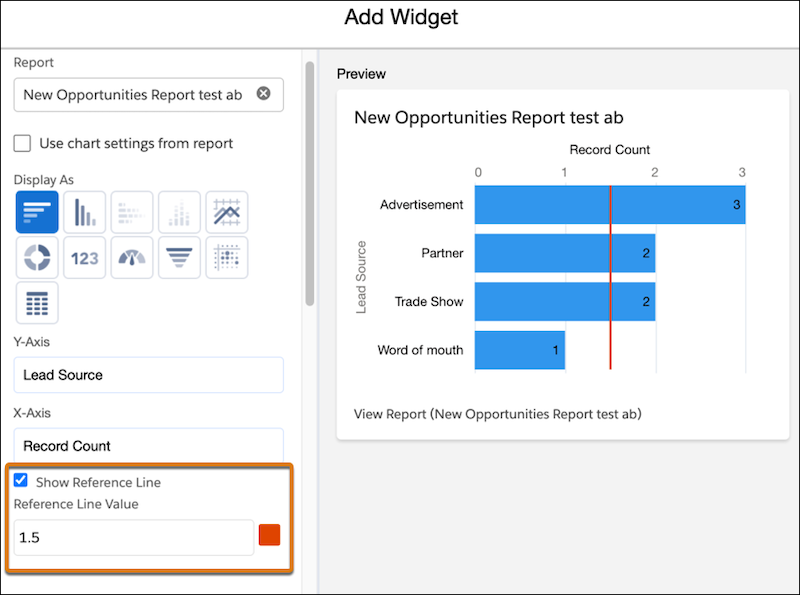 How to Interpret Data Easily with Reference Lines in Lightning Dashboard Charts
Sales managers now can add target lines directly to monthly sales charts for immediate performance evaluation.
Reports and Dashboards Now Support Multi-Language Translation for Global Teams
Salesforce enables translation of report and dashboard metadata labels including names, descriptions, widget titles, and footers to support non-English speaking users.
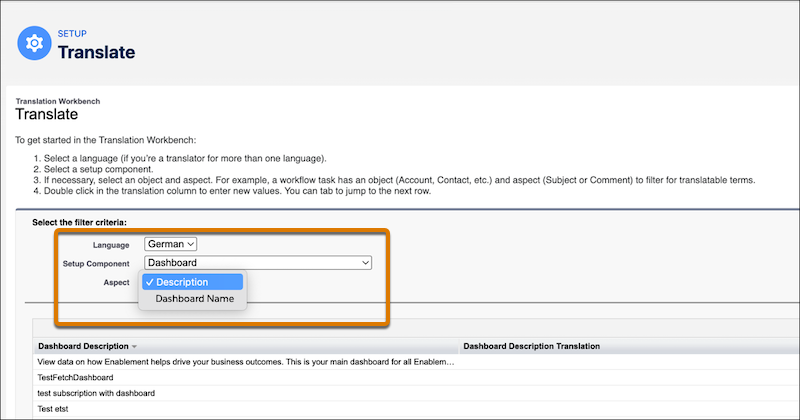 How to Enable Translations for Reports and Dashboards Metadata Labels in Salesforce
Organizations can use Translation Workbench to assign translators and customize metadata labels in multiple languages, significantly improving user experience for global teams accessing localized Salesforce content.
What are Salesforce Winter ’26 Release Features for Sales Cloud?
Sales Cloud introduces granular forecasting with opportunity line item (OLI) splits that roll revenue up to forecast periods based on service dates, enabling specialist and core sales teams to see their exact deal portions in territory hierarchies.
Additionally, consumption forecasting now supports custom fiscal year settings instead of standard Gregorian calendars, automatically updating all forecast periods, quarters, and display labels to match company-specific fiscal definitions for more accurate sales planning.
Sales Forecasting Gets Granular with Opportunity Line Item Splits and Service Dates
Sales teams can now create precise forecasts based on opportunity line item (OLI) splits, with each line item’s revenue rolling up to the forecast period specified by its service date.
This enhancement allows specialist and core sales teams to see their exact portion of deals accurately reflected in territory forecast hierarchies, providing a true monthly business picture.
“ Implement opportunity line item splits gradually. Start with your top 3 product lines that represent 70% of your revenue.
Most organizations see 25% more accurate forecasting within the first quarter because specialist teams finally have visibility into their exact deal portions. ”
Anzhelika Serhiienko, Salesforce-Certified Senior Content Marketer at Ascendix
Custom Fiscal Year Support Now Available for Consumption Forecasting
Consumption forecasting now aligns with custom fiscal year settings, eliminating the previous limitation to standard Gregorian calendar periods.
Sales teams can configure forecast periods and quarters to match their company’s unique fiscal definitions, with all aggregates and display labels automatically updating.
Need Help with Sales & Service Cloud Optimization?
We will teach you how to use Sales and Service Cloud to the fullest without overpaying for unnecessary functionality.
What are Salesforce Winter ‘26 Release Updates for Service Cloud?
The core Winter’26 updates for Service Cloud are:
- Enhanced AI and User Experience: Service plans now display source citations from knowledge articles for improved transparency, while simplified case management removes confusing checkboxes for community users and adds role-based reporting for better team performance analysis.
- SLA and Email Management: Service reps gain direct SLA milestone tracking in case list views for better prioritization, simplified SLA Management setup becomes generally available with streamlined configuration, and Email-to-Case introduces a 250 daily email limit per case with enhanced notification controls.
Service Plans Now Include Source Citations for Enhanced Trust and Transparency
AI-generated service plans in Winter ’26 now display exact source citations for each step created from knowledge articles, allowing service reps to quickly verify guidance and act with confidence.
This transparency enhancement requires the Service Planner User and Service Rep Knowledge Access permission sets, and automatically becomes available once an Agentforce Data Library is configured with the Knowledge data type.
 How to Generate Service Plan with Citations in Salesforce
New Opt-Out Controls for Web-to-Case Email Notifications
Organizations can now opt out of all Web-to-Case generated email notifications when disabling the feature, providing greater control over automated communications.
This enhancement gives administrators complete control over Web-to-Case email notifications.
Simplified Case Comments: Public Checkbox Removed for Community Users
Service admins can now hide the confusing “Public” checkbox for case comments from community users since their comments are always visible to service reps and on community pages anyway.
This org-level setting eliminates user confusion and creates a simpler, more consistent experience.
Check how to enable this improvement.
Role-Based Reporting Now Available for Case Team Performance Analysis
Service managers can generate custom case reports that include team member roles to analyze cases solved, time spent, and bandwidth across team members including vendors and partners.
This feature enables better workload management and more effective case assignment by providing visibility into individual team member contributions .
Check how to access this new feature.
Email-to-Case Now Limited to 250 Inbound Emails Per Case Daily
Salesforce automatically enforces a new 250 daily inbound email limit per case (calculated on a rolling 24-hour basis) to improve storage usage and infrastructure performance across all editions.
Previously unlimited, emails exceeding this threshold will fail with exception notifications sent to the Automated Case User.
Service Reps Can Now Track SLA Milestone Times Directly in Case List Views
The new “Time to Next Milestone” column in case list views helps service reps instantly identify cases nearing SLA violations, overdue, or stopped, enabling better prioritization and SLA compliance.
This Winter ’26 feature eliminates guesswork by showing exactly how much time remains to complete milestones, with sortable views to prioritize urgent cases.
Read how to enable this feature.
Simplified SLA Management Setup Now Generally Available After Summer ’25 Beta
The redesigned SLA Management (formerly Entitlement Management) configuration interface reduces implementation steps with intuitive controls for auto-completing milestones, mapping entitlements using predefined rules.
This enhancement includes SLA policy versioning for change tracking, preconfigured policies, and cloning capabilities for faster setup.
Check how to enable this enhancement.
What are Salesforce Winter’ 26 Release Features for Experience Cloud?
In Winter ’26 release, Experience Cloud introduces static resource images and Preview Style features for flows, allowing consistent image deployment and pre-publication site previews on Aura and LWR platforms.
Legacy force.com site URLs will stop working by Spring ’26, requiring immediate updates to all references in knowledge articles, integrations, and marketing materials to prevent access disruption.
Experience Cloud Flows Get Static Resource Images and Site Preview Features
Screen flows in Experience Cloud now support static resource images in Display Text components.
It ensures consistent image availability across different environments without the risk of lost files during deployment.
The new Preview Style feature allows admins to see exactly how flow screens will appear on both Aura and LWR sites before publishing.
Legacy Force.com Site URLs Will Stop Working by Spring ’26
Organizations must immediately update all references to legacy site URLs ending in force.com as redirections are disabled by default in Winter ’26 and permanently end in Spring ’26.
Search for these URLs in Salesforce knowledge articles, external integrations, marketing materials, and any other references to prevent site access disruption across Aura, LWR, and Visualforce sites.
Want to Improve Experience Cloud Sites Performance?
Our Experience Cloud specialists ensure seamless transitions, optimize site performance, and configure proper security controls to minimize deployment risks.
What are Salesforce Winter’ 26 Release Updates for Nonprofit Cloud?
In Winter ’26, Nonprofit Cloud introduces comprehensive volunteer management enhancements including automated initiative creation, smart matching technology for optimal volunteer placement, and a redesigned interface with streamlined workflows that reduce administrative overhead.
Group Membership functionality now available across all Experience Cloud add-ons ensures consistent user experience and complete feature parity for Nonprofit Cloud admins and end-users.
Nonprofit Cloud Achieves Feature Parity Across All Experience Cloud Add-ons
Group Membership functionality is now available in the Fundraising Experience Cloud add-on.
It gives all Nonprofit Cloud admins and end-users access to the same common components across Experience Cloud.
This enhancement ensures consistent user experience and feature parity across all Nonprofit Cloud add-ons with Fundraising Experience Cloud licenses enabled.
Enhanced Volunteer Management Gets New Homepage and Streamlined Workflows
The redesigned volunteer management interface features a new homepage, tabsets, and workflows that help managers easily:
- set up volunteer opportunities,
- access quick actions,
- track key performance metrics.
This enhancement requires specific permission sets:
- Manage Volunteer Data for Nonprofit Cloud,
- Manage Volunteer Work in Experience Cloud for standard users,
- Guest Access for Experience Cloud visitors.
Enable through Setup > Volunteer Management Settings to access the improved volunteer coordination tools.
“ Start with volunteer matching algorithms for your biggest programs that handle 200+ volunteers annually.
The smart matching feature reduces placement time from 3 hours to 15 minutes per volunteer, which means your coordinators can focus on relationship building instead of administrative tasks ”
Anzhelika Serhiienko, Salesforce-Certified Senior Content Marketer at Ascendix
Automated Volunteer Initiative Creation
The new volunteer initiative management system automates data entry and standardizes tracking to improve the volunteer experience while reducing administrative overhead.
Managers can quickly set up complete volunteer initiatives including jobs with specified shifts, streamlining the entire volunteer coordination process.
Access requires the Manage Volunteer Data permission set for Nonprofit Cloud or Manage Volunteer Work in Experience Cloud permission set for Experience Cloud users.
Simplified Record Creation for Volunteer Initiatives and Management
Volunteer managers can now easily create and manage volunteer initiatives, jobs, shifts, and reports through a streamlined interface that also supports form customization and internal approval processes.
Smart Matching Revolutionizes Volunteer Placement
Intelligent matching technology now finds the best volunteer candidates based on qualifications, availability, and location, with search results displaying names, matching shifts, and contact details.
This Winter ’26 feature streamlines the volunteer placement process for managers while helping volunteers discover roles that better match their skills and interests.
Schedule Your Free Nonprofit Consultation
Discover how these powerful updates can transform your volunteer programs and fundraising operations.
What are Salesforce Winter ‘26 Release Features for Agentforce & Einstein?
In Winter’26 release, Agentforce delivers one-click AI account research for customer insights, automated case closure through Employee Agent, and 13 pre-built Einstein email templates for faster service responses, with most features rolling out October 3, 2025.
New capabilities also include Service Agent progress indicators, multi-language Sales Coach with scenario testing, and streamlined Lightning Types Setup UI that eliminates Metadata API requirements, plus a critical license change requiring Service Assistant users to migrate to Service Planner User permission sets.
AI-Powered Account Research Delivers One-Click Customer Insights
Generative AI now provides deep customer understanding by researching and compiling answers to key strategic questions with one click, automatically updating account and account plan fields to accelerate relationship growth.
This feature rolls out starting October 3, 2025, requiring the Research Records permission set and Einstein Generative AI setup.
Sandbox access requires production availability first, followed by license matching or refresh requests.
Agentforce Employee Agent Now Automates Case Closure
The Agentforce Employee Agent can now close cases automatically when provided with a case number.
It checks case status and closing cases that meet closure criteria to eliminate repetitive manual work for service reps.
Available starting October 3, 2025, this customizable template-based agent frees up service rep time for higher-value customer service tasks by handling routine case closure processes.
Service reps simply provide the case number, and the agent handles the entire closure workflow automatically.
Agentforce Service Agent Gets Progress Indicators
Messaging users can now see progress indicators with loading text and animations that communicate when Agentforce Service Agent is actively working on their conversation and what actions the AI agent is taking behind the scenes.
Available starting mid-September 2025, administrators can choose from pre-written progress indicators or create custom ones with custom actions for Bring Your Own Channel messaging implementations.
Einstein Email Templates Accelerate Service Response Creation
Service reps can now use 13 pre-built Einstein email prompt templates in the email composer to quickly draft context-aware service emails.
 An Example of the Apologize for Delayed Response Email in Salesforce
They include apology messages, case summaries, appointment reminders, and customer milestone celebrations.
Available starting October 3, 2025, these templates reduce manual writing time, minimize errors, and improve compliance while enhancing customer experience.
These templates must be activated in Prompt Builder and accessed through “Draft with Einstein” in the Case page email composer.
New Lightning Types Setup UI Eliminates Need for Metadata API
Administrators can now create, preview, update, and delete custom Lightning types directly from Setup without using the Metadata API, with the ability to associate custom Lightning Web Components for enhanced UI customization.
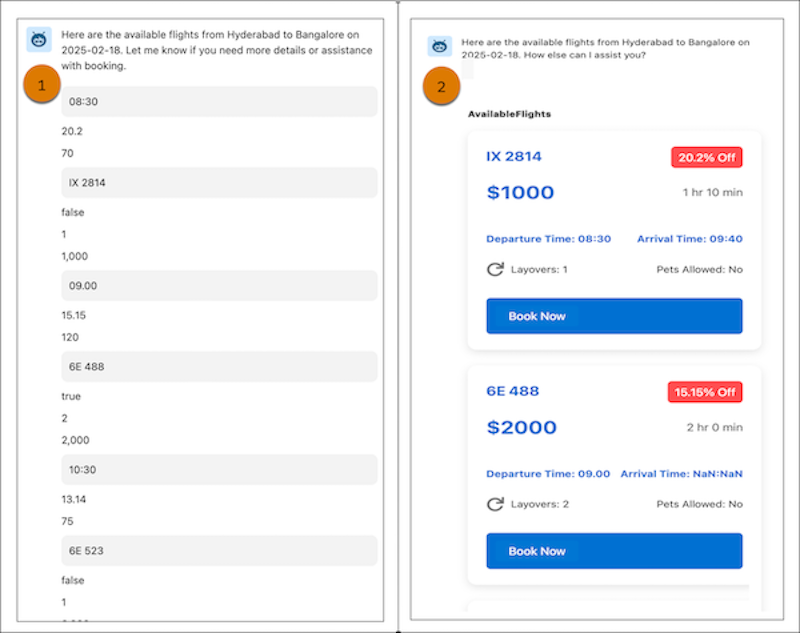 The Comparison of a Default UI and the Customized UI for Agent Output in Agentforce
Available starting October 3, 2025, this feature improves Agentforce Employee Agent action interfaces by ensuring chat responses display exactly as needed through intuitive Setup management.
Access through Setup > Lightning Types to create new types and configure custom LWC editors and renderers for improved user experiences.
Agentforce Sales Coach Now Offers Scenario Testing Before Team Deployment
Sales managers can preview coaching scenarios in a runtime-like environment by conducting role-plays and receiving feedback from Agentforce Sales Coach before activating scenarios for their teams.
This Winter ’26 feature ensures agent performance, feedback structure, accuracy, and effectiveness meet expectations prior to deployment.
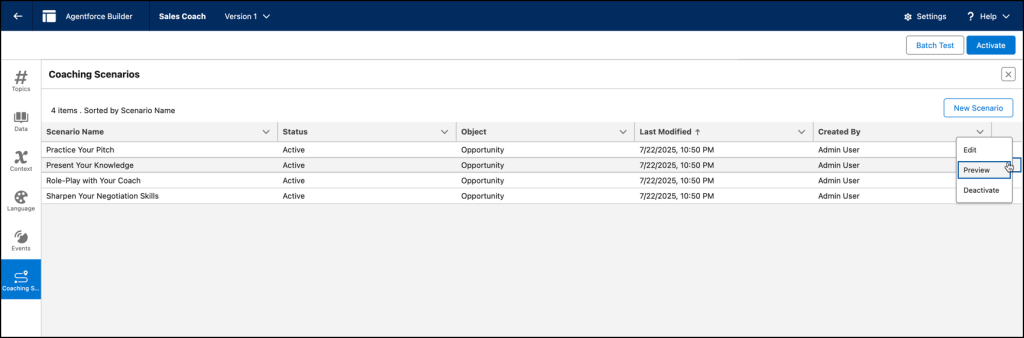 Preview and Validate Coaching Scenarios in Agentforce Sales Coach
Agentforce Sales Coach Now Supports Multi-Language Coaching Sessions
Sales representatives can now conduct role-play sessions and receive coaching feedback in their preferred language, with Agentforce Sales Coach supporting multiple languages based on the user’s Salesforce profile settings.
This Winter ’26 enhancement enables more effective coaching for global teams by delivering personalized feedback in each rep’s native language.
 Agentforce Sales Coach Supporting Conversations in Multiple Languages
AI-Powered Account Research Automates Customer Intelligence Gathering
Sales teams can now leverage generative AI to instantly research and compile answers to strategic customer questions with one click.
It can automatically update account and account plan fields to accelerate relationship growth.
This feature requires the Research Records permission set and Einstein Generative AI setup, rolling out starting October 3, 2025, with sandbox access following production availability.
Service Assistant Requires New Permission Set Starting Winter ’26
Agentforce Service Assistant access will be removed from standard Salesforce licenses in Winter ’26 and will only be available through the Service Planner User permission set license.
Organizations must immediately assign the Service Planner User permission set license to all users currently accessing Service Assistant through Salesforce licenses to maintain feature access when the changes are enforced.
What are Salesforce Flows Winter ’26 Updates for Admins and Developers?
In Winter ’26, Salesforce Flows introduce AI-powered Decision elements for unstructured data analysis, enhanced Resource Menu with smart filtering, immediate access to newly created record fields, and Flow Builder version comparison with debug mode testing capabilities.
Data tables now support Apex-defined collections with auto-sync protection, while approval processes feature simplified Resource assignee types, non-admin management permissions, external system triggers, and streamlined review workflows for cross-platform automation.
AI-Powered Decision Elements Now Handle Complex Unstructured Data in Flows
Generative AI enables Flow Decision elements to analyze complex unstructured data like email sentiment and context, routing workflows intelligently instead of relying only on structured fields like Case Type.
This capability functions like an experienced service rep who intuitively determines the best action based on customer tone and content.
Learn how to add a Decision element.
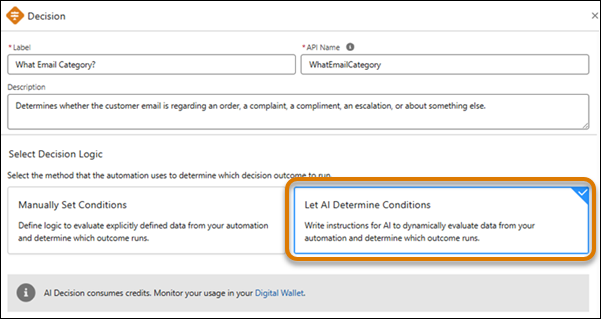 How to Automate Complicated Decisions in Flows with Generative AI
“ Replace your old Decision elements with AI-powered ones for unstructured data analysis, but test them with 100+ real email examples first.
You'll see a 60% improvement in routing accuracy, especially for sentiment-based cases where traditional field-based logic fails completely. ”
Arthur Ambartsumyan, Technology Director at Ascendix
Enhanced Flow Resource Menu Reduces Clutter with Smart Filtering
The Flow Resource Menu now shows only relevant resources that match your current flow position and data type.
It helps hide incompatible options and displaying nested resources like record fields through expanded search (now generally available).
Key improvements include smarter search results prioritizing whole word matches, API names and parent resources shown for differentiation, and better information window placement that doesn’t obstruct results.
It’ available across record-triggered flows, Formula Builder, and Wait For Conditions elements to streamline flow building with minimal scrolling.
Check how to view the resource menu in the Flow Formula Builder.
Flow Builder Now Provides Immediate Access to Newly Created Record Fields
Flow builders can now directly reference fields from newly created records through automatic Create Records element outputs.
It eliminates the need for additional Get Records elements in these scenarios.
This enhancement enables more dynamic workflows, though flows using API version 64 and earlier must update record references to ID fields before saving with API version 65+ to prevent failures.
 How to Add Newly Created Records Immediately to a Flow
Read how to add newly created records to a Flow
Flow Builder Adds Visual Focus Indicators for Better Navigation
Flow Builder now outlines the focused item in blue when adding or deleting elements. This visual cue helps users quickly identify their location within screen elements, fields, and components.
The enhancement supports WCAG 2.4.7 accessibility requirements for improved navigation.
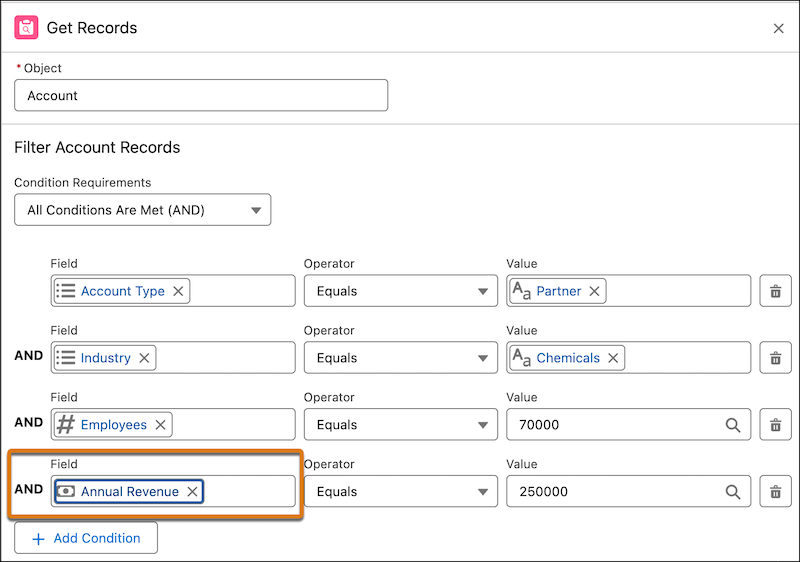 Visual Focus Indicators in a Flow Builder
File Attachment Triggers Now Generally Available for Automated Flows
The Automation Event-Triggered Flow type now supports File Attach events that automatically trigger flows when files matching specific criteria are attached to records.
Users can set triggers based on file type, extension, file names, or Created By field values.
Create through the Automation Event-Triggered Flow type by selecting File Attach from the Event Library in the Start node.
Flow Screens Now Support Preview Mode for Experience Cloud Branding
Flow builders can preview how screen flows will appear in Lightning Experience or Experience Cloud sites before activation using the new Preview Style feature.
This enhancement ensures flows seamlessly match site branding and appear as natural extensions of apps and pages, boosting user trust and reinforcing brand identity.
 An Example of How a Screen Looks with an Experience Cloud Site’s Style Settings
Check how to apply a Salesforce Lightning Design System 1 (SLDS1) Lightning theme
Data Tables Now Support Apex-Defined Collections for Complex Data Display
Screen flow data tables can now use Apex-defined collections as source collections, expanding beyond the previous limitation of standard object outputs only.
This Winter’26 feature enables presentation of complex data from sources like transform elements or HTTP callouts in tabular format.
Users must configure a unique identifier field to ensure proper row selection and prevent unpredictable behavior from duplicate values.
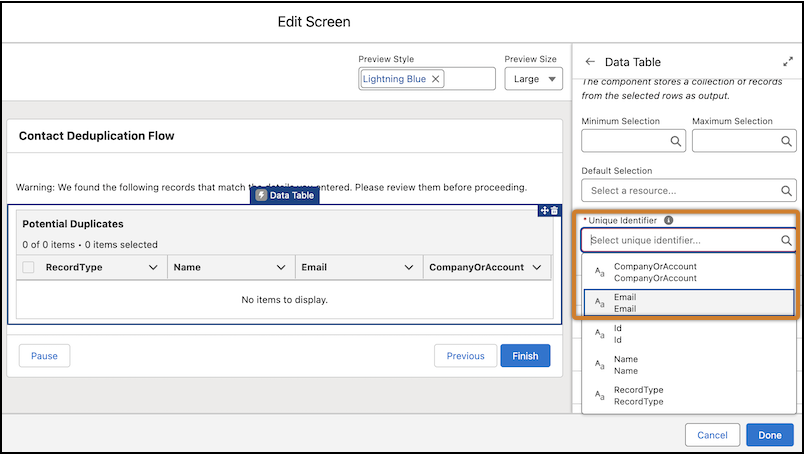 An Example of Display Complex Data with Apex-Defined Collection Support in Data Tables
Check how to display Data Tables with Apex
Data Tables Auto-Sync with Field and Language Changes to Prevent Runtime Errors
Data table screen components now automatically reflect changes when users update org language settings, field labels, or API names, eliminating the need for manual updates.
This update prevents flow runtime errors that previously occurred when API names were updated without corresponding data table updates.
Field Deletion Protection Prevents Data Table Flow Breakage
Salesforce now prevents deletion of fields currently used in data table columns, displaying an error with a direct link to the affected flow when deletion is attempted.
Users must first remove the field from the data table before deletion is allowed, eliminating the risk of screen flow breakage from accidentally deleted fields.
This protection applies to flows running in API version 65.0 or later.
Screen Flows Now Support LWC Local Actions for Enhanced Browser Functionality
Lightning Web Component (LWC) local actions can now be used in screen flows to expand functionality with features like confirmation toasts or record page navigation.
Local actions run directly in the browser, providing access to browser-specific functionality that wasn’t previously available in flows.
Display Text Components Now Support Heading Styles for Better Accessibility
Display Text screen components can now apply heading and paragraph styles instead of only specific font sizes, ensuring consistent styling that aligns with the overall flow theme.
This upcoming enhancement improves accessibility by allowing screen readers to build content outlines.
It enables users to jump directly between headings rather than listening to every word sequentially.
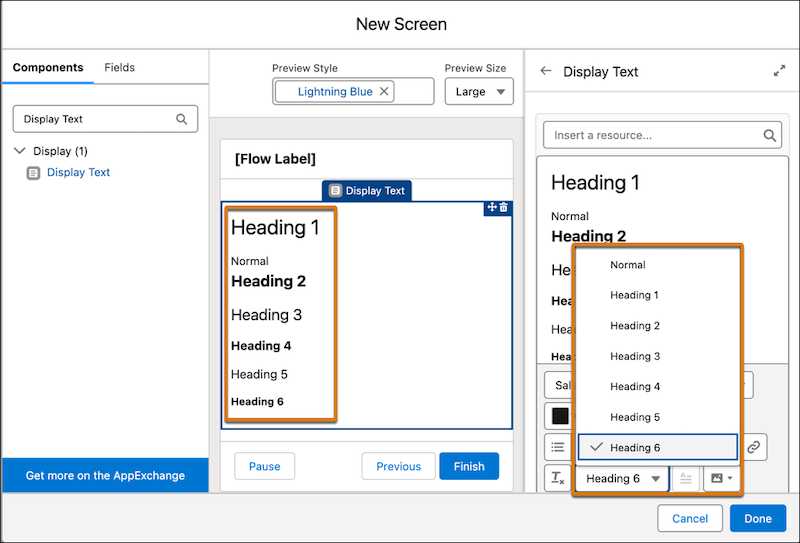 How to Make Display Text Components More Readable and Accessible
Check how to apply a paragraph style in a Flow.
Display Text Images Now Support Alternative Text for Accessibility and SEO
Display Text components can now include alternative text (alt text) for images to help screen readers explain visual content to low-vision users.
This Winter ’26 release feature also improves search engine optimization by providing context that increases website visibility in search results.
Users can add alt text descriptions through the Image alt text button in the rich text editor when selecting images.
 How to Improve Display Text Image Accessibility and Searchability with Alternative Text
See how to improve display text image accessibility and searchability with alternative text
Send Email Action 2.0.1 Combines Address Collections and Individual Recipients
The Send Email action version 2.0.1 now allows users to combine email address collections and individual addresses in the same recipient field for To, CC, and BCC recipients.
This creates a cleaner, more organized layout with multi-select support that combines text collections and individual email addresses in one unified input field, with the option to revert to previous versions that use separate input fields.
 How to Include Email Address Collections and Lists in One Recipient Field
Request Approval Action Gets Enhanced Usability and Required Input Updates
The Request an Approval dynamic action now requires Record ID and Submitter ID as mandatory inputs for improved data accuracy, replacing their previous optional status.
Input variables like Submitter Comments and First Approver now display user-friendly labels instead of API names, and the firstApprover variable accepts group and queue API names in addition to usernames.
 Enhanced Usability of the Request an Approval Dynamic Action
Learn how to set up and use this enhancement
Flow Builder Now Supports Direct Version Comparison for Change Tracking
Flow Builder can now pinpoint changes between any two flow versions of the same definition, eliminating manual comparison or XML file analysis.
This feature helps avoid issues with complex flows before deployment and enables faster change history tracking across autolaunched, scheduled-triggered, platform event-triggered, and record-triggered flows.
 How to Compare Flow Versions
How to compare flow versions
Updated Default Flow Record Page Layout Standardizes Navigation Across Lightning Apps
The default Flow record page features a new standardized layout with flow versions moved from the Related tab to a dedicated Versions tab for consistent navigation across all Lightning apps.
This Winter ’26 update overwrites existing customizations and requires users to recreate modifications through Lightning App Builder if custom layouts are needed.
The standardization helps users find key workflow information more predictably across their Salesforce environment.
How to use the updated default Flow Record Page layout
Flow Builder Debug Mode Now Supports Flow Approval Process Testing
Users with the Modify Flow permission can now use Debug mode in Flow Builder to thoroughly test flow approval processes before deployment, ensuring they work as intended.
This preview feature streamlines development, reduces deployment time, and builds trust in approval process solutions by allowing comprehensive testing in a controlled environment.
 Debug Mode in Salesforce Flow Builder
Discover how to troubleshoot Flow Approval processes in a Debug mode
Non-Admin Users Can Now Manage Flow Approval Processes with New Permission Sets
Users without Manage Flow permission can now create, change, and view autolaunched flow approval processes in the Approvals App by receiving the Approval Designer system permission and View Orchestration in Automation App user permission.
These users can submit approval processes for activation using the new Submit for Activation button in Flow Builder, though actual activation still requires the Manage Flow permission.
Flow Approval Process Activation Now Features Review Workflow for Non-Admin Users
Users without Manage Flow permission can now submit autolaunched flow approval processes for activation through Flow Builder, setting the status to “Under Review” for approval by users with Manage Flow permission.
During the review process, creators can recall activation requests to make changes or save new versions while waiting for the current version to be activated.
External System Changes Can Now Trigger Salesforce Flow Approval Processes
Third-party connectors can now trigger flow approval processes in Salesforce when changes occur in connected external systems, polling at configurable intervals to detect relevant changes like NetSuite sales order updates.
This feature enables users with Modify Flow permission to create approval workflows that respond to external system events, bridging cross-platform processes.
Flow Approval Process Assignment Simplified with New Resource Type
The new Resource assignee type replaces the previous User Resource, Group Resource, and Queue Resource options, providing a single simplified method for assigning approval steps.
When an approval is submitted, the system automatically identifies and validates the assignee type stored in the resource, streamlining the approval workflow setup process.
 How to Add a Text Resource to the Flow Approval Process
See how to add a text resource to your flow approval process
As your trusted Salesforce partner, Ascendix transforms complex Winter ’26 updates into strategic business advantages. Our certified consultants ensure seamless implementation while minimizing disruption to your daily operations.
Ready to unlock Winter ’26’s full potential? Contact Ascendix and book a free consulting call with us, and together we’ll find the best solution for your needs.
Anzhelika Serhiienko , Content Creator & Marketer at Ascendix
Anzhelika is a seasoned B2B content marketing strategist with extensive experience in elevating corporate profiles through compelling content. At Ascendix, she offers a wealth of knowledge in Salesforce consulting, providing valuable tips, tricks, and comprehensive guides. Additionally, Anzhelika stays at the forefront of the industry, delivering expert analysis on the latest Salesforce tools and emerging technology trends.



 Loading...