For years, notepads and Outlook have been the partners of the commercial real estate industry. But in today’s market, managing a sophisticated deal flow, you need to transition from simple data storage to active relationship management. A professional top CRE CRM is a multifaceted technology that serves as a trustworthy assistant that never forgets a detail.
We have authored this guide to the top 11 commercial real estate CRMs for 2026, looking beyond the features to find the best fit for your specific brokerage needs.
Which Top CRE CRM Fits Your Needs?
Here’s a quick guide to match your specific scenario. Click to jump to the detailed overview:
- AscendixRE CRM – best for Salesforce-based CRE teams needing deep customization and full CRE workflows.
- REThink CRM (now a part of Buildout ecosystem) – best for Buildout-connected and international brokerage teams needing collaboration and pipeline visibility.
- Apto (now a part of Buildout ecosystem) – legacy CRE CRM formerly used for hybrid workflows.
- RealNex – best for investment sales teams needing built-in financial analysis and marketing tools.
- Zoho CRM – best for budget-focused teams needing basic CRM functions.
- ClientLook – best for small CRE teams and solo brokers who want simple setup and contact/deal tracking.
- SharpLaunch – best for brokerages focused on property marketing sites and lead generation.
- HubSpot CRM – best for marketing-driven teams needing strong automation and inbound lead management.
- VTS – best for landlords and tenant rep teams focused on leasing lifecycle and portfolio insights.
- Freshworks CRM – best for mobile-first or general sales teams needing quick pipeline management.
- Vtiger CRM – best for cost-sensitive teams needing customizable CRM structure.
11 Top CRE CRMs Features & Pricing Comparison
In the table below, we’ve compared key aspects like pricing, standout features, and ideal use cases.
Please note, that every CRM offers flexible and customizable pricing plans. Commercial real estate CRM pricing plans vary, offering options from budget-friendly to enterprise-level solutions. Providers like AscendixRE CRM, Apto, ClientLook, RealNex, and others offer tiered plans to accommodate diverse business needs, making it essential to assess features and scalability for the right fit.
For brokerages that need both CRM and commission processing, see our Yardi CommissionTrac and CommercialEdge Commissions alternatives comparison.
Our Evaluation Methodology
Our analysis moves beyond generic feature checklists. We focused on the factors that directly impact daily commercial real estate operations. Our comparison of 11 top commercial real estate CRM platforms is built around the following six criteria.
- CRE-specific workflow support: Does the platform reflect how commercial real estate teams actually work? We looked at whether each CRM supports brokerage workflows like listing management, deal stages, commission visibility, tenant and landlord relationships, lease activity, and team collaboration without forcing brokers into a generic sales process.
- Property, deal, and comp management: A top CRE CRM should do more than manage contacts. We assessed how well each platform handles properties, availabilities, deals, leases, and comparable data, and whether those records stay connected in a way that gives brokers full context.
- Customization and workflow fit: Most brokerages do not operate the same way, so flexibility matters. We evaluated how easily each platform can be adapted to match a firm’s process, reporting needs, and operating model, and whether teams can manage those changes internally or depend heavily on outside consultants. The best systems can be tailored without becoming difficult or expensive to maintain.
- Capital markets capability: A robust commercial real estate CRM must support complex deal structures. We looked at whether each platform can support investor, lender, and capital markets workflows out of the box or with minimal adaptation. For firms involved in more sophisticated deal structures, this can be a major deciding factor.
- Data visibility and decision support: A CRM is only useful if your team can quickly find the information it needs and act on it. We evaluated how well each platform surfaces property, relationship, and deal data, and how easily users can turn that information into next steps. In practice, this affects everything from broker productivity to leadership visibility across the pipeline.
- Automation and AI capabilities: Administrative work continues to slow down many brokerages, so we looked closely at which platforms do the most to reduce it. That includes workflow automation, follow-up management, data capture, and emerging AI functionality that helps teams move faster and work more consistently. Learn more about details of AI-powered CRM comparison.
- Scalability: A commercial real estate CRM must support growth without increasing operational overhead. We assessed how well each platform scales across users, offices, data volume, and workflow complexity, as well as how much effort it takes to maintain over time. A system should support growth without becoming harder to manage every quarter.
What Makes a CRM Good for Commercial Real Estate?
✔️ A professional commercial real estate CRM must prioritize properties over simple contact lists. Every lease, sale, and debt transaction should link directly to a specific property. This asset-first architecture is the foundation of any effective brokerage tool.
✔️ The system must also manage complex relationship mapping. In commercial real estate, a single contact often plays multiple roles, acting as a tenant in one building and an owner in another. A good commercial real estate CRM tracks these overlapping connections without creating duplicate data. This provides a clear history of a contact’s entire market influence.
✔️ Industry-specific workflows are equally critical. Your commercial real estate CRM should automate the unique stages of a lease renewal or a multi-parcel sale. It must track critical dates and contract contingencies automatically. This ensures that no deadline is missed during the due diligence process.
✔️ Brokerage-specific reporting. Dashboards and reports should speak the language of CRE, such as commission tracking, deal volume, and activity metrics that map to how a brokerage actually measures performance.
✔️ A good CRE CRM makes contact ownership, deal activity, and pipeline status visible across the entire team, keeping brokers aligned and client relationships consistently managed.
Which CRM Is Best if I Already Use Salesforce?
If you’re invested in Salesforce, stick with CRMs that build on it for seamless integration. AscendixRE is a top CRE CRM since it has CRE-tailored features like AI Assistant, geomapping search, and commission tracking, making it the top choice for efficiency. Apto offers strong prospecting, while REThink excels in pipelines but requires Buildout for full marketing.
AscendixRE
Best For: CRE professionals needing a Salesforce-based powerhouse for efficient deal management (AI functionality coming soon).
✅ Pros: AI Assistant, geomapping search of Properties/Records/Availabilities, stacking plans, document generation software, comprehensive commission tracking.
❌ Cons: potential learning curve.
💰 Pricing: $79–$99/user/mo (includes Salesforce license).
AscendixRE CRM is one of the best commercial real estate CRMs based on Salesforce. Being an industry-tailored and robust CRM solution, AscendixRE delivers more value to brokers and agents than any other platform. All the nuances that we’ve learned over the 16+ years in commercial real estate have been incorporated into the functionality of AscendixRE CRM.
AscendixRE CRM Features:
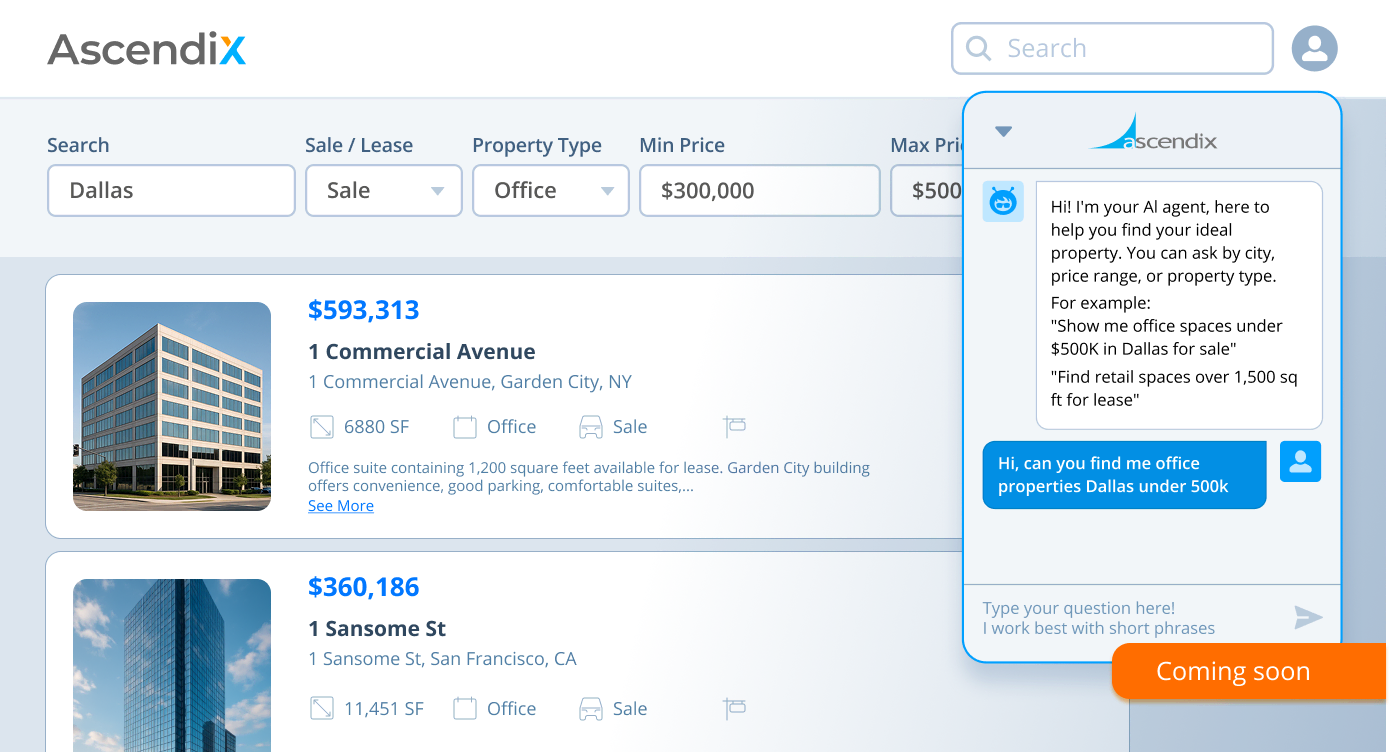
This upcoming feature empowers users to apply natural voice commands. In other words, instead of typing, users talk to AscendixRE CRM. The functionality will allow users to capture notes, create records, and search the database using simple commands. AI Assitant can be perfect for logging updates after calls or finding what users need without clicking through filters.
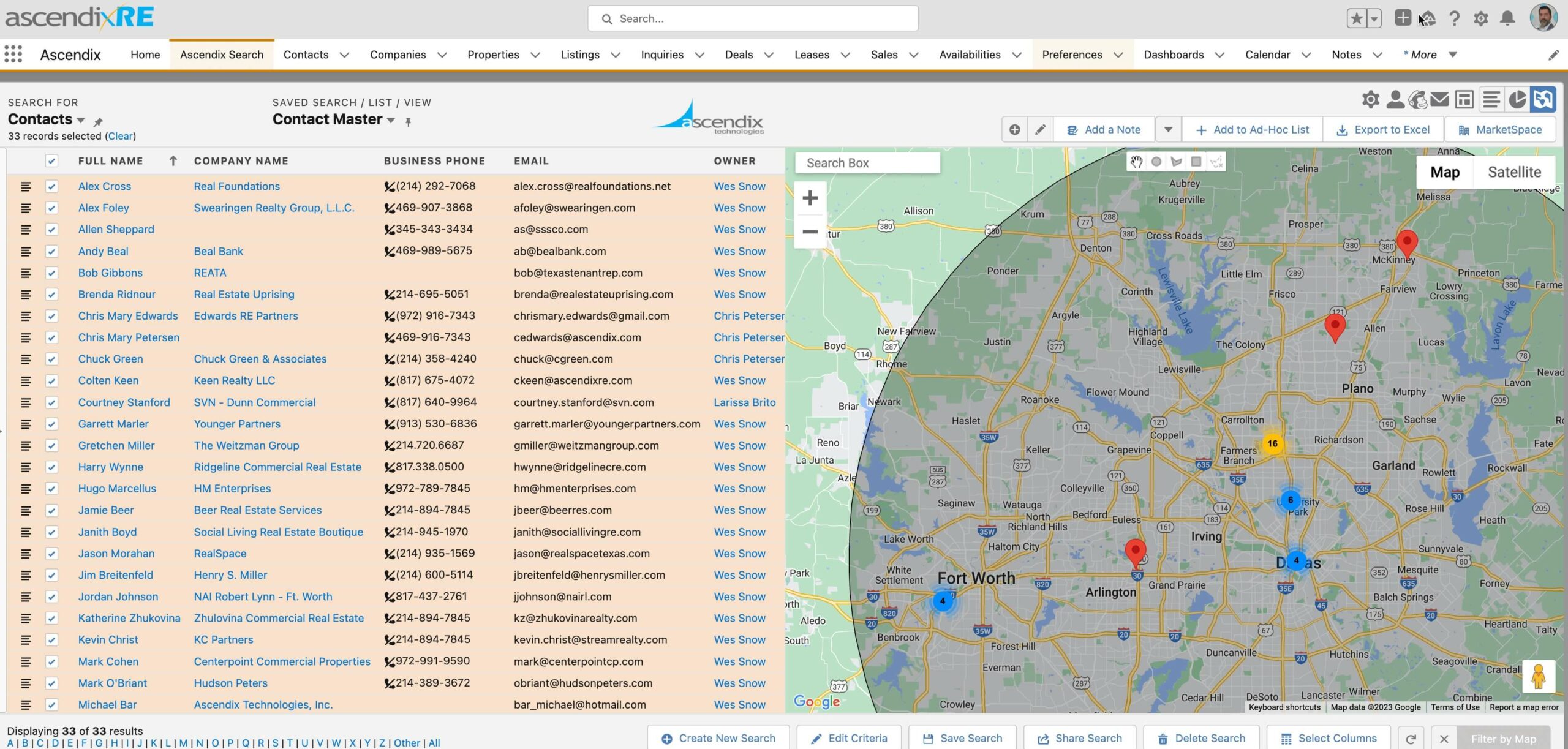
AscendixRE is integrated with Ascendix Search – a tool that lets brokers find properties on the map within a specific area/radius/zone by applying various searching filters. Along with Properties, you can search for Contacts/Leases/Availabilities and export the lists into Excel or send them directly to clients via Mailchimp.
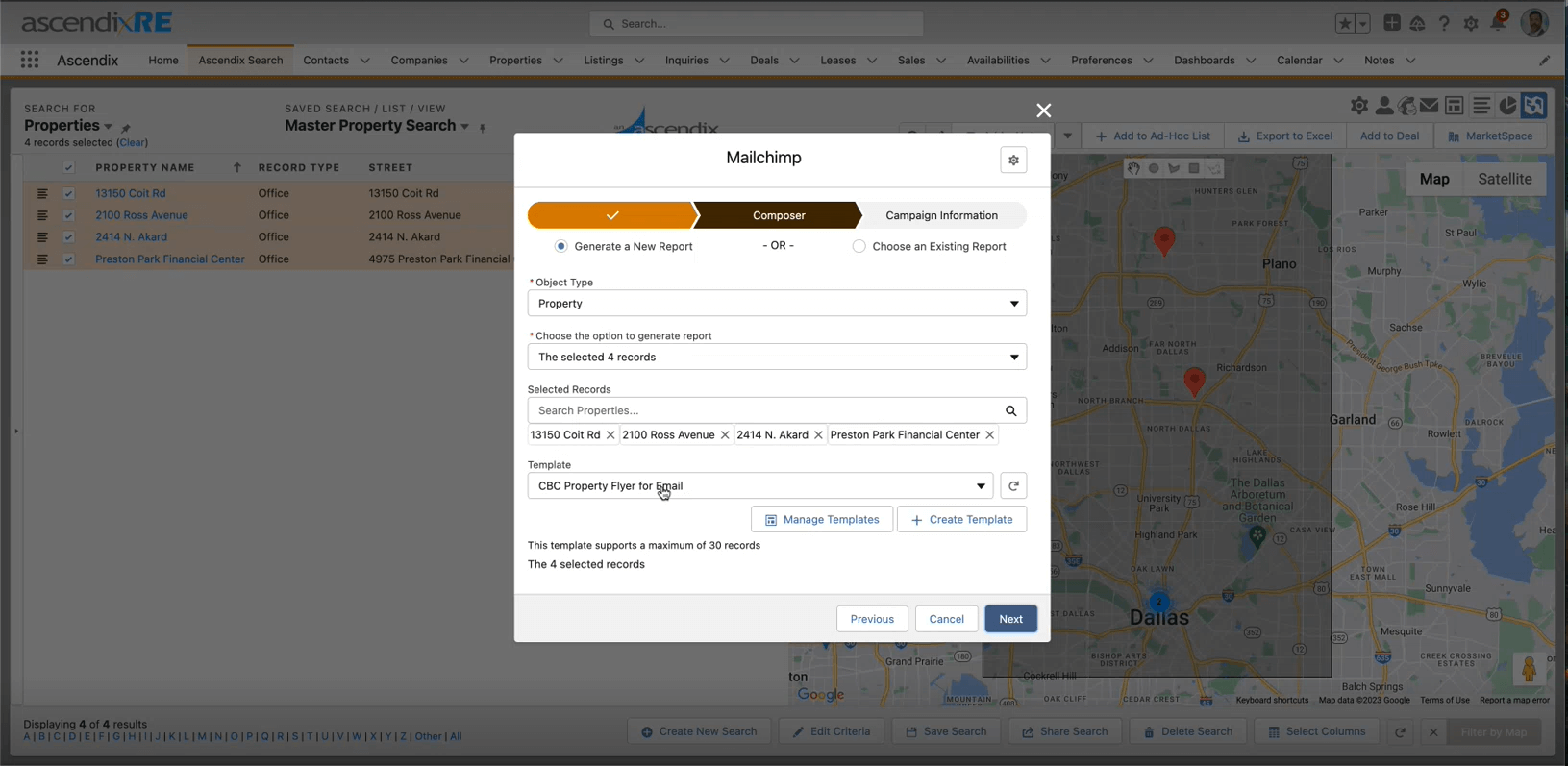
- Ability to send emails directly from AscendixRE CRM using Mailchimp
A new integration of AscendixRE + Mailchimp allows brokers to send targeted email campaigns with custom content and property templates in a few clicks without leaving a CRM or switching between separate systems.
- Tracking of Property Status, Lease Expirations, Sales Transactions
AscendixRE CRM allows CRE brokers to manage and track their property listings, lease agreements, and sale transactions in one central location. In terms of listings, it tracks important details such as property listing location, pricing, status (whether it’s active or pending), and monitors any changes to the listing, such as price reductions or offers.
In terms of lease expirations, within AscendixRE brokers can create a listing record and then track the details of the agreement, such as the lease start date, lease end date, rent amount, and any other relevant information. The CRM also includes Composer – a tool brokers can use to generate any types of lease reports, documents, agreements and invoices.
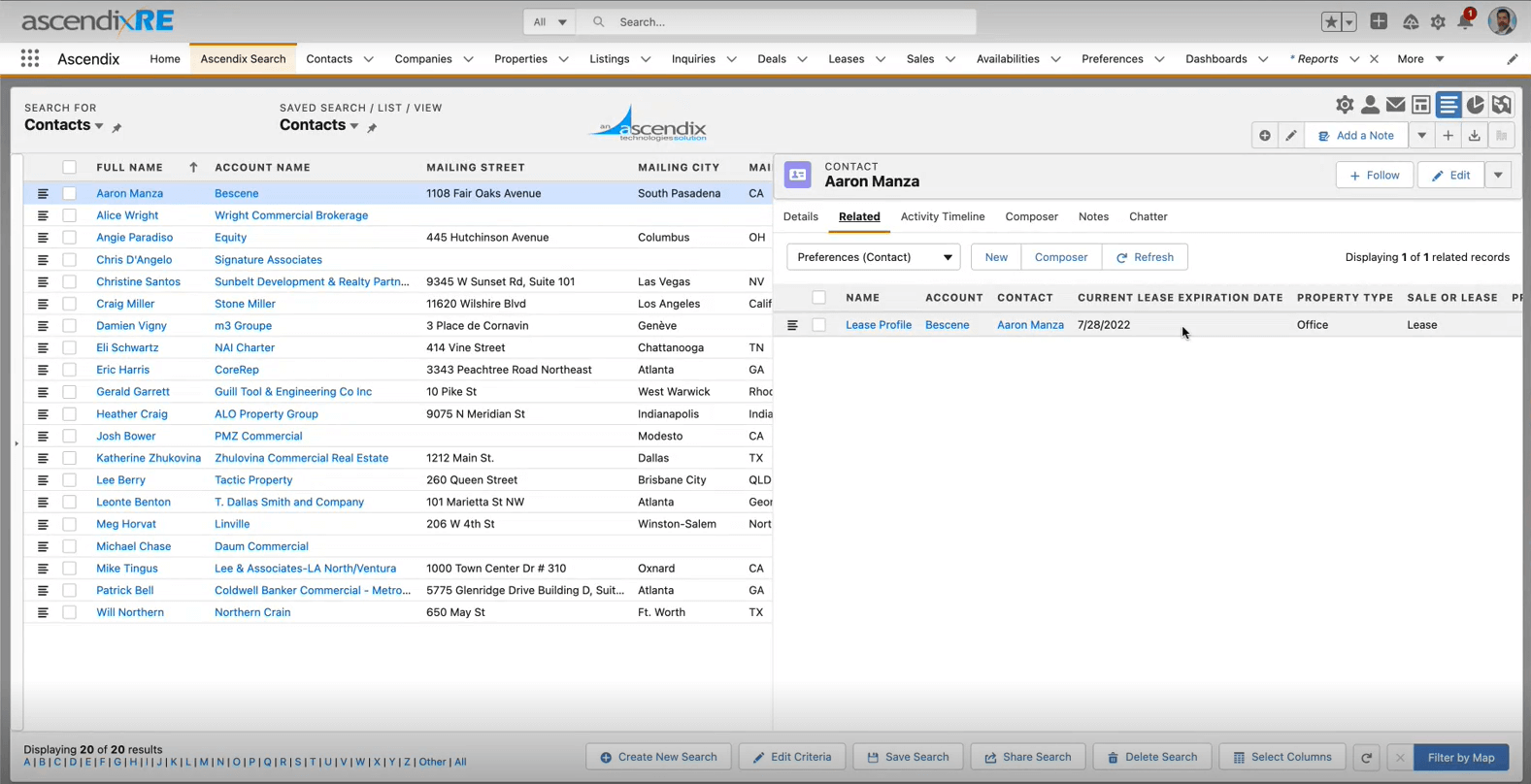
Notification about upcoming lease expiration in AscendixRE
- Report and marketing collaterals generation
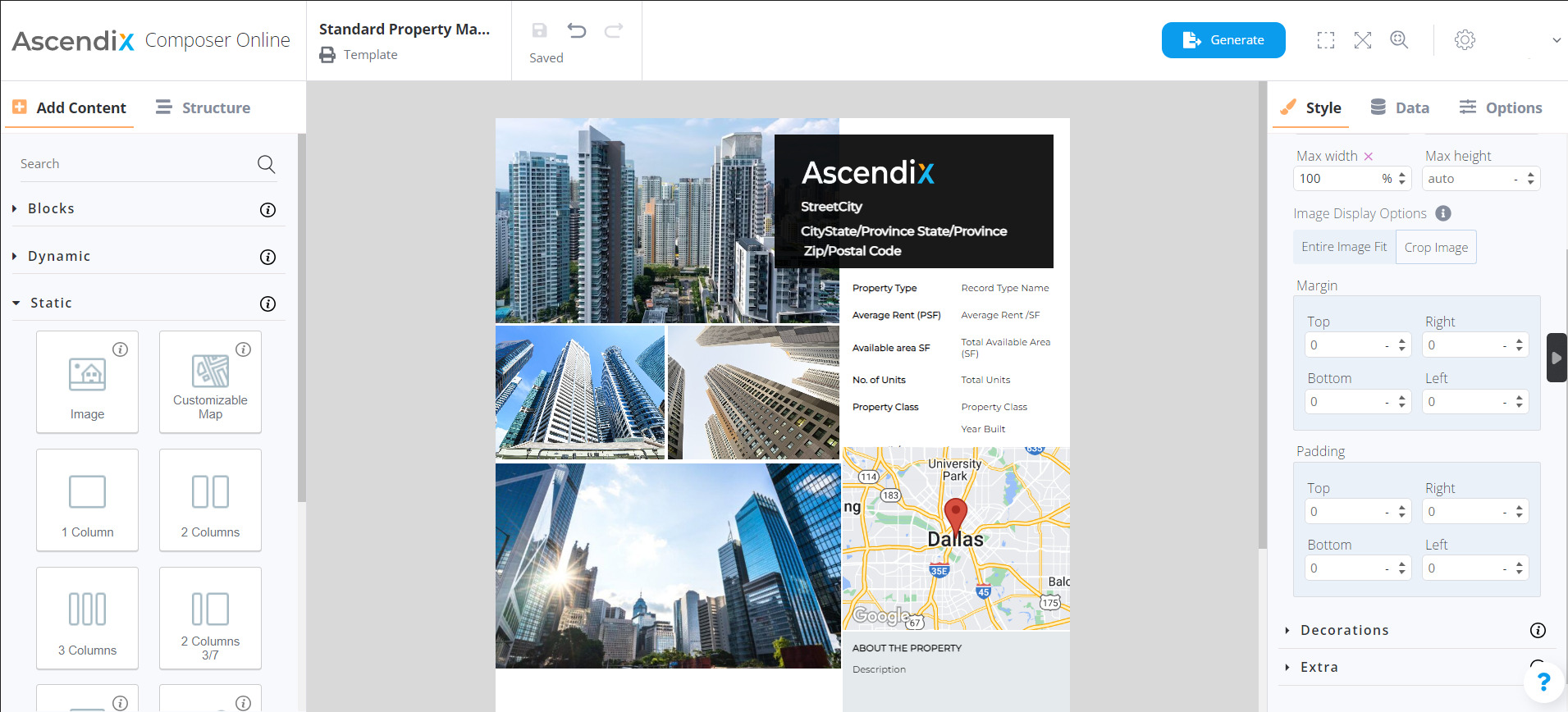
AscendixRE is integrated with Composer – a robust report generation tool for CRE brokers. Composer contains a huge library of predefined templates brokers may need: from Property flyers to Offering memorandums. Brokers can also use Composer to design their own templates and send visually-appealing emails to prospects.
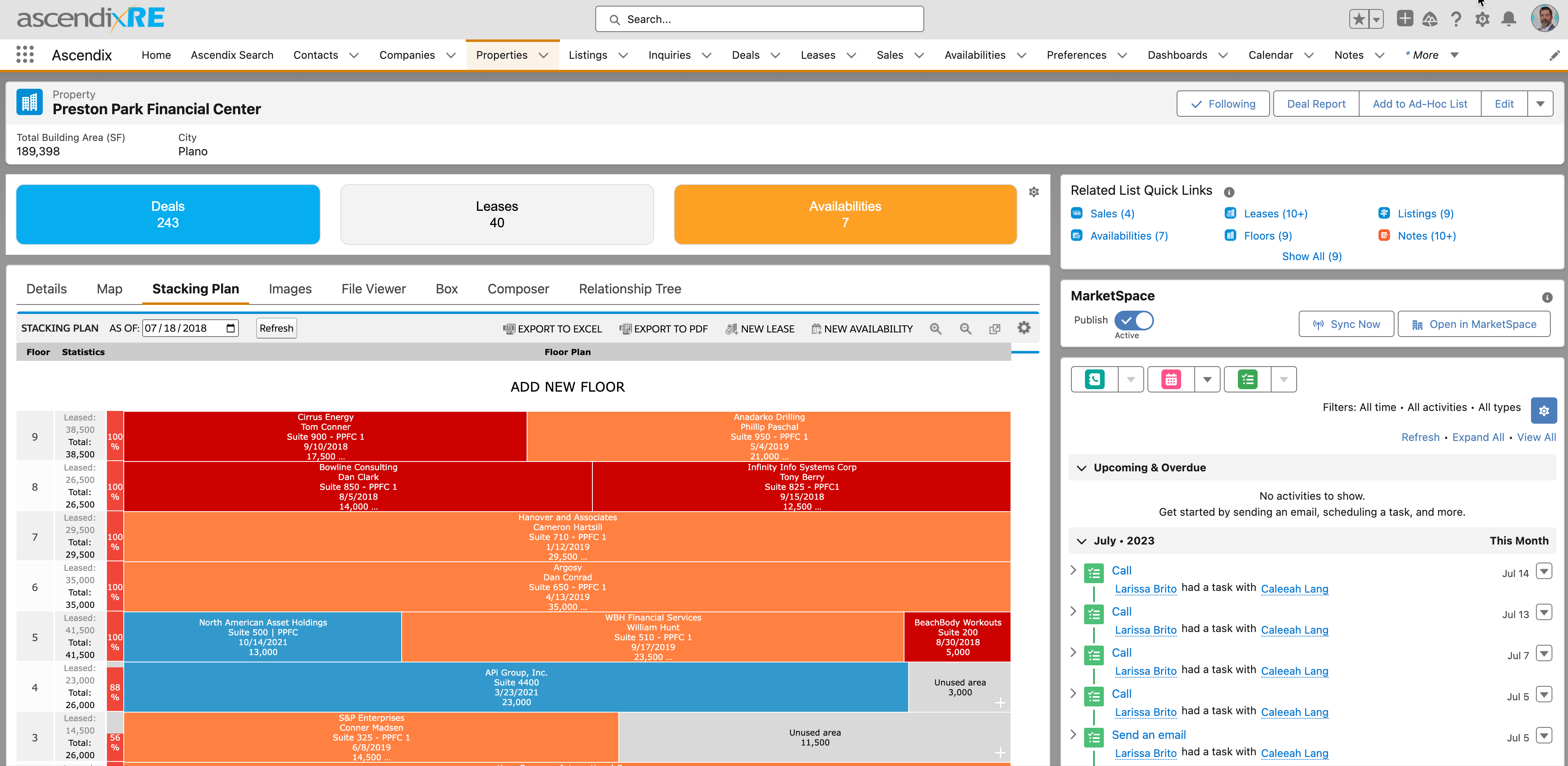
AscendixRE CRM incorporates an advanced stacking plan module that allows brokers to visualize vacant lease spaces in commercial buildings. The module is simple to use and offers high customization capabilities. By having that within the core CRM system, brokers can pull the required data from Records and automatically update lease expiration dates, space sizes, etc.
The commission tracking feature in AscendixRE CRM allows real estate brokers and agents to easily manage and track their commission payouts for each deal they close. With this feature, you can set up commission rates for each agent and deal, calculate the commission payouts based on the deal value, and track the status of commission payments.
- Capture of inbound Inquiries from LoopNet&CREXi
Introducing Email to Inquiry, an extension of Salesforce’s Email to Lead functionality, this new AscendixRE CRM feature automates the extraction of leads from inbound inquiries on platforms like LoopNet and CREXi, seamlessly converting them into CRM records.
With this feature, brokers can track the progress of each deal, manage tasks and activities, collaborate with team members, and generate reports and documents related to each deal. The system allows assigning tasks to team members, setting deadlines, and tracking the progress of each task within the system. Brokers can also set reminders and notifications to ensure that everyone is on track and deadlines are met.
- Integration with Outlook and Gmail
AscendixRE CRM offers seamless integration with Microsoft Outlook and Gmail, allowing brokers to manage email communications directly within the CRM platform. This integration makes it easy to keep track of email correspondence with clients and leads and ensures that all communications are centralized and organized in one place.
Related Case Study
From a Custom CRM Software to AscendixRE: a CRM Story of Visintainer
Learn how Visintainer transitioned from a custom-built CRM platform to AscendixRE, improving operational efficiency, data management, and business growth.
Read Full Case Study
Get a full overview of AscendixRE features in this video.
AscendixRE AI Suite: Four New Modules Now Available
Ascendix has released AscendixRE AI Suite, adding four AI modules directly into AscendixRE CRM. Each module addresses a specific part of how brokers work with their data.
- AscendixRE Connector for ChatGPT and Claude removes the need to switch between your AI assistant and your CRM. Brokers can ask ChatGPT or Claude about their pipeline, clients, and deals, create contacts, and update records in plain English without opening AscendixRE. Support for Gemini is coming soon.
- Harvest solves the problem of deal intelligence sitting in inboxes instead of the CRM. Brokers forward any deal-related email to their Harvest address and the contact, property, lease terms, and deal details appear as draft records in AscendixRE. Nothing saves without broker approval.
- Agent makes existing CRM data easier to access and update. Brokers can search records, log activity, create contacts, and update deals using plain-English commands by text or voice, from any device. Agent understands CRE terminology such as NNN, FSG, WALT, TI, and others.
- Composer AI eliminates manual document assembly. Brokers upload a branded CRE document and Composer rebuilds it as a live template connected to AscendixRE records. Any document can be generated from any record in minutes, with no manual data entry.
Learn more about AscendixRE AI capabilities
“ In the short time of me using AscendixRE it has been a big time saver. It’s also easy to run reports and especially to pull my comps. I can now focus on preparing for the deal instead of wasting time combining excel sheets and creating reports from scratch. In addition to making more informed decisions with the organization of the data, I would guess I’m saving about 3 hours a week and a lot can get done in 3 hours! ”
Robert Sattler, Principal, Cresa New York
Request AscendixRE CRM Demo
See how AscendixRE can help you close more deals and improve your prospecting.
Rethink CRM by Buildout
Best For: CRE brokerages looking for an out-of-the-box Salesforce-based CRM with integrated prospecting, deal pipeline management, and optional marketing tools.
✅ Pros: Robust deal pipeline, GeoSearch mapping, Prospect by Buildout integration.
❌ Cons: Limited customization, higher price.
💰 Pricing: From $129/user/month (Rethink) to $299–$429/user/month (Rethink Plus)
Rethink is a commercial real estate CRM solution built on top of Salesforce. In February 2021 it was acquired by Buildout. Since then, Rethink has been positioned as the main CRM system (deal pipelines, contact, properties, and companies’ information resides here), whereas Buildout offers advanced marketing and reporting functions, which are not included in the base subscription of REThink.
Rethink CRM Features:
- Deal pipeline management (seller, buyer, landlord, tenant rep deal types)
- Task tracking and action plan templates (pre-built task sequences assignable to brokers)
- Contact and company management with privacy/sharing controls per broker
- Prospect management with inquiry tracking
- GEOsearch (mapping tool) (map-based visualization to identify property owners near a listing)
- Rethink Search (used to look up new properties) (individual address property lookups, save records to your database)
- Comps analytics
- Stacking plan module
- Commission tracking (basic; splits and full invoicing require Manage & Close add-on)
- Workflow automation tools
- Integration with Outlook / Gmail
- Activity reporting (tasks, calls, inquiries per broker or deal)
- Mobile app (via Salesforce mobile app)
Rethink Plus is an upgraded tier that adds Prospect by Buildout, a built-in prospecting database with millions of property and ownership records, available in a Regional plan (200 credits/user/month at $299) or National plan (500 credits/user/month at $429). Each credit unlocks owner contact data for one property, credits pool across your team
Pricing
Rethink CRM starts at $129/user/month. Rethink Plus starts at $299/user/month. Larger teams qualify for bulk discounting — a bundle of Showcase Plus + Rethink was quoted at approximately $178/user/month plus a $275/month platform fee for Showcase.
Additional costs to be aware of:
- Showcase (marketing platform): $199–$249/user/month at standard pricing, or bundled with Rethink at a discount
- Manage & Close (back-office commission splits, invoicing, broker earnings tracking): sold as a Showcase add-on
- Premium Support: $2,400/year for unlimited customization support hours (otherwise $100/hour); strongly recommended for teams over ~10 brokers
- Data migration: handled by Buildout’s partner Data Orchestra, typically around $1,000 — recommended over DIY for teams with large or complex data sets
Apto Commercial Real Estate CRM by Buildout
*Please note that Apto is no longer available on the market. We include Apto in this list because of its current users that may look for an alternative solution.
Best For: Brokers handling both residential and commercial workflows with strong prospecting and reporting.
✅ Pros: Contact/deal management, automation tools.
❌ Cons: Bugs, high learning curve, poor customer support
💰 Pricing: $129/user/mo + $250 setup.
Apto is a commercial real estate CRM built on Salesforce. It provides a web-based solution for managing customer relationships, back-office, deals, listings, properties, and more. Recently, Apto was acquired by Buildout.
Apto commercial real estate system allows brokers to manage the full lifecycle of a deal, set up appointments, automate daily tasks, forecast sales, etc.
Apto Features:
- Contact Management – Helps brokers to quickly find contact information in CRM and enter information once as well as organize all information and link between contacts, businesses and properties
- Prospecting Tools – Ability to make connections quickly – like strategic call lists and contact info- and win more deals, make proper commission estimates, etc.
- Deal Management – Provides brokers with visibility into deal progress and the necessary actions to drive each one forward
- Reports & Dashboards – This solution helps brokers to pull performance metrics, run reports on different criteria, and track commissions so that every team member can see the results
- Integration w/ Outlook & Gmail
- Workflow tools for automation
“ Across our CRE implementations, we've seen multiple cases of efficiency gains from adopting a top CRE CRM. One enterprise brokerage saw CRM adoption jump six-fold after switching to AscendixRE, while a property search that used to take four hours dropped to about ten minutes. In another rollout, data migration accuracy landed near 95%, up from an expected 50%, saving the team roughly three hours a week. ”
Ascendix Team
What Is the Best CRM for CRE Agencies?
ClientLook is straightforward for tracking, ideal for smaller operations. RealNex integrates analytics and marketing, suiting complex deals. Both handle properties and pipelines effectively, but RealNex edges out for investment focus.
RealNex
Best For: Investment sales brokers and leasing agents needing integrated analytics and marketing under one roof.
✅ Pros: Cloud-based, stacking plans, transaction tracking.
❌ Cons: Outdated interface, performance issues, steep learning curve.
💰 Pricing: $99–$174/user/mo + onboarding fees.
RealNex bundles CRM, financial tools, and e-marketing, allowing data sync across platforms. It’s accessible on mobile and supports mass emails, making it suitable for solo brokers and agencies.
This software allows brokers to push and pull data between different platforms. The RealNex bundle allows you to harness your CRM, financial analytics, and property listing/e-marketing functions under the same roof.
RealNex is suitable both for a single broker or the traditional global brokerages.
RealNex Features:
- Cloud-based CRM
- Advanced tracking system – the ability to track properties, and clients, and manage the pipeline
- Accessibility – on-demand access from any mobile device
- Synchronization with third-party tools – Outlook/Gmail Sync
- Easy data entry
- Mass email marketing campaigns
- Stacking plan building tool with customizable templates
- Transaction tracking.
Pricing
RealNex offers 2 pricing plans: Basic Subscription and Advanced Subscription.
A basic subscription (CRM only) includes 200 emails per user per month and has several pricing options:
- Annual: $1188 (= $99 per month) + $99 one-time onboarding fee per user
- Annual but paid Monthly: $109 per month + $99 onboarding
Advanced subscription Navigator (CRM + other functionality) includes 1000 emails per user per month and has several pricing options:
- Annual: $1788 ($149/user/mo) + one-time onboarding fee of $149
- Monthly with annual commitment: $174 per month
ClientLook
Best For: New or solo brokers wanting simple, integrable CRM with a free trial.
✅ Pros: Easy tracking, third-party integrations.
❌ Cons: Lacks advanced features, data migration challenges, and customization limitations.
💰 Pricing: $0 (trial)–$129/user/mo.
ClientLook manages properties, leads, and deals within a single interface.
Built from the ground up for CRE sales professionals, ClientLook allows you to manage every integral aspect of your commercial real estate business, including your properties, leads, clients, and deals. ClientLook has tailor-made sections for each business component to maximize business management efficiency in every area. In addition, the software can also be integrated with several other CRE apps and services.
ClientLook Features:
- Contact management – This feature allows brokers to build relationships between people and properties, check the updates, and search Contacts quickly
- Property Tracking – Brokers can search for properties, enter every property detail, manage and track property listings
- Deal Tracking – This feature allows CRE specialists to keep track of all contacts and emails related to a particular Deal
- Integrations with third-party tools – ClientLook integrates with tools like The Analyst PRO, RPR, MailChimp, HubSpot, and Google.
Pricing
ClientLook has three types of pricing plans:
- Free (for new brokers): you pay 0$ for 4 months, and then $99/mo thereafter
- Annual: you can pay $89/user/mo (the total price billed annually is $1068)
- Monthly: $129/user/mo on month-to-month term. You can convert to annual at any time and save $480 (the total annual price is $1548).
What is the Most Affordable CRM for Small Real Estate Teams?
For budget-conscious small teams, Zoho and Freshworks offer great entry points. Zoho starts free with scalable features, while Freshworks provides mobile-friendly basics from $0.
Zoho CRM
Best For: Small teams seeking affordable, customizable tools for contact and deal management.
✅ Pros: Versatile features, reporting, integrations.
❌ Cons: Limited user customization.
💰 Pricing: $0–$300/org/mo.
Zoho CRM is a versatile customer relationship management platform that is actively used by commercial real estate brokers due to its customizable nature and extensive feature set.
Zoho’s flexibility shines for CRE with property management, communication tools, and analytics. It’s budget-friendly but may need consultants for advanced tweaks.
Zoho Features:
- Contact Management—Agents can store detailed information about clients, leads, investors, and other contacts, including property preferences, communication history, and important notes.
- Deal Tracking — Commercial real estate agents can use Zoho CRM to track deals and transactions throughout the sales cycle. The platform provides customizable pipelines and stages, enabling agents to monitor deal progress, set reminders for follow-ups, and collaborate with team members.
- Property Management — Zoho CRM enables agents to manage their property listings effectively. They can input property details, upload images and documents, schedule showings, and track property availability, which helps them stay organized and informed about their listings.
- Communication Tools — Zoho CRM offers various communication tools to streamline interactions with clients and leads. Agents can send and receive emails, text messages, and calls directly within the platform, ensuring all communication is centralized and logged for future reference.
- Reporting and Analytics — Agents can generate reports on lead sources, conversion rates, and deal progress, allowing them to identify trends and areas for improvements.
Pricing
Zoho CRM offers tiered pricing plans, making it suitable for solo brokers and larger teams.
- Free Plan: ($0/month)
- Standard Plan: ($20/organization/month)
- Professional Plan: ($50/organization/month)
- Premium Plan: ($100/organization/month)
- Elite Plan: ($300/organization/month)
Freshworks CRM
Best For: Mobile teams prioritizing accessibility and basic analytics.
✅ Pros: Lead/deal tracking, mobile app.
❌ Cons: Basic lower tiers, scalability issues, poor customer support.
💰 Pricing: $0–$39/user/mo (Enterprise custom).
Freshworks offers user-friendly tools for CRE, with document management and insights.
Freshworks CRM is a robust CRM platform designed to assist businesses in managing their customer interactions throughout the entire lifecycle. It offers a comprehensive suite of features to streamline sales processes, enhance collaboration, and provide valuable insights into customer relationships. Freshworks CRM is known for its user-friendly interface, customization options, and scalability.
Freshworks CRM Features:
- Lead Management – Freshworks CRM allows commercial real estate brokers to capture, organize, and prioritize leads. The platform assists in tracking lead interactions and managing them through the sales pipeline.
- Contact Management – Brokers can maintain a centralized database of contacts, including property owners, investors, and other stakeholders. Freshworks CRM facilitates contact organization and communication history tracking.
- Deal Tracking – The platform enables brokers to monitor and manage deals at various stages of the sales pipeline. Brokers can set milestones, assign tasks, and collaborate with team members for efficient deal progression.
- Document Management – Freshworks CRM provides functionality for document storage and organization. Brokers can manage important documents related to properties, contracts, and agreements within the CRM.
- Analytics and Reporting – Freshworks CRM offers analytics and reporting tools to help brokers gain insights into sales performance. Metrics can be tracked, and reports can be generated to identify trends and areas for improvement.
- Mobile Accessibility—Freshworks CRM Recognizes the real estate industry’s mobile nature and provides mobile accessibility. Brokers can access information, update records, and communicate on the go using their mobile devices.
Pricing
Freshworks CRM offers four pricing plans:
- Free: The Free plan is a great way to get started with Freshworks CRM. It includes all of the basic features that you need to manage your leads and contacts, such as contact management, deal management, and task management.
- Growth ($15/user/month): The Growth plan is a good option for small businesses that need more features than the Free plan offers. It includes all of the features of the Free plan, plus features such as email marketing, lead scoring, and custom reports.
- Pro ($39/user/month): The Pro plan is a good option for medium-sized businesses that need more advanced features than the Growth plan offers. It includes all of the features of the Growth plan, plus features such as workflow automation, predictive analytics, and custom integrations.
- Enterprise (Contact Freshworks for pricing): The Enterprise plan is a good option for large businesses that need the most advanced features that Freshworks CRM has to offer. It includes all of the features of the Pro plan, plus features such as dedicated support and custom development.
The pricing for Freshworks CRM’s ongoing pricing plans depends on the number of users and the plan that you choose.
What is the Best CRM for Marketing in Commercial Real Estate?
For marketing-driven CRE operations, SharpLaunch and HubSpot are top contenders. SharpLaunch specializes in automating property promotion and lead generation with custom websites and tools. HubSpot provides a free core CRM with powerful email marketing and analytics, making it versatile for integrated sales and marketing efforts.
SharpLaunch
Best For: Marketing-oriented teams automating lead gen and property promotion.
✅ Pros: Property websites, automation, reporting.
❌ Cons: No transparent pricing, limited integrations.
💰 Pricing: Custom (contact sales).
SharpLaunch is a commercial real estate (CRE) marketing platform that helps brokers and teams automate their marketing tasks and workflows to streamline their marketing and get more leads and sales. SharpLaunch focuses on CRE marketing with search engines, lead tools, and document portals.
SharpLaunch Features:
- Property search – SharpLaunch provides a property search engine that allows visitors to search for properties listed on your website and in your database.
- Property websites — SharpLaunch can create custom property websites for each of your listings. These websites can be optimized for search engines and used to generate leads and schedule appointments.
- Lead management – SharpLaunch’s lead management tools can help you track and manage your leads throughout the sales process.
- Document portal – SharpLaunch’s document portal allows you to share documents with your clients and prospects securely.
- Marketing automation — SharpLaunch’s marketing automation tools can help you automate marketing tasks such as sending follow-up emails and nurturing leads.
- Reporting – SharpLaunch provides a variety of reports that can help you track the performance of your marketing campaigns
Pricing
You need to contact sales managers to get ongoing subscription prices.
HubSpot
Best For: Brokerages needing an all-in-one platform for sales, marketing, and tasks.
✅ Pros: Free core, email marketing, integrations.
❌ Cons: Hidden costs, limited customization, poor customer support
💰 Pricing: $0–$5,000/mo (CRM Suite).
HubSpot is a customer relationship management (CRM) platform that helps businesses of all sizes manage their leads, contacts, and deals.
HubSpot Features:
HubSpot offers a variety of features that can be useful for commercial real estate brokers, including:
- Contact management – HubSpot allows you to store and manage all of your contact information in one place. This includes contact names, email addresses, phone numbers, and other relevant information.
- Lead management – HubSpot helps you track and manage your leads throughout the sales process. You can create lead nurturing sequences, schedule follow-up tasks, and track your lead conversion rate.
- Deal management – HubSpot helps you track and manage your deals from start to finish. You can create deal pipelines, track your sales progress, and close more deals.
- Task management – HubSpot helps you manage your tasks and to-do lists. You can create tasks, assign tasks to other users, and track your progress.
- Email marketing – HubSpot allows you to create and send email marketing campaigns to your leads and customers. You can segment your audience, personalize your emails, and track your results.
- Reporting – HubSpot provides a variety of reports that can help you track your progress and identify areas for improvement. You can create reports on your leads, deals, tasks, and email marketing campaigns.
In addition to these core features, HubSpot also offers a variety of integrations with other popular software applications. This makes it easy to connect HubSpot to your existing workflow and to get the most out of the platform.
Pricing
HubSpot pricing is complicated because the company offers different prices for different types of offerings: Platform Solutions and Products. The company also offers different pricing bundles that clients can customize. With a wide range of offerings, it can be difficult to define the exact price, so it’s better to contact HubSpot sales managers.
For commercial real estate, the CRM Suite may be interesting. The Suite plan is HubSpot’s all-in-one platform that includes all of its products, including CRM, Marketing Hub, Sales Hub, Service Hub, CMS Hub, and Operations Hub. The Suite ranges from $1600 per month (Professional Pricing Plan) to $5000 per month (Enterprise Pricing Plan).
What is the Best CRM for Lease Management in Commercial Real Estate?
VTS is a standout for lease management, offering real-time market data, property searches, and collaboration tools to streamline the entire leasing process for landlords, tenants, and brokers. It’s particularly useful for tracking negotiations and generating proposals.
VTS
Best For: Landlords and tenant reps streamlining leasing with market data.
✅ Pros: Property search, collaboration tools.
❌ Cons: High cost, complexity, limited use cases.
💰 Pricing: $1,000–$3,000/year.
VTS is a commercial real estate (CRE) software platform that connects landlords, tenants, brokers, and other professionals to streamline the leasing process. VTS connects stakeholders for efficient leasing, with real-time data and proposals. It offers a variety of features that can be useful for commercial real estate brokers, including:
VTS Features:
- Property search—VTS provides a comprehensive database of commercial properties for rent and sale. Brokers can use VTS to search for properties based on criteria such as location, type of property, size, and price.
- Market data—VTS provides real-time market data on commercial real estate transactions. Brokers can use this data to inform their pricing decisions and negotiate better deals for their clients.
- Lease management—VTS helps brokers manage the entire leasing process, from generating leads to closing deals. Brokers can use VTS to track their leads, create proposals, and manage negotiations.
- Collaboration—VTS allows brokers to collaborate with their clients and other professionals in real time. Brokers can share listings, proposals, and other documents with their clients and other professionals through VTS.
Pricing
VTS offers three ongoing pricing plans for commercial real estate:
- Essentials: The Essentials plan starts at $1,000/year
- Professional: The Professional plan starts at $2,000/year
- Enterprise: The Enterprise plan starts at $3,000 per/ year
VTS also offers a free trial of all of its plans, so you can try out the software before you commit to a paid plan.
The price of VTS depends on the features that you need and the number of users that you have. You can get a custom quote by contacting VTS.
Win more CRE deals with AscendixRE CRM
Track calls and emails with ease while automating property listing, marketing emails and client reporting. Get AscendixRE demo.
What is the Best Customizable CRM for Budget-Conscious CRE Teams?
Vtiger CRM is an excellent open-source option for teams needing high customization on a budget. It allows for tailored modules for contacts, leads, and properties, with integrations to fit unique workflows, though it may require some technical setup.
Vtiger CRM
Best For: Budget-conscious users open to customizing an open-source platform.
✅ Pros: Customizable, integrations, reporting.
❌ Cons: Pricing uncertainty, complex setup, performance issues.
💰 Pricing: $0–$5+/user/mo (contact for details).
Vtiger CRM offers an open-source and cost-effective solution for commercial real estate brokers. While it might require some technical expertise for setup and ongoing maintenance, it provides a solid foundation for managing client relationships, deals, and properties.
Pros of Vtiger CRM:
- Contact Management – Using Vtiger CRM, brokers can organize and centralize client information, communication history, and preferences for efficient relationship building.
- Lead Management – Vtiger CRM helps to Capture potential clients, nurture them through the sales cycle, and convert them into paying customers.
- Deal Pipeline Management – Brokers can visualize the progress of your deals at various stages, ensuring deals stay on track and close successfully.
- Property Management (Limited) – Track key property details, availability status, and related documents to maintain a clear overview of your properties. For more comprehensive property management features, customization might be required.
- Reporting & Analytics – Gain valuable insights into your sales performance by generating reports and analyzing data. Identify areas for improvement and make data-driven decisions to boost your success.
- Customization – Adapt Vtiger CRM to fit your specific workflows and team needs. Create custom modules and fields to tailor the platform to your unique business processes. (Technical knowledge may be required for advanced customization)
- Integrations – Connect Vtiger CRM seamlessly with other essential tools you use daily. Integrate email marketing platforms, accounting software, or other applications to create a unified workspace. (Additional fees might apply depending on the chosen integration).
Pricing
Vtiger offers a free tier with limited features and storage. Paid plans, starting at around $5 per user/month for the “One User” plan, offer more features and storage capacity. For brokers requiring advanced property management features or extensive customization, additional costs for add-ons or development work might be necessary.
Reduce manual work and focus on meaningful activities
AscendixRE is a simple yet powerful CRM that helps CRE brokers increase their efficiency. Get a demo.
How to Choose a Top CRM for Commercial Real Estate Business?
- Start with your deal structure and not with the feature list. Before you look at a single vendor, analyze how your team closes business: are you mostly leasing, or do you run investment sales and capital markets deals too? Do deals sit with one broker start to finish, or pass through several hands? Choose the top CRE CRM that matches your processes.
- Decide on Salesforce-based vs standalone. Salesforce-based CRE CRMs like AscendixRE or Rethink can be easily customized with the help of dev team. They cost more to get into, but they bend to your workflow as you grow, and they play well with the other Salesforce tools. Standalone options like RealNex or ClientLook get you up and running faster and cheaper, but customization and third-party integrations top out sooner. If you’re already in the Salesforce ecosystem, it’s usually cheaper to choose Salesforce-based than to migrate later.
- Look for asset-first architecture. A commercial real estate CRM worth its price tag organizes everything around the property and the deal pipeline related to it. Every lease, sale, and debt transaction should tie back to a specific record, and the same contact should be able to show up as a tenant on one deal and a landlord on another without the system forking into duplicates.
- Prioritize the two or three features that fix your actual bottleneck. Nearly every CRM on this list claims commission tracking, document generation, and lease-date reminders. The top CRE CRM for your business will solve an issue that’s currently costing you deals or hours. So start with identifying the issue – and focus on finding and prioritizing the solution to it. Chasing a complete feature checklist usually just means paying for modules nobody opens.
- Price out the whole system, and consider the number of seats and implementation costs. The advertised per-user rate is rarely what you end up paying. Always remember to ask about onboarding and data migration costs, which add-ons are actually required to get core functionality (marketing capabilities are usually sold separately), and whether there is an extra charge for premium support services.
- Listen to the brokers who’ll use it daily. The system your ops team loves and your brokers quietly avoid is money down the drain. Run a pilot with a handful of active brokers across different deal types before rolling it out firm-wide, and take their read on daily usability as seriously as anything on a feature comparison chart.
- Take into account your plans for the future. It’s worth asking whether the platform still makes sense at three times your current headcount or deal volume, since switching CRMs mid-growth is expensive and disruptive in ways that are hard to appreciate until you’re living through it.
Final Words
Choosing the right CRM isn’t just about ticking boxes—it’s about transforming your commercial real estate workflow from chaotic to conquering. We’ve dissected the top 11 options, from Salesforce powerhouses like AscendixRE with its AI-driven edge, to budget-friendly gems like Zoho and Freshworks that punch above their weight. Whether you’re a solo broker chasing leads on the go, an international team scaling deals across borders, or a marketing maven automating property buzz, there’s a CRM here that fits like a tailored suit.
Remember, the “best” CRM is the one that aligns with your unique needs—be it seamless integrations, mobile mastery, or lease-tracking prowess. Use our comparison table, detailed overviews, and FAQs to narrow it down, and don’t forget to factor in scalability as your brokerage grows.
If you don’t feel 100% confident about which CRM to choose, contact Ascendix team. Our experienced CRM consultants are ready to help you with all stages of CRM implementation, migration, and optimization.
Commercial Real Estate CRM FAQs
What Is the Best CRM for Commercial Real Estate?
Taking into account the price-quality balance, level of customer and technical support, built-in features and apps, client feedback, and user experience, you may consider AscendixRE CRM.
Why is Commercial Real Estate CRM Important?
Commercial real estate CRM helps firms to run and upgrade the next activities:
- Pipeline Management – A good CRM for CRE will ensure you follow up with deals when needed. With CRM in hand, you’ll never forget to call for leases or follow up with your clients on a particular day.
- Better Team Collaboration – When your team is informed about the current workflow, it makes all the processes visible and increases your team members’ loyalty. As a result, a team delivers better results
- Back Office Management – Robust commercial CRMs offer back-office management as well. This feature reduces the time spent tracking multi-agent commission plans, generating customizable invoices, applying for payments, and more
- Business Scalability – The best commercial real estate CRM is scalable. It means, your CRM has a high level of extensibility, so you can manage increasing amounts of data as you scale and integrate third-party tools for additional functionality.
What Software Do Commercial Real Estate Brokers Use?
The choice depends on various factors, including business needs, team size, deal value, etc. If brokers are looking for a customizable and industry-tailored solution, they’d choose AscendixRE CRM, RealNex, ClientLook, or Rethink CRM. If they want to heavily invest in marketing, they’d choose HubSpot or SharpLaunch.
Which CRE CRM Features Improve Deal Tracking for Small Teams?
Small teams can improve their deal tracking by using such features as visual pipelines, customizable deal stages, integrated analytics tools, and automated follow-ups. AscendixRE CRM, Zoho CRM, Rethink, and ClienLook include the features mentioned above.
Kateryna Zhukovina , Content Marketer
Kateryna creates engaging content about Salesforce consulting, Ascendix products, and CRM best practices for the commercial real estate industry and legal services. Her articles provide readers with relevant data, stats, business tricks and overviews of new industry trends and CRM updates.



 Loading...
Thanks for such a deep research! It helped me a lot while I was looking for a suitable CRM for our commercial brokerage.
Anna, thanks for your comment. That’s so inspiring! Glad that our article helped you.